Your shipping labels, packing slips and invoices, made from your orders in Airtable
You run the orders and the shipping for a wholesale or distribution business, and your orders already live in Airtable. TypeFlow is a document generation and e-signature tool for businesses that run on Airtable. When an order is ready, it turns the order record into the shipping label, the packing slip or the delivery note, and saves the PDF back on the order.
Over 1M documents generated · 4.9 on G2 · 2,000+ users · 20 free documents, no credit card
Your orders are in Airtable. The label and the packing slip still don't come out of it.
The PDF tools you tried don't fit an order
You tried Airtable's Page Designer, and it was not enough for a document of several pages. The other PDF tools you looked at were made for long documents when all you need is a small shipping label, or had no link to your Airtable base.
The order documents are still made by hand
Packing slips are made one by one, in the office. Or you use a stock packing slip that doesn't carry the information your team needs.
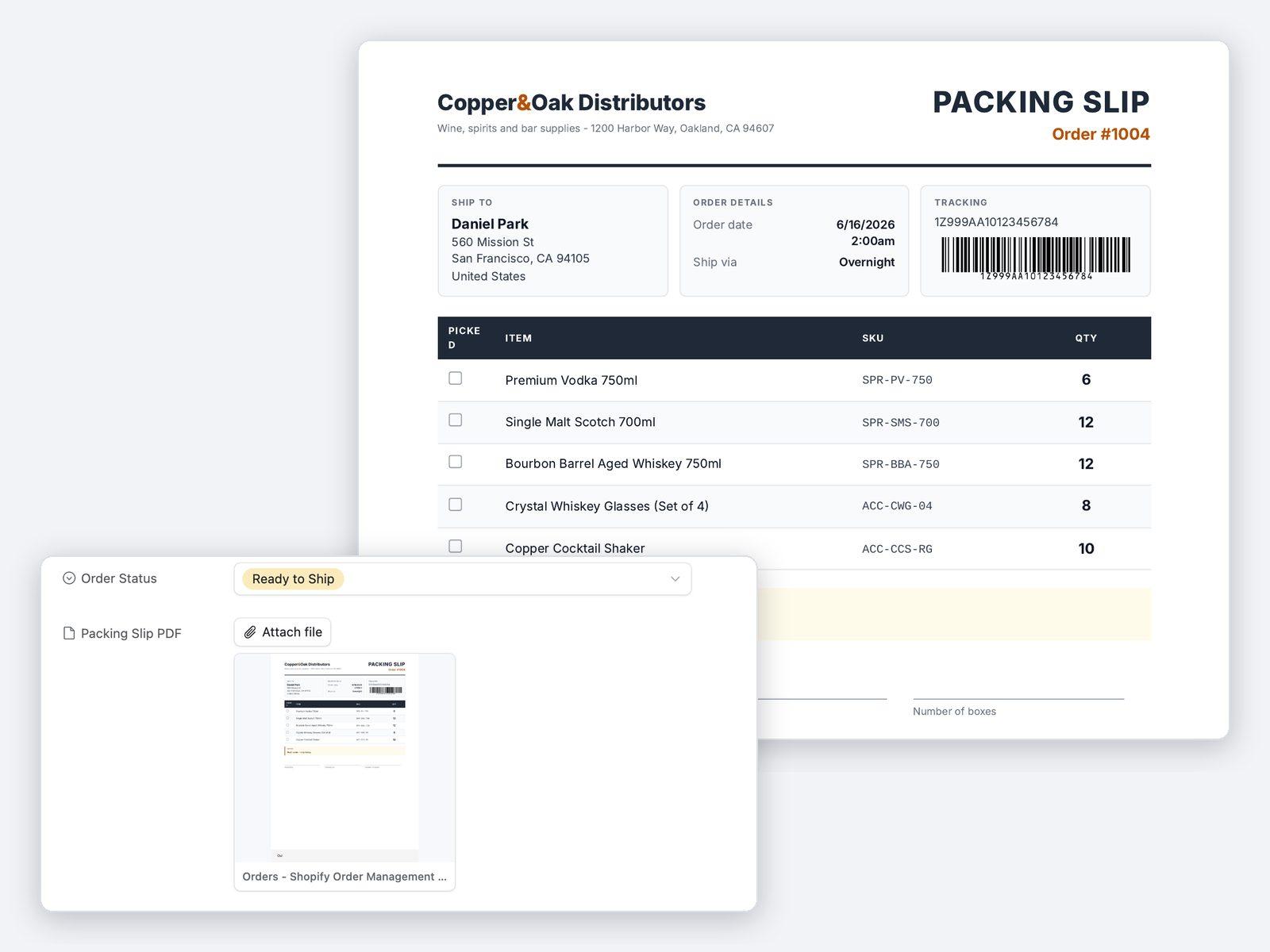
When an order is ready, its shipping label or packing slip is made from the order record
The label or packing slip lands back on the order, ready to print. The same order then gives the delivery note and the invoice.
From "order ready" to the document in the box
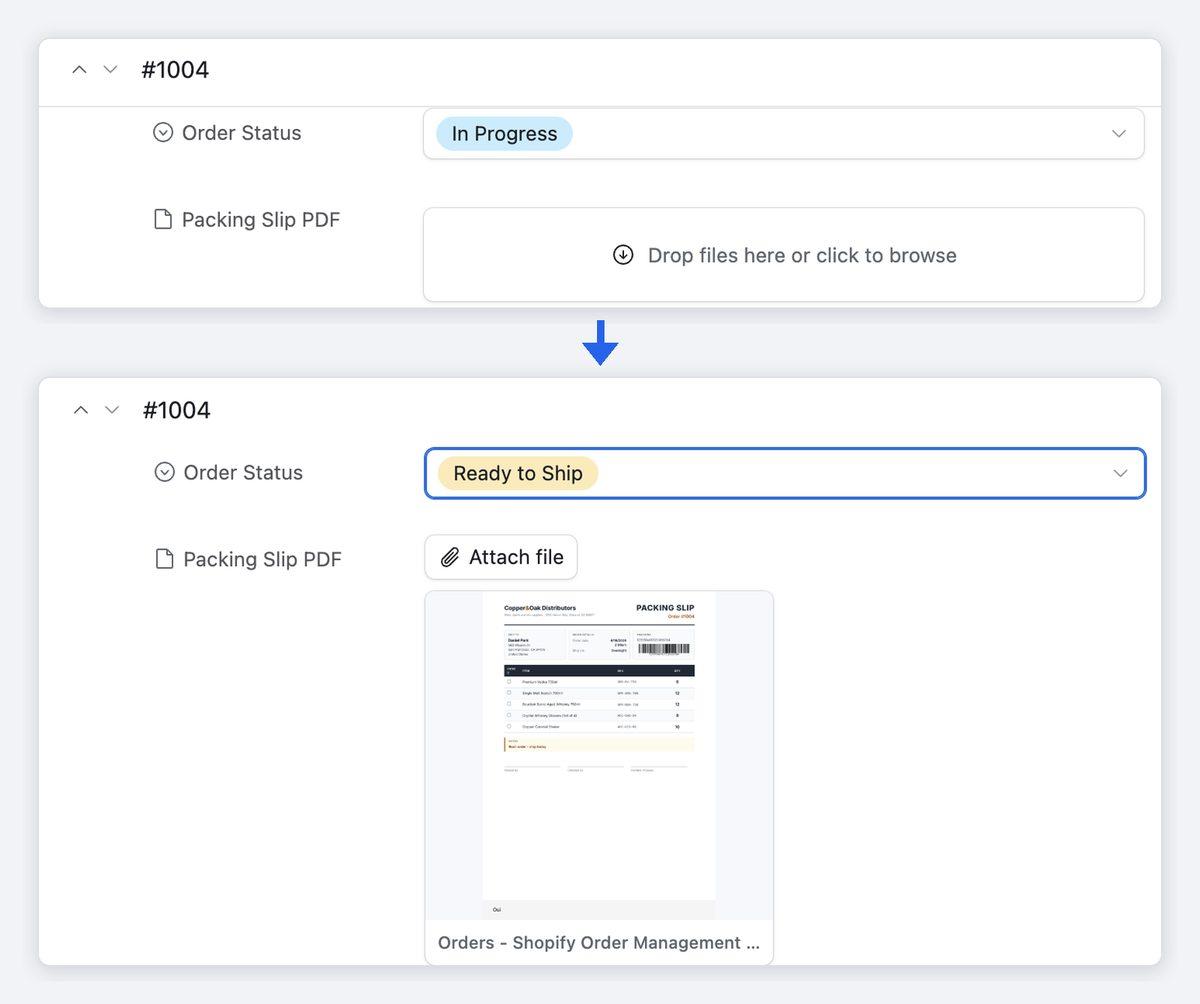
- 1An order is ready. Its status changes in Airtable, or someone clicks a button on the order.
- 2TypeFlow makes the document from the order record. It fills your template with the customer, the address and one line for each item ordered, taken from the linked order lines.
- 3The PDF lands on the order. TypeFlow saves it to an attachment field on the order record, ready to print. Nobody has to upload a file to Airtable by hand.
- 4The invoice follows. After shipping, the invoice is made from the same order and emailed to your customer with the PDF attached.
When an order is ready, its label or packing slip is made and lands back on the order
On the Pro and Enterprise plans, when an order's status changes in Airtable, its label or packing slip is made on its own. TypeFlow Automation watches your orders table and generates the document when the status changes to the value you chose, such as "Ready to ship", with no code, no Zapier and no Make. On the Starter plan, TypeFlow does not start documents on its own: you start them with a button on the order, or in bulk for every order of a view, such as the day's shipments. You can start with the button, then switch to automatic generation, on the Pro and Enterprise plans, once you trust the result. On every plan, an Airtable automation can also start a document, with TypeFlow's ready-made script. Either way, the PDF is saved to an attachment field on the order record it came from.
One order gives every document it needs
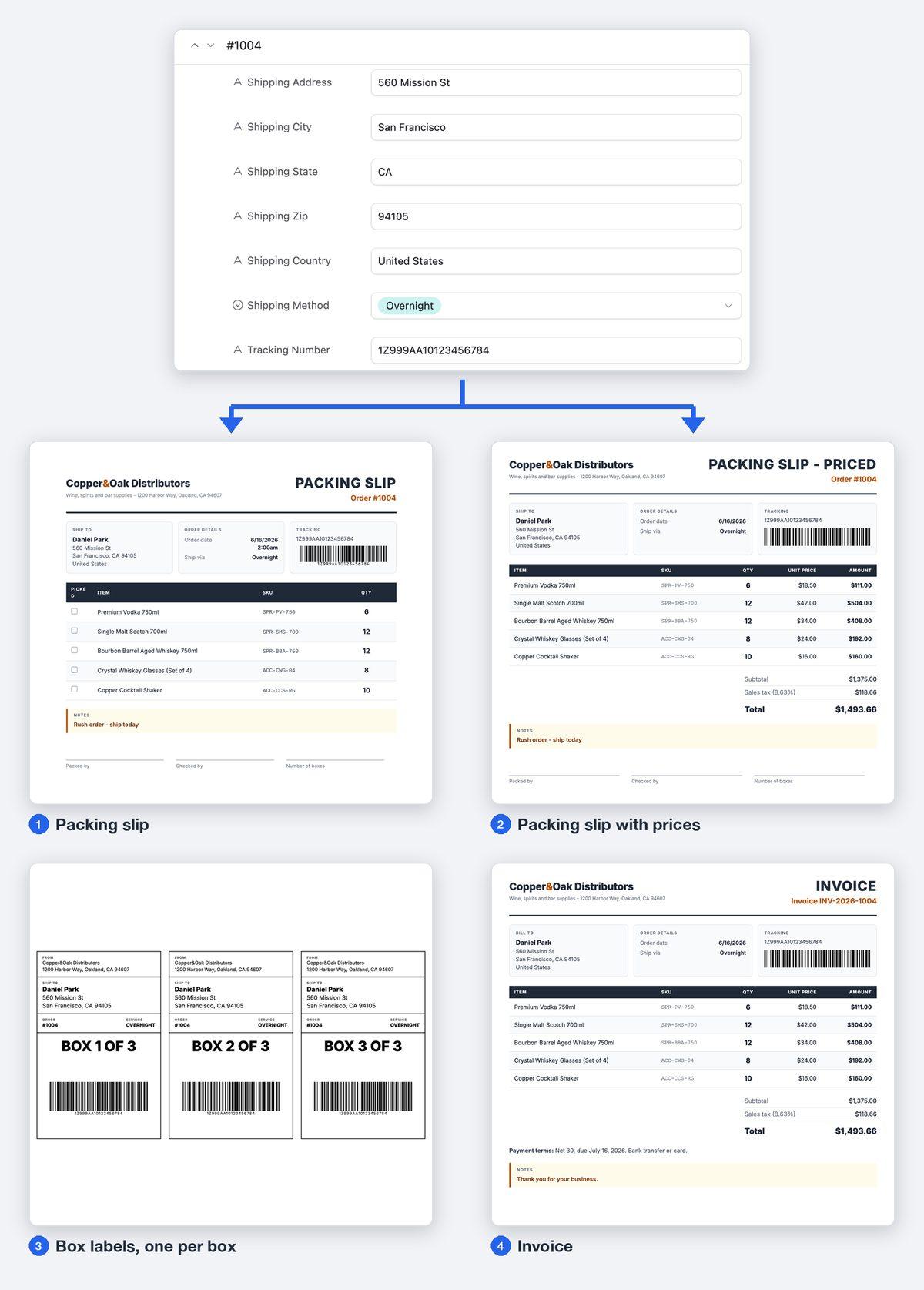
A packing slip lists one line for each item ordered, taken from the linked order lines. From the same order, you can make a copy with prices for your customer and a copy without prices for the warehouse. Each document has its own template, and with the Document Selector, one link on the order record offers all of them. A label repeats as many times as a number field on the order says, one for every box or pallet. After shipping, the invoice is made from the same order, with its line items, taxes and payment terms. TypeFlow emails it to your customer itself, on every plan, with the PDF attached and a copy to your own address if you want one. A purchase order to a supplier is made the same way, from TypeFlow's purchase order template. Transport documents are made from a record in the same way: rate confirmations, bills of lading and freight invoices.
The support and the price behind each document
Human support, usually within a few hours
TypeFlow's team replies by chat or email, usually within a few hours on business days. You can book a 30-minute setup call before you start, and a first document is typically ready in 5 to 15 minutes.
One flat price, with no fee per user or per signature
You pay a flat monthly price set by the number of documents you generate, not per user and not per signature. Plans start at $24 a month, billed yearly, for 200 documents a month.
See pricing →
FAQ
What happens when an order changes after the label or packing slip is made?
You generate the document again from the order record, with the same button. TypeFlow reads the order as it stands at that moment, so the new PDF carries the change. The new PDF replaces the earlier one on the order record, or sits beside it when you keep existing files. On the Pro and Enterprise plans, the document is made again on its own each time the field you chose changes to the value you chose.
Can the label carry a barcode and print on our thermal printer?
Yes. You place the barcode in a template made in TypeFlow's Template Builder, and TypeFlow draws it from the Airtable field that holds the code, as Code 128, EAN-13 or QR Code. For a thermal printer, TypeFlow makes the PDF at the label's exact size, such as 4x6 inches or 100x60 mm, or a custom size. You print it through the printer's own driver.
How are documents counted?
One generated PDF is one document, whatever its number of pages. Labels repeated for one order come as one PDF, so they count as one document. Your plan sets the number of documents a month: 200 on Starter, 1,000 on Pro, unlimited on Enterprise, with no fee per document on top. The free trial gives you 20 documents, one time, with no credit card.
Can it keep up as our orders grow?
Yes. Bulk generation makes the documents for the orders of a view in one run, up to 500 at a time, each with its own order's data. It is included on every plan. What your plan sets is the number of documents a month, and the Enterprise plan has no monthly limit.
Can we change the template ourselves when our process changes?
Yes. You make and change your templates yourselves, in one of three ways: a Google Docs template, TypeFlow's HTML/CSS Template Builder, or an existing PDF form that TypeFlow fills. A Google Docs template is edited like any Google Doc. Each placeholder is then matched to an Airtable field on screen, with no code. So adding a field to your packing slip does not need a developer.
Who is behind TypeFlow?
TypeFlow is a French company, based in Aix-en-Provence. Over 1M documents have been generated with it. TypeFlow has more than 2,000 users and is rated 4.9 out of 5 on G2.
Make your next packing slip from the order in Airtable
Try TypeFlow on your own Airtable data with 20 free documents. No credit card required. From $24 a month, billed yearly.