Your contracts, engagement letters and NDAs, made and signed from Airtable
You keep your legal work in Airtable and get documents signed from it. TypeFlow is a document generation and e-signature tool for businesses that run on Airtable. It fills your engagement letters, authorizations and NDAs from the record, sends them for signature and puts the signed copy back on the record.
Over 1M documents generated · 4.9 on G2 · 2,000+ users · 20 free documents, no credit card
Your contracts and records are in Airtable. Getting a document signed from them is still the weak point.
The signing tool you use is clunky, and thin on proof
In the signing tool you use now, a document that two people must sign is hard to set up. And that signing tool collects a signature with little behind it: no trail of who signed and when.
The tools with a stronger signature cost too much
You found the best-known e-signature tools expensive. The other e-signature tools you looked at charge per user, not per document.
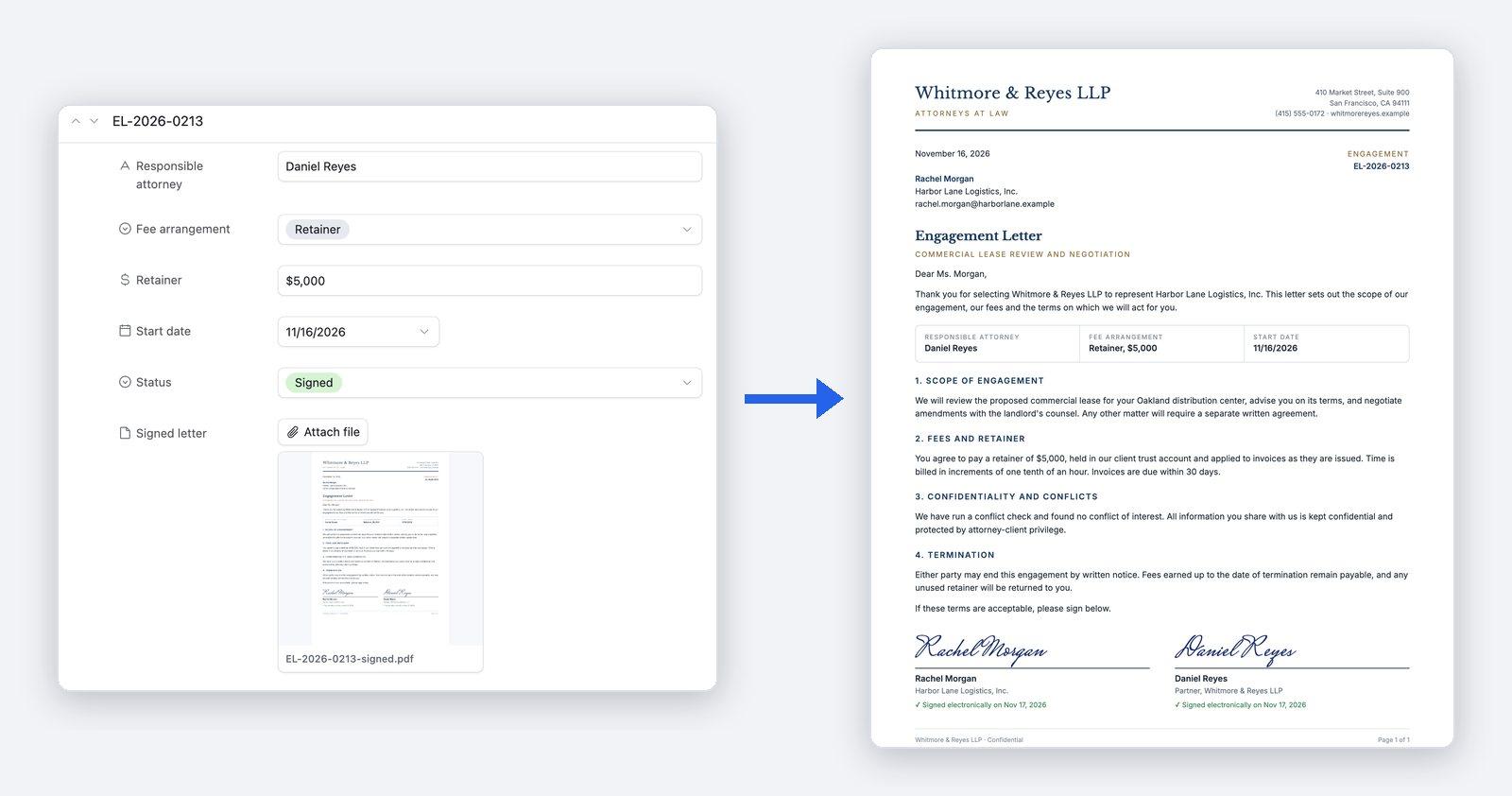
The document is filled from the Airtable record, signed by the other party and filed back on it, with its proof of signature
With TypeFlow, there is nothing to download and nothing to upload again.
From the Airtable record to the signed document
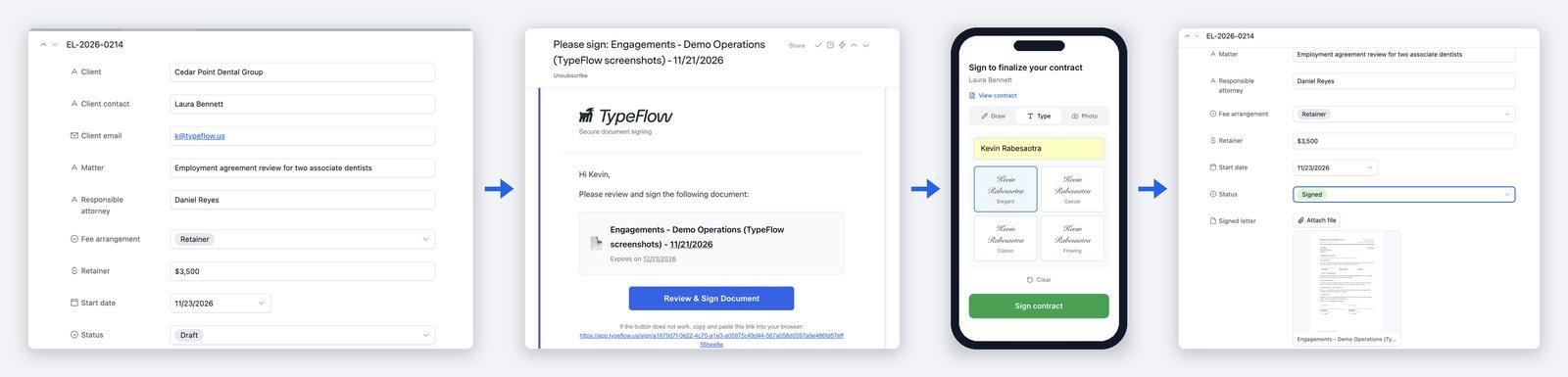
- 1Start from the record. The other party's name, the matter and the terms are already in Airtable. TypeFlow fills your template from them: a Google Docs template, one built in TypeFlow's Template Builder, or a PDF form you already have.
- 2Send the document for signature. A button on the record generates the document and emails each signer a link to sign it, using the name and email address held on the record. On the Pro and Enterprise plans, the document can also go out on its own when a field changes, for example when a status becomes "Ready to Sign".
- 3The other party signs. They open the link and sign in a browser, on a computer or a phone, with no account to create.
- 4The signed copy is filed on the record. When every signer has signed, the signed PDF is attached to the record, with its Certificate of Completion. A field on the record updates itself when the document is signed or declined.
One step further. On the Pro and Enterprise plans, the same documents can also run as a workflow. One record then produces its documents as its status moves: the full engagement package when the work moves forward, the termination letter if the engagement ends, the closing letter when the matter is completed.
Everyone signs the same document, and you see where it stands
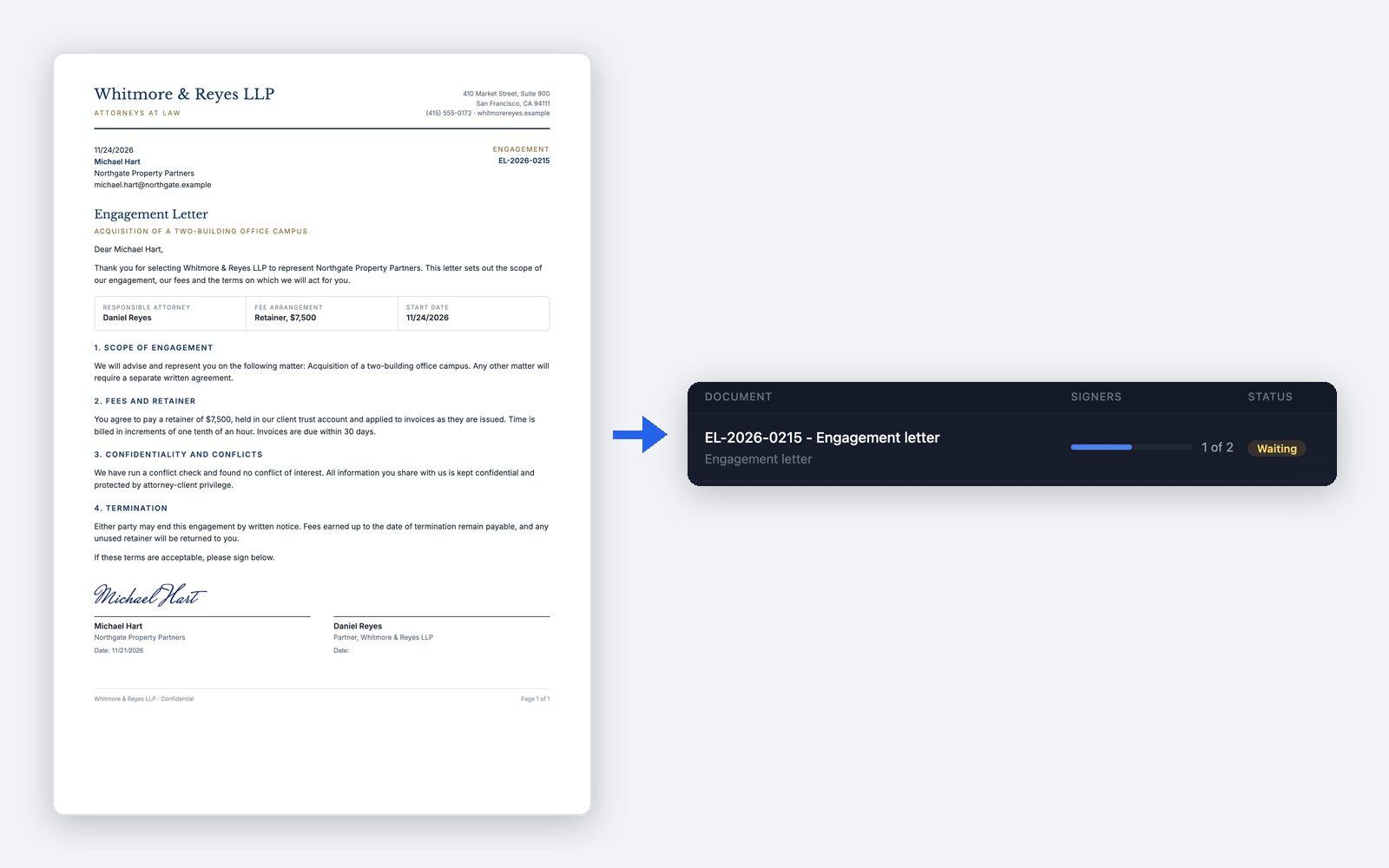
TypeFlow sends the document it generated for signature, to one signer or to several, all at once or one after the other. It collects the signatures itself, so there is no separate signing tool to pay for or to connect. Signers who have not signed yet get automatic reminders. In TypeFlow's History, you see each request, how many signers have signed, and whether it is pending, completed or declined. E-signatures are unlimited on the Starter, Pro and Enterprise plans, with no fee per signature.
A signature a legal team can stand behind
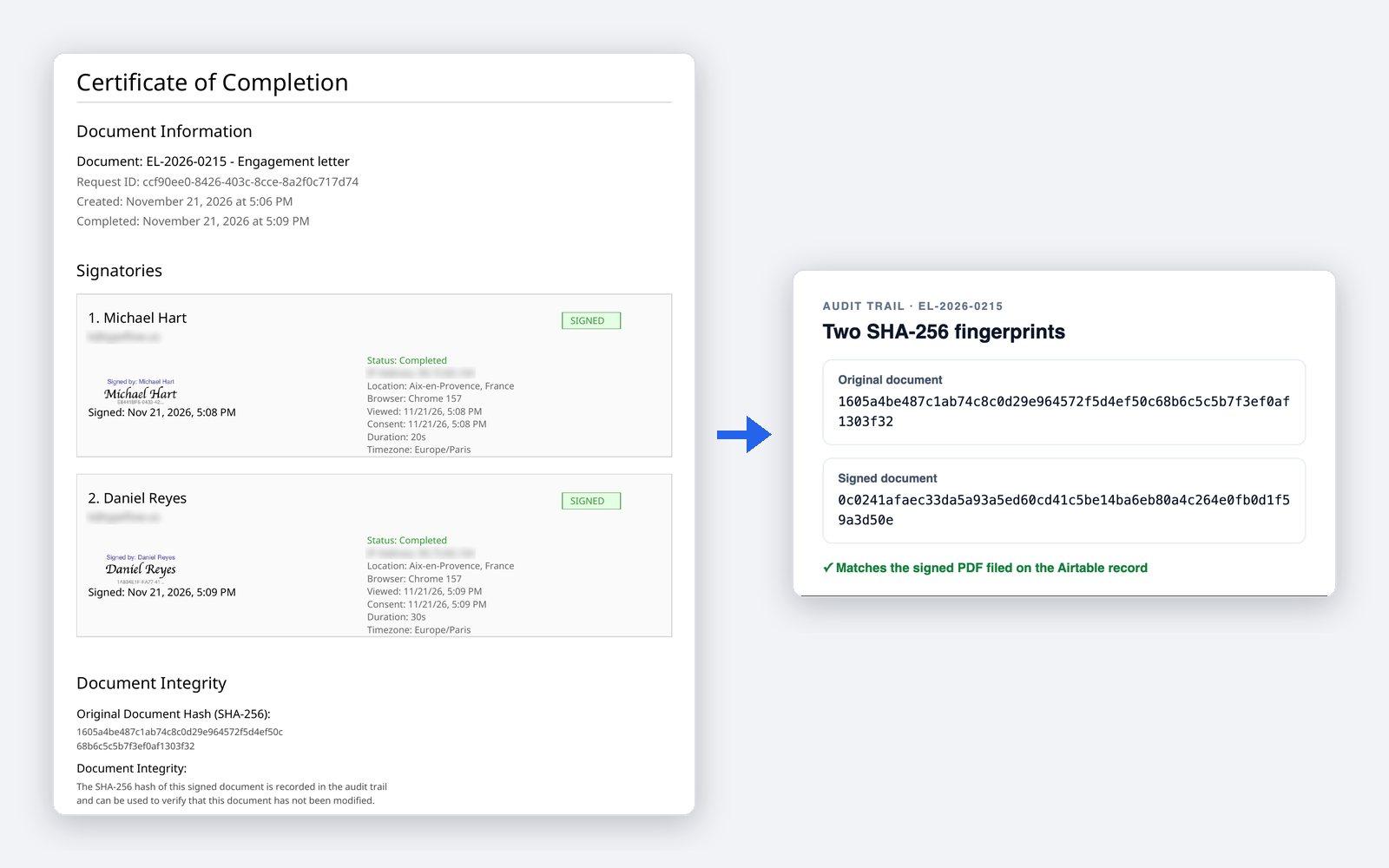
TypeFlow e-signatures are simple electronic signatures that comply with the US ESIGN Act and UETA and with the EU eIDAS Regulation, and are legally binding for most standard business contracts. Every signed document comes with a Certificate of Completion, which holds the signer details, the audit trail and the document hashes (SHA-256 fingerprints of the original and the signed document). For each signer, the audit trail includes the consent to sign electronically, the times of viewing, consenting and signing, the IP address, and the browser and device. On Pro and Enterprise, you can ask a signer to enter a 6-digit code sent to their email before viewing or signing. The code confirms access to that email address, not the signer's legal identity.
The support and the price behind each document
Human support, usually within a few hours
TypeFlow's team replies by chat or email, usually within a few hours on business days. You can book a 30-minute setup call before you start, and a first document is typically ready in 5 to 15 minutes.
One flat price, with no fee per user or per signature
You pay a flat monthly price set by the number of documents you generate, not per user and not per signature. Plans start at $24 a month, billed yearly, for 200 documents a month.
See pricing →
FAQ
Is it an eIDAS signature, and at which level?
TypeFlow e-signatures are simple electronic signatures under the EU eIDAS Regulation, and are legally binding for most standard business contracts.
Do signers have to prove who they are?
Not by default. On Pro and Enterprise, you can ask a signer to enter a 6-digit code sent to their email before viewing or signing. The code confirms access to that email address, not the signer's legal identity. Email authentication is the common standard for most contracts, quotes and business documents. Highly regulated sectors that require proven identity need a dedicated identity verification provider, which TypeFlow does not offer.
Can the audit trail be kept apart from the document itself?
Yes. By default, the Certificate of Completion, which holds the audit trail, is the last page of the signed PDF. On the Pro and Enterprise plans, and during the free trial, the Certificate of Completion can be delivered as a separate PDF, in its own Airtable attachment field on the same record. The signed PDF then holds only the document and its signatures.
Can signature requests come from our own email address, with our branding?
By default, signature emails come from TypeFlow's address, signatures@typeflow.us. On the Enterprise plan, you can change the sender name, send the emails from your own Gmail or Outlook address instead, and put your firm's logo, name and color on the signing page.
How long are signed documents kept?
The signed PDF and its Certificate of Completion are saved on your Airtable record. TypeFlow also keeps its own copy with no time limit, until you ask TypeFlow to delete it, so the audit trail can always prove what was signed, by whom and when. On the Enterprise plan, a retention period can delete signed documents automatically after the number of days you choose.
Send your next engagement letter for signature from Airtable
Try TypeFlow on your own Airtable data with 20 free documents. No credit card required. From $24 a month, billed yearly.