Send Documents for Electronic Signature from Airtable
Generate a contract, quote, or approval document from an Airtable record, send it for electronic signature, and save the signed PDF and Certificate of Completion back to the same record. TypeFlow combines document generation, signing, and Airtable automation in one workflow - without a separate DocuSign, Zapier, or Make setup.
Airtable record → document generated → signing link sent → signed PDF returned to Airtable
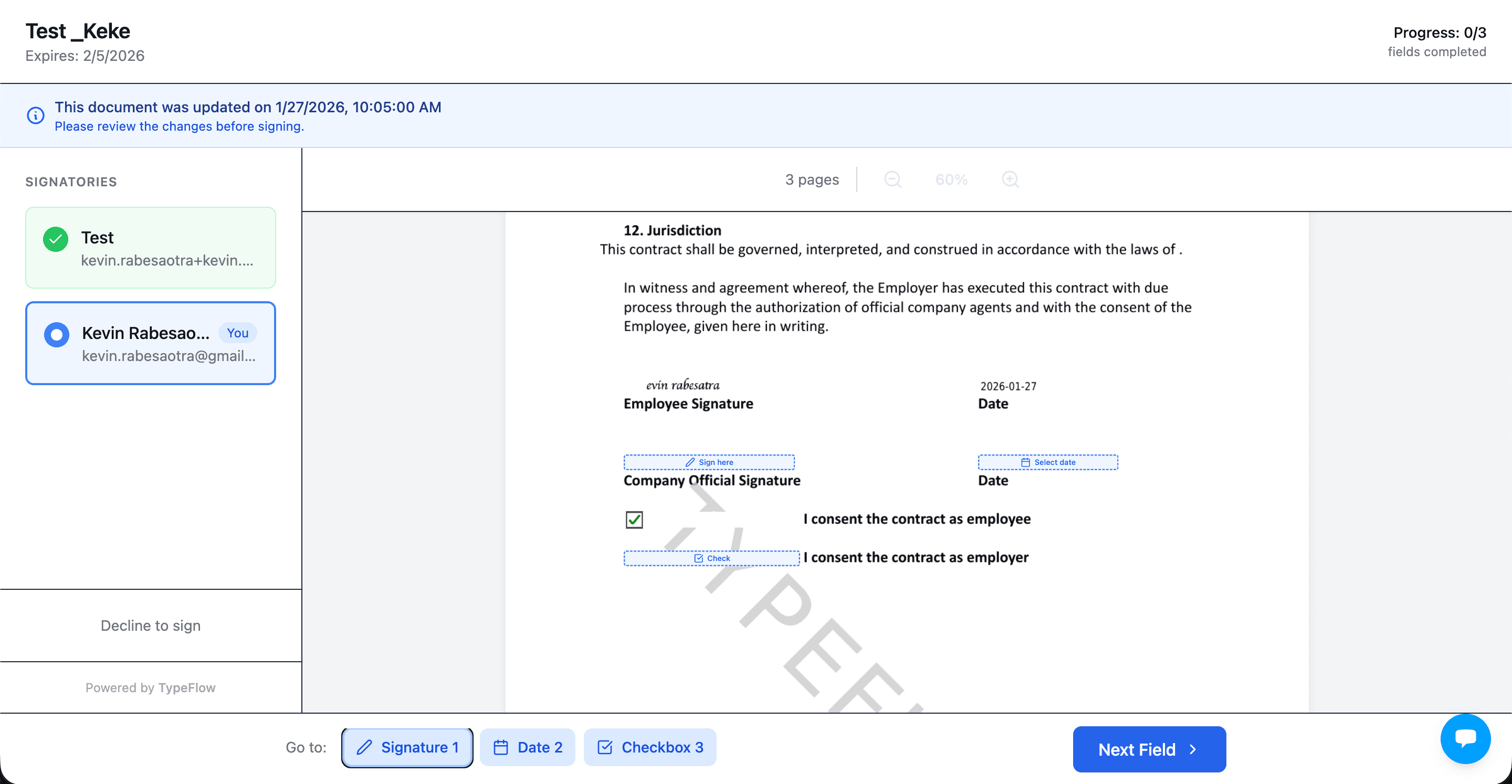
How to Send and Sign Documents from Airtable
Create the document from an Airtable record, send a secure signing link, and let TypeFlow return the completed PDF and signature status to Airtable automatically. See the full tutorial →
Add placeholders to your template
Use {{e-signature.signature_1}} for signatures, {{e-signature.text_1}} for text fields, {{e-signature.date_1}} for dates.
Configure your signers
Add signers with static emails or pull from Airtable fields. Set sequential or parallel signing.
Generate and send
Generate the document from Airtable. Signers receive an email with their secure signing link.
Signed PDF back to Airtable
Once all signers complete, the signed PDF with Certificate of Completion saves to your Airtable record.
Automate the workflow
Trigger document generation and signing automatically with an Airtable checkbox, Airtable Automation, or webhook. No manual clicks needed.
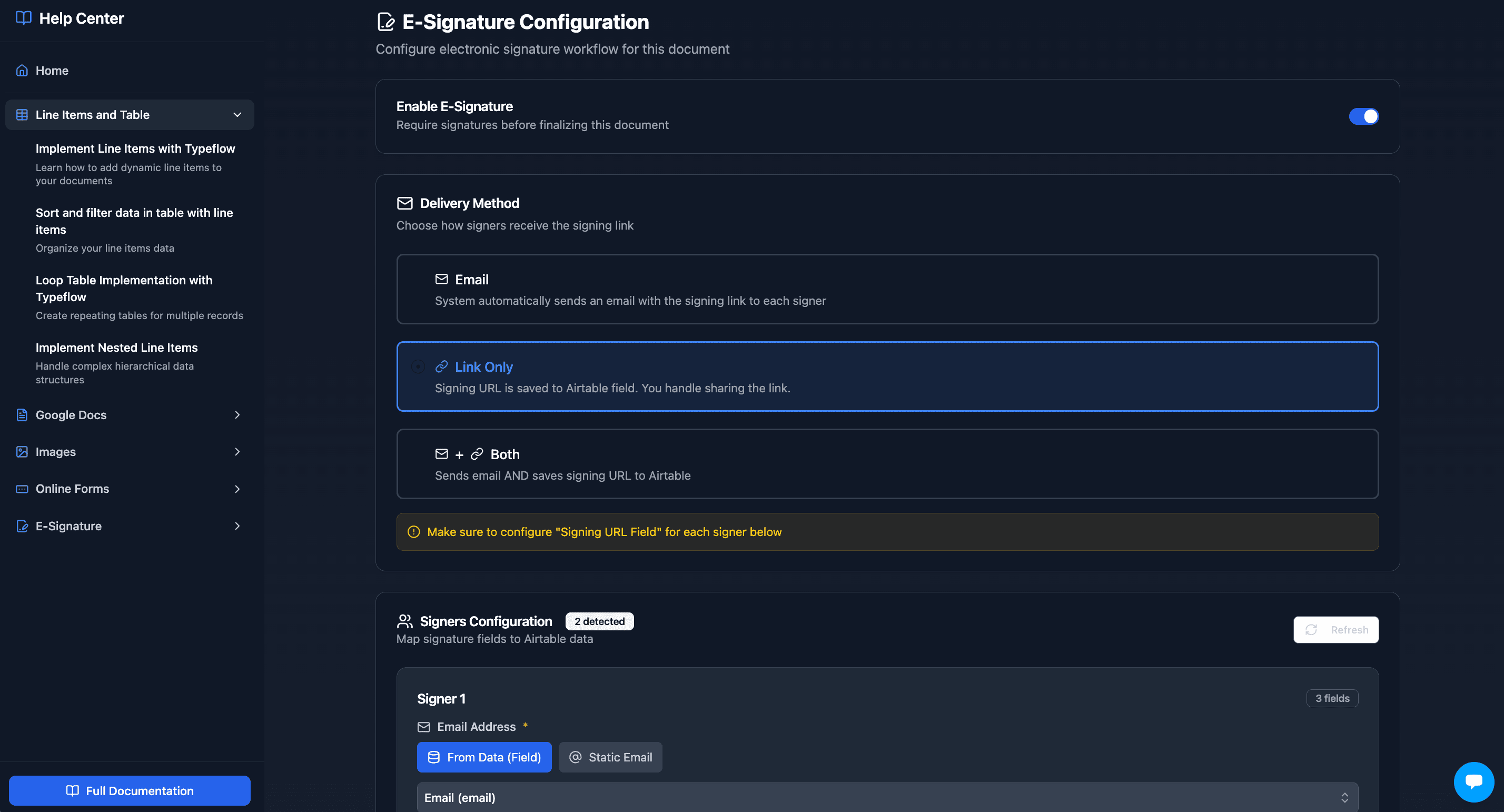
E-Signature Features Built for Airtable
Everything you need to collect signatures and keep records clean inside Airtable
Contract Redlining
Scale+Signers suggest changes directly on the document. Accept with one click, Airtable updates automatically.
Multi-Signer Support
Sequential or parallel signing. Each signer gets their own secure link.
Signer Audit Details
IP address, location, browser, timestamps on every signature. Audit trail sync to Airtable on Enterprise.
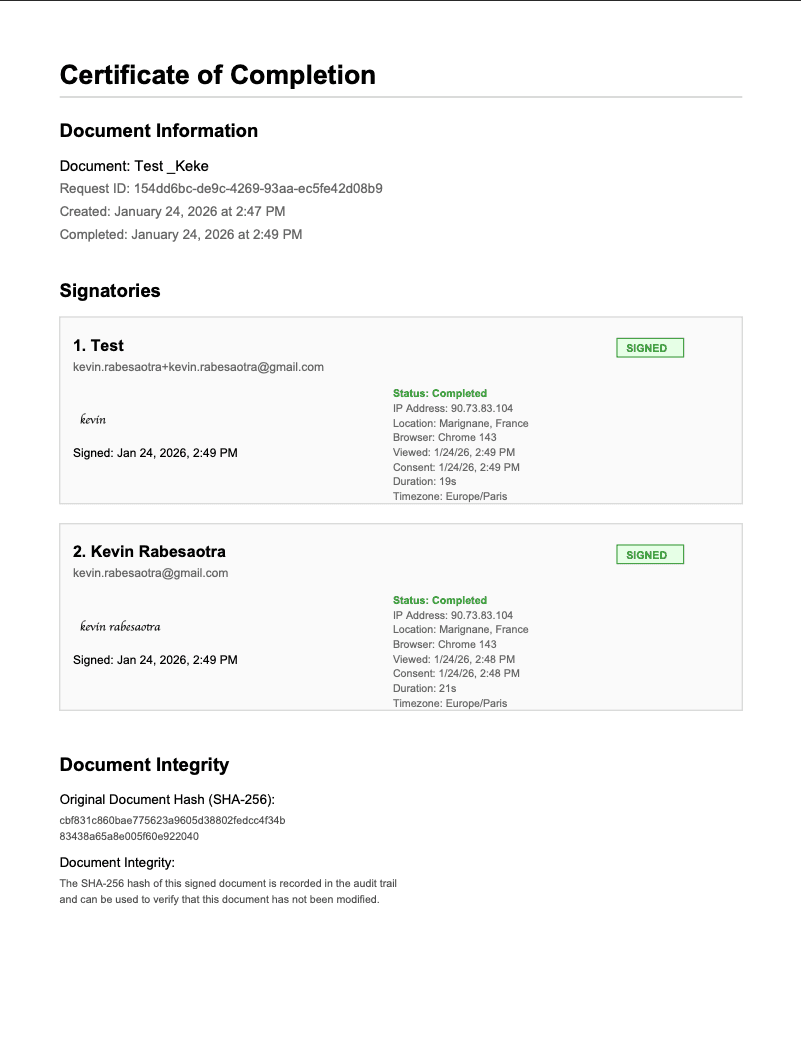
Certificate of Completion
Every signed document includes a certificate with signatures and audit details.
Multiple Field Types
Signature (draw or type), text input, date picker, and checkbox fields.
Native Airtable Integration
No Zapier needed. Signed PDF saved directly to your Airtable attachment field.
E-Signature Audit Trail
EnterpriseSync every signature event (sent, viewed, signed, declined) to a dedicated Airtable table in real-time. Track status across all signers without leaving Airtable.
Legal Compliance
ESIGN Act, UETA, and eIDAS compliant. SHA-256 document hashing.
Automate Signature Sending from Airtable
You don't have to click "Generate" manually for every record. TypeFlow supports automatic document generation and signature sending.
Checkbox Trigger
Add a checkbox field in Airtable. When checked, TypeFlow generates the document and sends the signing link automatically.
Airtable Automation
Use Airtable's built-in Automations to trigger signing when a record enters a view, a field changes, or a button is pressed.
Webhook / API
Trigger document generation and signing programmatically from any system using TypeFlow's API endpoint.
Trusted by Teams Using Airtable
"We switched from DocuSign to TypeFlow for our Airtable contracts. The native integration saves us hours every week - no more Zapier headaches."
Sarah Mitchell
Operations Manager
"The audit trail and Certificate of Completion give us everything we need for compliance. Our legal team approved it immediately."
Marcus Chen
Legal Coordinator
"Setting up e-signatures took 15 minutes. Now our client onboarding contracts go out and come back signed the same day."
Emily Rodriguez
Operations Manager
TypeFlow vs DocuSign vs HelloSign for Airtable
TypeFlow is the only e-signature tool with native Airtable integration. DocuSign and HelloSign require Zapier or Make to connect, adding cost and complexity. Connect Airtable to DocuSign or skip the middleware entirely.
| Feature | TypeFlow | DocuSign | HelloSign |
|---|---|---|---|
| Native Airtable integration | |||
| No Zapier/Make required | |||
| Document generation included | |||
| Contract redlining | Scale+ | ||
| Signed PDF back to Airtable | Via Zapier | Via Zapier | |
| Multi-signer support | |||
| Audit trail | |||
| Certificate of Completion | |||
| Mobile signing | |||
| Starting price | $22/mo | $15/mo + Zapier | $20/mo + Zapier |
Common Use Cases
If your team runs approvals and paperwork in Airtable, these are the workflows that benefit most from e-signature.
Client Contracts and Proposals
Generate a contract from an Airtable record, send it to sign, and store the executed PDF automatically.
Employment Offers and Onboarding
Send offer letters from candidate records and keep signed copies attached to each hire.
Vendor Agreements
Create vendor agreements from your vendor database and track signature status in Airtable.
Internal Approvals and Sign-Offs
Route internal documents for approval with a clear audit trail of who signed and when.
Certificate of Completion
Every signed document includes a certificate page with complete audit information for legal compliance.
- Embedded signature images for each signer
- IP address and geographic location
- Browser and device information
- Timestamps for viewing, consenting, and signing
- SHA-256 document hash for integrity verification
- ESIGN Act and eIDAS compliance statement
Common Questions About Airtable E-Signatures, Legal Compliance, and Pricing
Find answers to the most common questions about this feature.
Popular Questions
All Questions
Need more help?
Our team is here to help you solve all your problems and answer your questions.
Contact UsSend, Sign, and Track Documents from Airtable
Generate from Airtable. Send for signature. Save the signed PDF back to the record. Start free with 20 documents.