TypeFlow: The Best Alternative to Plumsail for Airtable
If you're searching for a PDF generation tool that works seamlessly with Airtable, you've likely come across both TypeFlow and Plumsail. While both platforms help you create documents from your data, they take very different approaches to getting the job done. This comparison breaks down the key differences in features, integrations, and pricing - so you can decide which tool fits your workflow best.
Key Takeaways
- Airtable connection: Both have native extensions. TypeFlow is Airtable-only; Plumsail supports multiple data sources.
- E-signatures: TypeFlow includes built-in e-signatures at no extra cost. Plumsail requires DocuSign ($10-25/month extra).
- Pricing: TypeFlow: $29/month (200 docs). Plumsail: $25/month (200 docs). TypeFlow includes unlimited e-signatures at no extra cost.
- Templates: TypeFlow offers Google Docs + visual Template Builder. Plumsail supports Word, Google Docs, and HTML.
- Best for: TypeFlow for Airtable-focused teams wanting simplicity. Plumsail for multi-platform needs (Google Sheets, Salesforce, Power Apps).
TypeFlow vs Plumsail: Features
TypeFlow is the better choice for Airtable users who want simple, fast PDF generation without technical complexity. While Plumsail supports more template formats, TypeFlow focuses on ease of use - letting you build templates in Google Docs and generate documents in under five minutes.
Both tools generate PDFs, but their approaches differ significantly.
Plumsail's Approach
- Multiple import options: Import docx, Google Docs, PDF, or HTML files, or create PDFs using built-in templates
- In-platform editing: Create and modify templates in Google Docs without leaving Plumsail
- Cloud storage: Save or send files to Google Drive and Dropbox
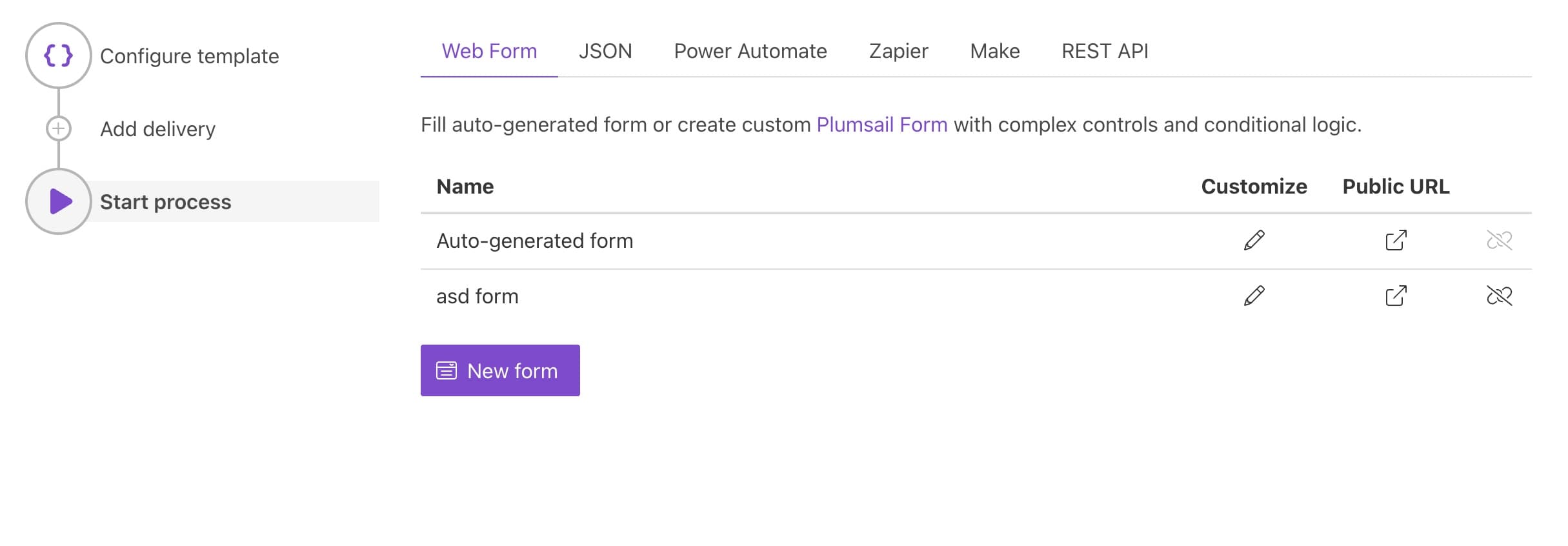
The features are solid, but the setup process is overwhelming. Once you've configured your document, the next steps aren't always clear.
TypeFlow's Approach
- Google Docs templates: Build and edit templates in familiar software
- Automatic email delivery: Receive the exported PDF via email instantly
- No technical skills required: Our process is completely frictionless
- Five-minute setup: Get everything configured and running quickly
TypeFlow vs Plumsail: Integration
The next step, of course, is to get the data from a source to generate a PDF.
Plumsail's integration challenges
- Hidden integrations: Integration options exist but aren't immediately visible
- Form-focused onboarding: Encourages form creation without highlighting other data sources
- Third-party dependencies: Make, Zapier, and Power App integrations require separate subscriptions
- Technical API: API options available but require developer skills
- Paid Airtable required: Native Airtable integration only works with paid Airtable plans
TypeFlow's integration benefits
- Predictable costs: No surprise fees or third-party subscription requirements
- No technical skills needed: Anyone on your team can set it up
- Works with free Airtable: Generate PDFs without upgrading your Airtable plan
- Airtable-first design: Built specifically for Airtable users, not adapted from other platforms
TypeFlow vs Plumsail: Pricing
This table presents a factual comparison of pricing structures between TypeFlow and Plumsail. Each plan is shown with its corresponding price point and primary feature.
| Plan Type | TypeFlow | Plumsail |
|---|---|---|
| Starter | $29/month Unlimited e-signatures - no per-signature fees | $25/month 200 PDFs/month |
| Pro | $59/month Everything in Starter | $84/month 1,000 PDFs/month |
| Enterprise | $199/month Everything in Pro | $249/month 3,500 PDFs/month |
TypeFlow starts at $29/month with 200 PDFs and unlimited e-signatures included. Plumsail's starter plan costs $25/month for 200 PDFs with no e-signature.
Why Choose TypeFlow Over Plumsail?
Choose TypeFlow if you want simpler setup, lower costs, and a tool built specifically for Airtable. Here's what you get:
- Save money: Pay less and get more documents compared to Plumsail
- Save time: Set up in minutes instead of hours with our intuitive interface
- No technical skills required: Perfect for teams without dedicated developers
- Works with free Airtable: No need for paid subscriptions to start generating PDFs
If label printing is a key part of your workflow, see Best Label Printing Tools for Airtable in 2026 to compare all options.
Automate your document generation
Start with 20 free documents. Built for businesses using Airtable.

Kevin from TypeFlow
•AuthorKevin Rabesaotra is a growth engineer and automation specialist with 8+ years of experience building no-code solutions. As Founder & CEO of TypeFlow, he has helped hundreds of businesses automate document generation and streamline workflows with Airtable integrations. Previously, Kevin was a Product Lead specializing in growth engineering, running experiments to drive revenue, retention, and lead generation.