Best Alternative to CraftMyPDF: TypeFlow Comparison
TypeFlow and CraftMyPDF are both PDF generators for Airtable, but they differ significantly in pricing, ease of use, and integration depth. This comparison breaks down which tool fits different use cases.
Pricing Comparison: TypeFlow vs CraftMyPDF
TypeFlow starts at $29/month with unlimited templates and e-signatures included. CraftMyPDF starts at $29/month but limits you to 1,200 PDFs and 6 templates. Here's the full breakdown:
This table presents a factual comparison of pricing structures between TypeFlow and CraftMyPDF. Each plan is shown with its corresponding price point and primary feature.
| Plan Type | TypeFlow | CraftMyPDF |
|---|---|---|
| Starter | $29/month Unlimited e-signatures - no per-signature fees | $29/month 1,200 PDFs/month + 6 templates |
| Pro | $59/month Everything in Starter | $150/month 3,000 PDFs/month + $0.05 per additional PDF |
| Enterprise | $199/month Everything in Pro | Custom pricing Contact sales |
CraftMyPDF offers a free plan (20 documents/month) and paid plans starting at $29/month for 1,200 PDFs and 6 templates. TypeFlow doesn't limit templates, making it more flexible for businesses with diverse document needs - and it's easier to use.
TypeFlow vs. CraftMyPDF: Features
Templating Experience
CraftMyPDF
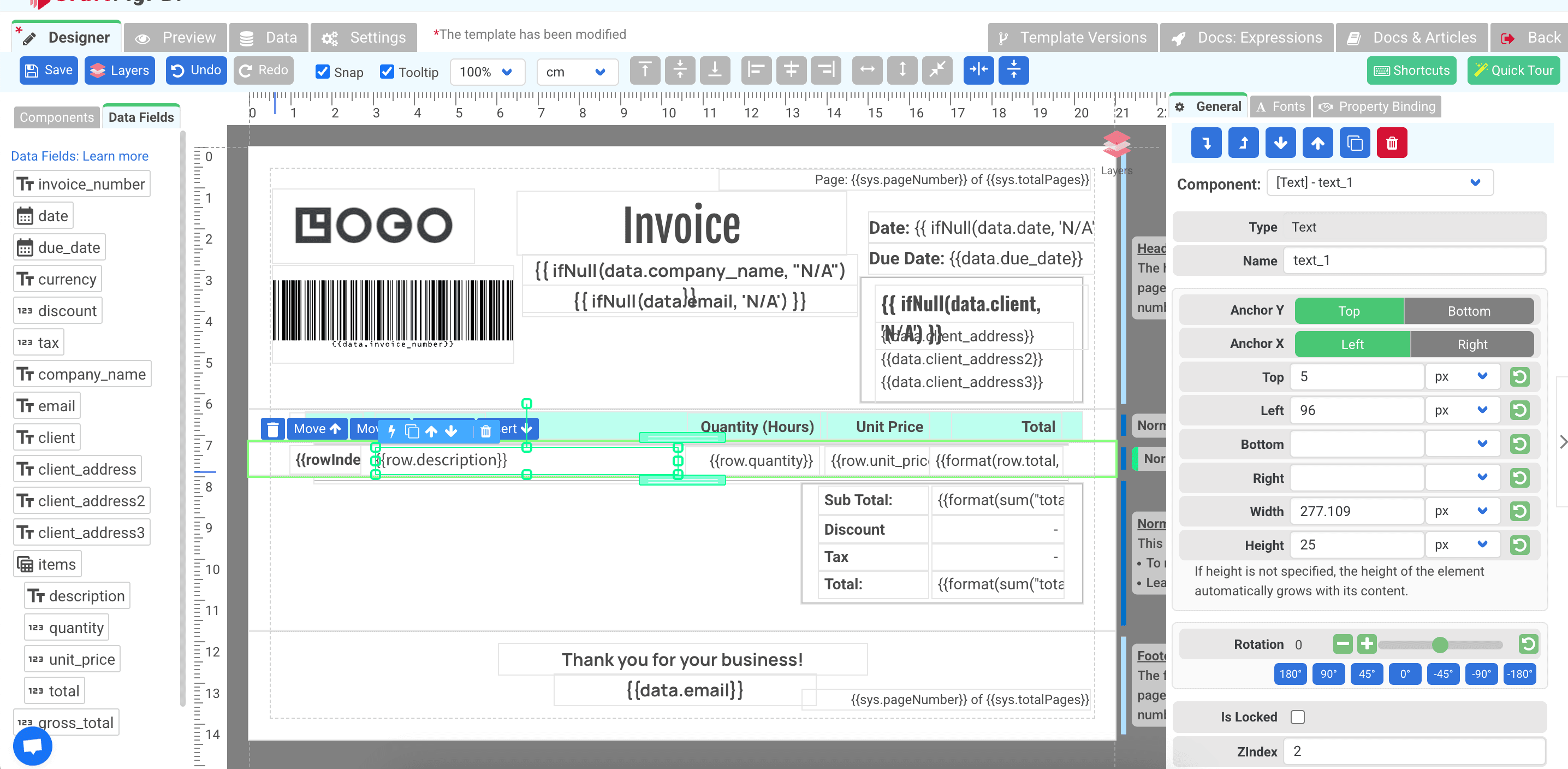
CraftMyPDF offers a drag-and-drop template builder. While powerful, users must learn their proprietary editor and formatting system - challenging for non-technical users.
How CraftMyPDF allows you to build template
TypeFlow
TypeFlow uses Google Docs as its templating engine, which offers key advantages:
- Familiar interface: Most users already know Google Docs
- No learning curve: Create templates using skills you already have
- Simple variables: Use straightforward syntax in your document
- Built-in collaboration: Leverage Google Docs' native sharing features
Document Complexity Support
Handling line items and nested data differs significantly between platforms:
| Feature | CraftMyPDF | TypeFlow |
|---|---|---|
| Line items | Requires custom Airtable scripting | Built-in support for product loops |
| Nested line items | Difficult without advanced coding | Dedicated variable syntax |
| Formatting control | Available but requires learning their system | Uses Airtable metadata automatically |
Automate your document generation
Start with 20 free documents. Built for businesses using Airtable.
Airtable Integration
CraftMyPDF
CraftMyPDF lacks native Airtable integration. You'll need to use an Airtable extension and custom scripting to map data and handle complex features like nested line items.
This approach has several drawbacks:
- Technical expertise required: Users need JavaScript knowledge
- Complex data handling: Mapping fields requires custom coding
- Line item challenges: Linked records require complex querying
- Formatting issues: Doesn't leverage Airtable's native formatting
- API limits: Aggressive querying can hit Airtable rate limits
- Nested data complexity: Requires extensive scripting
One of our users that switched from CraftMyPDF to TypeFlow said:
"The struggle is with automating the pdf generation process. but I managed to make an airtable script to automate everything.."
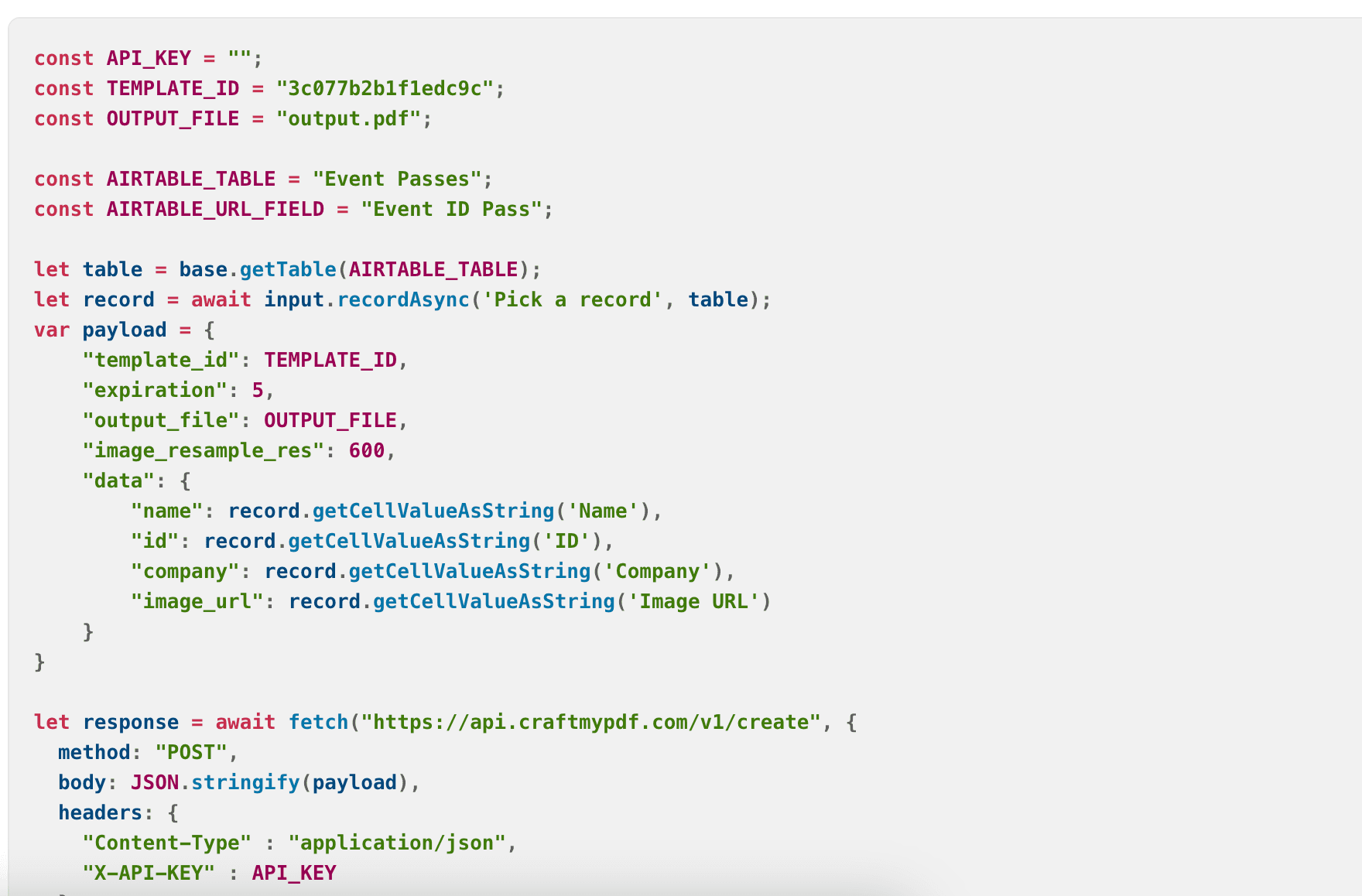
If you have technical teams, you can use CraftMyPDF. But if you want a solution that is more accessible to non-technical users, TypeFlow is the way to go.
TypeFlow
TypeFlow offers native integration with Airtable that significantly simplifies the process:
- Direct field mapping: Visual interface to map Airtable fields to document variables
- Automatic formatting: Respects Airtable's native formatting
- Simple line item handling: Built-in support for linked records and line items
- No coding required: Complete setup through a user-friendly interface
- API optimization: Handles Airtable API limits automatically
The native integration means users can configure their document generation workflow without writing a single line of code.
Other Integrations
CraftMyPDF
CraftMyPDF supports a range of integrations, including:
- Zapier
- Integromat/Make
- API REST
- Bubble.io
TypeFlow
TypeFlow doesn't support a lot of integrations, but it has a:
- a REST API
It means it's possible to create PDFs from other platforms like Zapier or Make even if it doesn't have a native integration.
The Bottom Line
CraftMyPDF suits teams with dedicated technical resources who need highly specialized document formats. TypeFlow is built for Airtable users who want document automation without JavaScript - using Google Docs templates and native integration to eliminate technical barriers.
For most users, TypeFlow offers lower total cost of ownership when factoring in both subscription fees and implementation time.
Automate your document generation
Start with 20 free documents. Built for businesses using Airtable.
Frequently Asked Questions about CraftMyPDF vs TypeFlow
Find answers to the most common questions about this feature.
Popular Questions
All Questions
Need more help?
Our team is here to help you solve all your problems and answer your questions.
Contact Us
Kevin from TypeFlow
•AuthorKevin Rabesaotra is a growth engineer and automation specialist with 8+ years of experience building no-code solutions. As Founder & CEO of TypeFlow, he has helped hundreds of businesses automate document generation and streamline workflows with Airtable integrations. Previously, Kevin was a Product Lead specializing in growth engineering, running experiments to drive revenue, retention, and lead generation.
 Typeflow