Your team's contracts, quotes and reports, made and signed from Airtable
You run the orders, the contracts or the files for your team, and they already live in Airtable. TypeFlow is a document generation and e-signature tool for businesses that run on Airtable. It turns a record into a finished PDF on your own template, sends it for signature and puts the signed copy back on the record.
Over 1M documents generated · 4.9 on G2 · 2,000+ users · 20 free documents, no credit card
Your orders and contracts are in Airtable. Getting the document out is still the hard part.
The tools you tried can't make your documents
You tried Airtable's Page Designer, or another PDF tool. It was not enough for a document of several pages or a table with one row for each item, or it took too long to set up.
The documents are still made by hand
Your team still makes each document by hand: a mail merge in Word, an export to Excel or a printed Airtable view. Then someone places the signature fields one by one.
IT has other priorities
Building a document tool in-house takes developer time. Your team's documents are never first on IT's list.
The tool you pay for costs too much, and doesn't connect to Airtable
The price or the limits of the tool you pay for don't fit the number of documents you make. And you keep Zapier or Make running only to link it to your base.
The document is made from your Airtable record, signed in the same tool and saved back on the record
One person on your team sets TypeFlow up on screen, with no code. There is no script and no Zapier or Make scenario to build and keep running.
From your Airtable base to a first document in 5 to 15 minutes
- 1Connect your base. You authorize TypeFlow on Airtable's own screen and choose which bases it can read. Connecting a base takes under 30 seconds, and is done once.
- 2Make your template. Write it in Google Docs, design it in TypeFlow's Template Builder, or upload a PDF form you already use.
- 3Map your fields. Match each placeholder of your template to an Airtable field, on screen, with no code. TypeFlow can pull data from records linked to the main record, up to 3 links away, with nothing extra to set up in Airtable.
- 4Choose how each document starts. Start each document with a button on the record, or make one for every record of a view in a single run. On the Pro and Enterprise plans, the document can also be made on its own when a field changes.
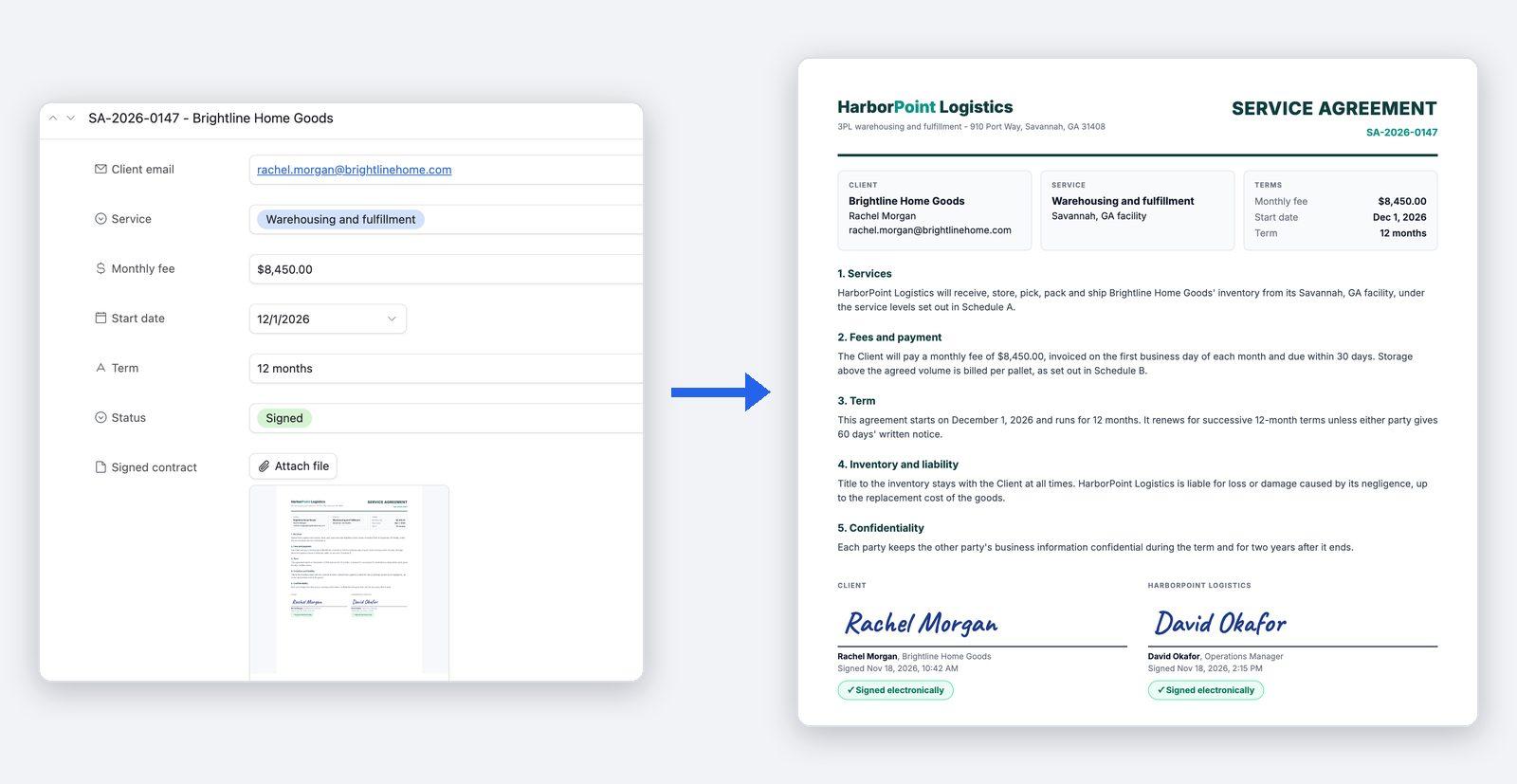
The document is made when the record is ready, and lands back on the record
On the Pro and Enterprise plans, you change a status in Airtable and the document is made. TypeFlow Automation watches your table and generates the document when a record is created or when a field changes to the value you chose, with no code, no Zapier and no Make. On the Starter plan, you start each document yourself, with a button on the record or in bulk for every record of a view. Either way, the PDF is saved to an attachment field on the record it came from. TypeFlow can also send the PDF by email, on every plan.
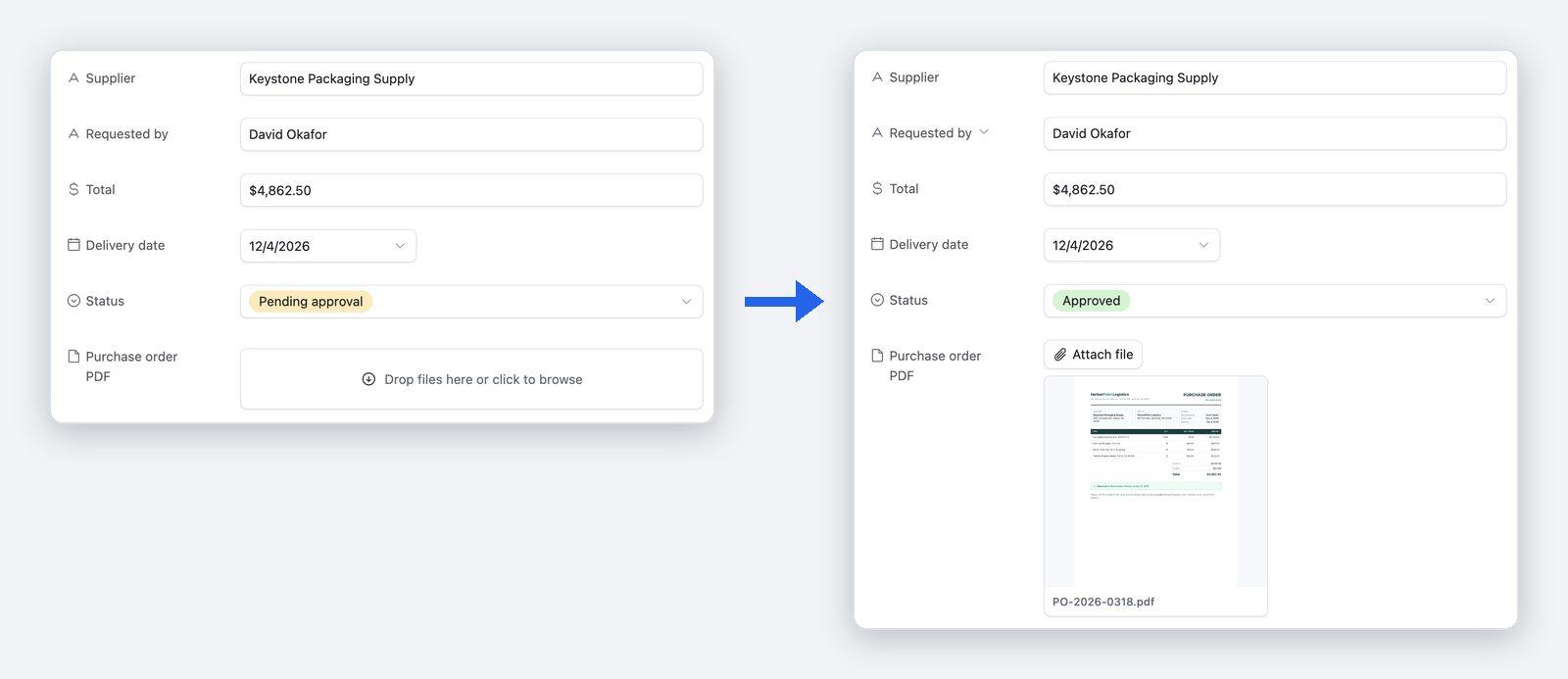
The contract is signed in the same tool, and your team sees who has signed
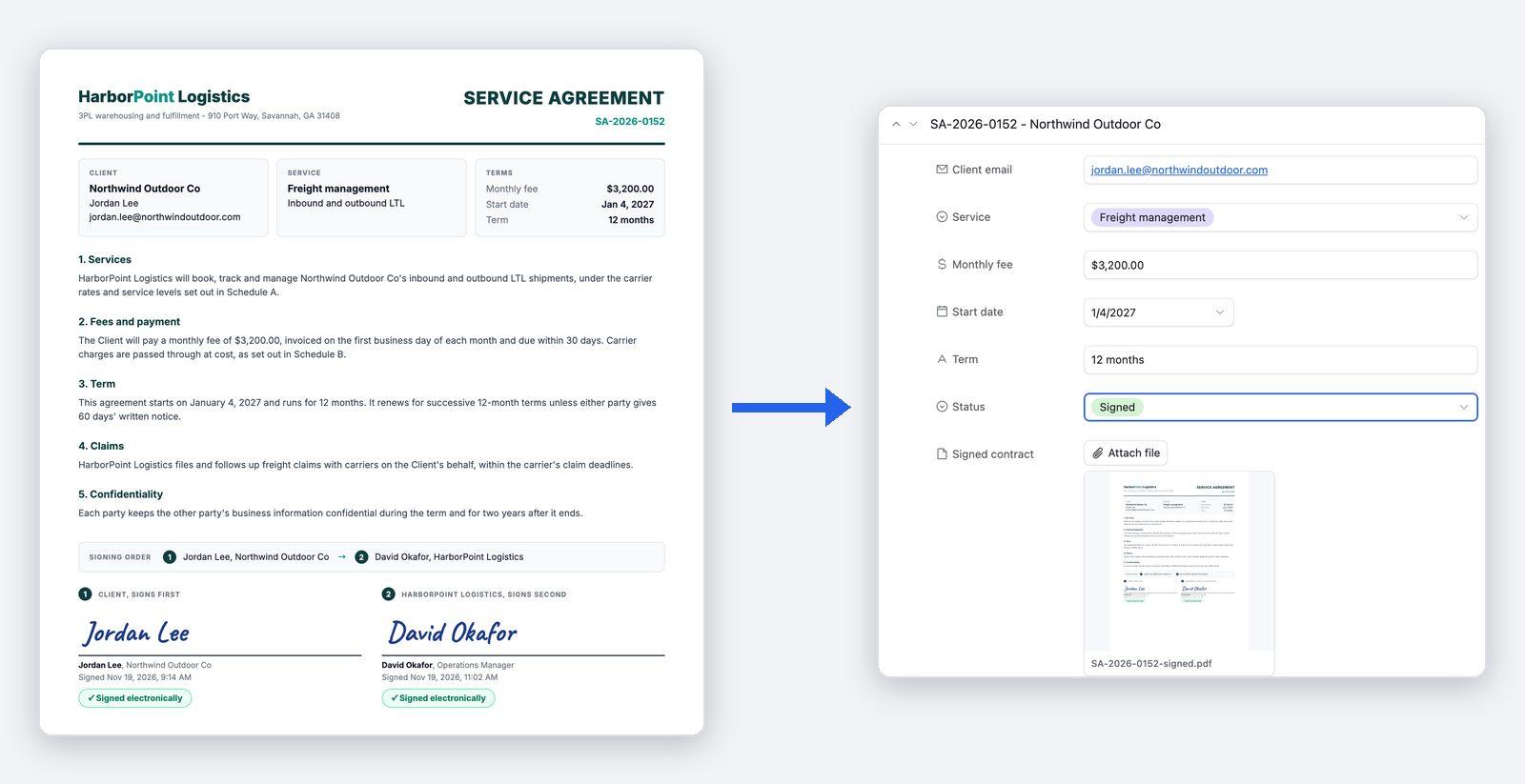
TypeFlow sends the document it just generated for signature, to one signer or to several, all at once or one after the other. It collects the signatures itself, so there is no separate signing tool to pay for or to connect. E-signatures are unlimited on the Starter, Pro and Enterprise plans, with no fee per envelope or per signature. Each signed document comes with a Certificate of Completion, which records who signed and when. When everyone has signed, the signed PDF is attached to the Airtable record. A field on the record also updates itself when the document is signed or declined. While a contract is out for signature, TypeFlow's History shows how many signers have signed.
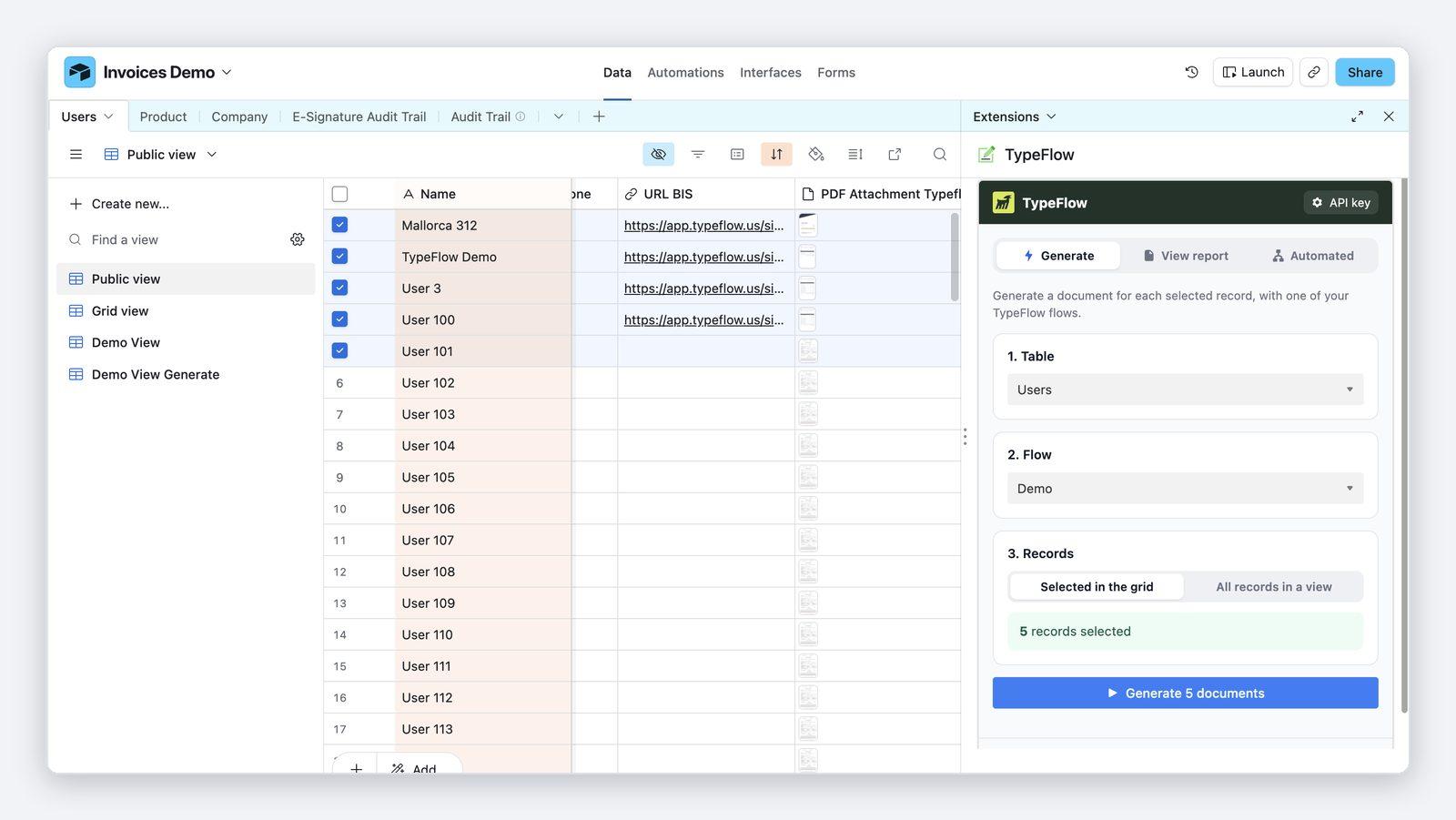
TypeFlow works inside Airtable, with no IT project and no extra tool
TypeFlow's Airtable Extension is installed from the Airtable Marketplace and runs inside your base. You select the records and generate their documents without leaving Airtable. TypeFlow connects to Airtable directly and is set up on screen, with no code, so there is nothing to ask IT to build. Generation, e-signature and email delivery are in the same tool, so you have no Zapier or Make scenario to build and keep running. Every plan allows unlimited team members, so the colleagues who need it can use it at no extra cost.
The support and the price behind each document
Human support, usually within a few hours
TypeFlow's team replies by chat or email, usually within a few hours on business days. You can book a 30-minute setup call before you start, and a first document is typically ready in 5 to 15 minutes.
One flat price, with no fee per user or per signature
You pay a flat monthly price set by the number of documents you generate, not per user and not per signature. Plans start at $24 a month, billed yearly, for 200 documents a month.
See pricing →
Need someone else to say yes? Here is what they will ask.
Who is TypeFlow, and will it still be there in a few years?
TypeFlow is a French company, based in Aix-en-Provence. Over 1M documents have been generated with it. TypeFlow has more than 2,000 users and is rated 4.9 out of 5 on G2.
Where is our data?
Your Airtable data stays in Airtable: TypeFlow reads the records it needs when it generates a document and saves the file back on the record. TypeFlow's database, generated files and processing servers are hosted in the EU (Frankfurt, Germany). Access to a base is granted on Airtable's own screen, limited to the bases you choose, and can be revoked at any time. Only TypeFlow's founder can access a connected base, and only to resolve a support request. Data is encrypted in transit and at rest. TypeFlow keeps its copy of generated and signed documents with no time limit, until you ask TypeFlow to delete it, so the audit trail can always prove what was signed, by whom and when. On the Enterprise plan, a retention period can delete signed documents automatically after the number of days you choose. A data processing agreement and security documentation come with the Enterprise plan.
Is the e-signature legally valid?
Yes, for most standard business contracts. TypeFlow e-signatures are simple electronic signatures that comply with the US ESIGN Act and UETA and with the EU eIDAS Regulation. Every signed document includes a Certificate of Completion with the signer details, the audit trail and the document hashes (SHA-256 fingerprints of the original and the signed document). On Pro and Enterprise, you can ask a signer to enter a 6-digit code sent to their email before viewing or signing. The code confirms access to that email address, not the signer's legal identity. Email authentication is the common standard for most contracts, quotes and business documents. Highly regulated sectors that require proven identity need a dedicated identity verification provider, which TypeFlow does not offer.
Can we try it first?
Yes. The trial gives you 20 free documents, one time, on your own Airtable data, with no credit card. For signatures, Test Mode lets you try a signing flow before going live.
FAQ
Can it make our documents, with repeating tables, images and sections that change?
Yes. With line items, one row of a table repeats for each linked record, for example each product of an order. Line items can be nested, and grouped with a header and totals for each group. Images come from your Airtable attachment fields. Conditional sections show or hide a part of the document depending on a field value, so one template covers several cases. A document can be any length, and a PDF counts as one document whatever its number of pages.
Can we keep the templates we already have?
Yes, if your templates are Google Docs or PDF forms. A Google Docs template keeps its formatting in the final PDF, and an existing PDF form is filled as it is, with its layout and wording unchanged. TypeFlow templates are not made in Word. A Google account is needed only for Google Docs templates: the Template Builder and PDF forms work without one. And if your team works in Outlook, the email that delivers a generated document can be sent from your own Outlook mailbox on Pro and Enterprise.
Can it handle hundreds of documents at once?
Yes. Bulk generation makes the documents for all the records of a view in one run, each with its own record's data. It is included on every plan. What your plan sets is the number of documents a month: 200 on Starter, 1,000 on Pro, unlimited on Enterprise.
Can I check a document before it goes out on its own?
Yes. Start each document with a button until you trust the result, then switch to automatic generation, which comes with the Pro and Enterprise plans. For documents sent for signature, "Review before sending" holds each one until you have checked it and clicked Send for signature. "Review before sending" is also on the Pro and Enterprise plans.
Our data is not only in Airtable. Does it still work?
Yes, when the record the document is made from is in Airtable or in Softr Databases, TypeFlow's two data sources. Softr Databases is built in: you connect it with your Softr API key and map its fields in your templates, like Airtable. An event in another tool can start a document, on every plan. Any tool that can call a URL (Zapier, Make, n8n or your own app) does it by calling a generation link or the TypeFlow API. The outside event starts the generation, and the record in your data source provides the data.
Will the price go up as more of my team uses it?
Not because of the number of people. TypeFlow prices per workspace, not per seat, and every plan allows unlimited team members. The price follows the number of documents you generate each month.
Make your team's next document from Airtable
Try TypeFlow on your own Airtable data with 20 free documents. No credit card required. From $24 a month, billed yearly.