TypeFlow - Softr Document Generator
Softr doesn't have native PDF generation. TypeFlow solves this by letting you automatically generate custom PDFs from your Softr database using simple Google Docs templates-no coding required.
Softr Has No Native PDF Generation
Softr is great for building apps on top of Airtable, but it lacks any built-in document generation capabilities. This forces teams to manually create documents or use complex workarounds.
Common challenges include:
No PDF Export
Softr has no way to generate PDFs from your database records.
Manual Document Creation
Teams copy-paste data from Softr into Word or Google Docs manually.
Complex Workarounds
Building document generation requires Zapier, Make, and third-party tools.
No Client-Facing Documents
You can't automatically send invoices, contracts, or certificates to clients.
Why Use TypeFlow for Softr Document Generation
TypeFlow adds professional document generation to your Softr apps. Generate invoices, contracts, and certificates directly from your Softr database.
Here's why teams choose TypeFlow:
Google Docs Templates
Use a familiar tool that anyone can edit. No proprietary builders to learn.
Advanced Features
Handle invoices with line items, create multi-level groupings, and use conditional logic.
Unlimited Generation
A flat monthly rate means no surprise bills. Generate as many documents as you need.
Direct Softr Integration
Connect your Softr database with a simple API key. Setup takes 15 minutes.
Document Generation for Softr
Understanding your options for PDF creation from Softr databases
Native Softr Solutions
Softr focuses on building web apps and portals on top of Airtable. It does not include any native document generation capabilities.
Limitations:
No PDF generation at all
No document templates
No export functionality for records
No signature capture functionality
Third-Party Options
Most third-party document generation tools require complex Zapier or Make workflows to work with Softr, proprietary template builders, and charge per-document fees that add up quickly.
Limitations:
Requires Zapier/Make + separate PDF tool
Complex multi-step automations
Per-document pricing adds up
No native Softr integration
Why TypeFlow Works Better with Softr
Professional document generation without the complexity or per-document fees
Direct Softr integration
Connect with just your Softr API key - no complex setup
Google Docs templates
Anyone can edit and maintain templates without learning new software
Advanced features
Line items, e-signature, conditional sections - all from Softr data
Flat monthly pricing
No per-document fees. Predictable cost every month.
E-signature included
Send for signature and save signed PDFs back to Softr
20 free documents • No credit card required
Signature Collection Options for Softr
Softr has no native signature capabilities. Third-party tools like DocuSign require complex Zapier/Make workflows and per-signature pricing.
TypeFlow's Native E-Signature Solution
TypeFlow offers a complete solution - generate documents from your Softr database and send them for legally binding signature. Signed PDFs automatically save back to Softr.
Legally Binding
Compliant with ESIGN Act (US), UETA, and eIDAS Regulation (EU)
Certificate of Completion
Every signed document includes a certificate with signer details, timestamps, and audit trail
Document Integrity
SHA-256 hash verification ensures documents haven't been tampered with
Multi-Signer Support
Sequential or parallel signing with unique secure links per signer
Complete Audit Trail
IP address, location, browser, timestamps captured for legal compliance
No Per-Signature Fees
Unlimited signatures included in your TypeFlow plan
What you can do with TypeFlow + Softr
Three pillars of document automation
Generate
TypeFlow creates professional documents from your Softr data
- Invoices with line items from Softr
- Contracts with e-signatures from Softr
- Certificates and badges from Softr
- Quotes and proposals from Softr
- Reports and summaries from Softr
- Packing slips and labels from Softr
Automate
TypeFlow triggers PDF generation from Softr without manual work
- Via Make (Integromat) with TypeFlow
- Via Zapier with TypeFlow
- Via TypeFlow API (custom workflows)
- From Softr button actions
- On database record updates
- Scheduled batch generation
Customize
TypeFlow gives you full control over document design and branding
- Use Google Docs templates with TypeFlow
- Custom fonts and colors in TypeFlow
- Your branding and logos in TypeFlow PDFs
- TypeFlow conditional sections
- TypeFlow dynamic images from Softr
- Multi-language support in TypeFlow
All powered by your existing Softr data, Google Docs templates, or the built-in HTML/CSS builder
How to Generate Documents from Softr with TypeFlow
In this short tutorial, we'll show you how to generate your first document from Softr. You can have a working setup in about 15 minutes.
Step 1: Create Your Google Docs Template
Create your template in Google Docs. Add merge tags like {{Field Name}} and control branding with your own fonts and logos.
Step 2: Connect TypeFlow to Softr
Enter your Softr API key in TypeFlow settings. One-time setup takes less than a minute.
Step 3: Map Softr Fields to Your Template
Select your Softr database and table, then match your tags to Softr fields.
Step 4: Generate Your PDF
Click generate or set up automation. PDF appears in under 2 seconds and saves to Softr.
"TypeFlow finally gave us PDF generation for our Softr client portal. Setup was straightforward and it just works."
TypeFlow Features for Softr Document Generation
TypeFlow includes advanced capabilities designed to handle any document workflow from your Softr database.
Dynamic Line Items
Handle invoices, reports, and any kind of itemized lists from Softr effortlessly with this powerful TypeFlow feature
Nested Line Items
TypeFlow supports multi-level line items from Softr for complex documents like detailed quotations
Sorting & 3-Level Grouping
TypeFlow organizes Softr data with up to three levels of grouping in your templates
Linked Records
TypeFlow accesses data from Softr linked records seamlessly
E-Signature
Generate documents from Softr and send them for signature. Signed PDFs save back to your database.
Form Builder
TypeFlow creates forms with signature capture and automatic PDF generation saved to Softr
Make / Zapier Integration
Trigger document generation from any event using Make or Zapier with your Softr data
Save as Google Doc
TypeFlow lets you save your generated documents as Google Docs for easy editing
Plus 27+ more features
All Softr field types, automation options, output formats, and more
Complete feature list
Every capability TypeFlow offers with Softr
Ready to use all these features with your Softr data?
Start free trialSoftr Document Generation Automation Options
Automating your document creation is where you'll save the most time. TypeFlow offers several ways to trigger generation from your Softr database.
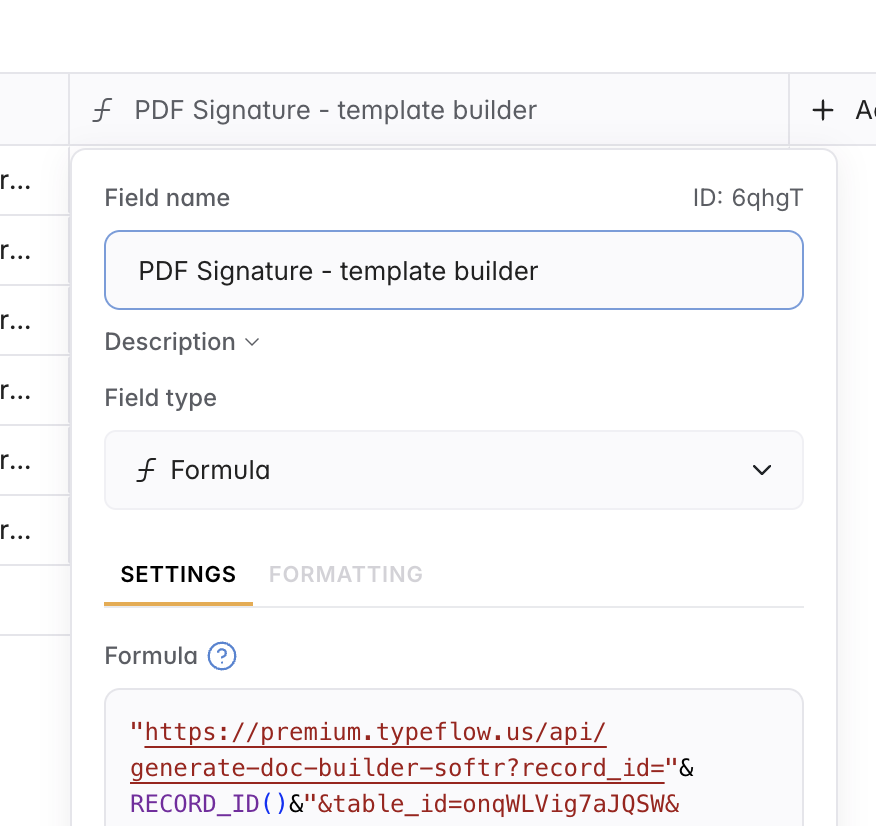
Database Formula
Clickable link in your database
Add a formula field to your Softr database that generates a clickable URL for each record. Click the link to generate the PDF instantly.
Best for:
- Quick manual generation
- Works with free Softr accounts
- No additional setup required
- Direct access from database view
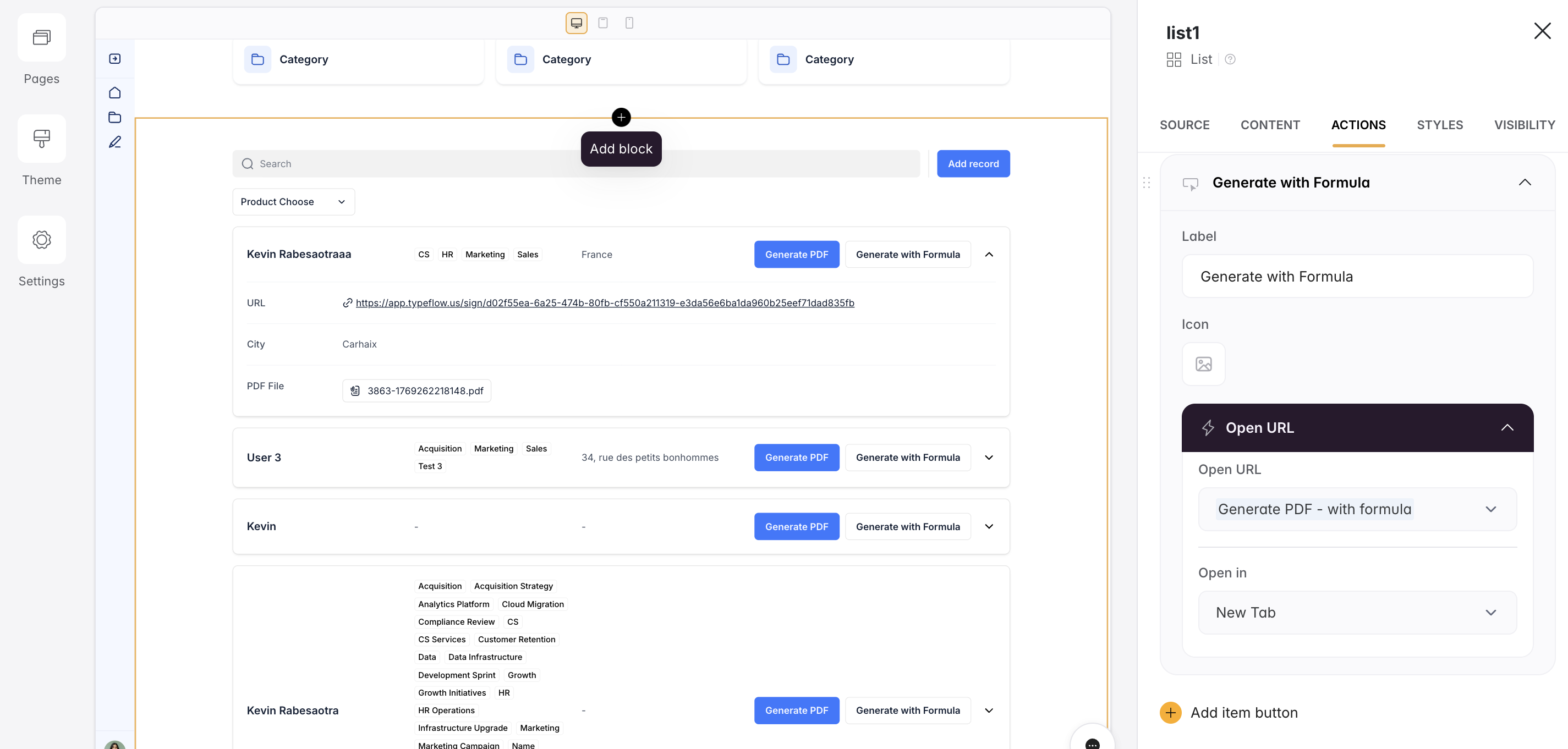
Interface Button
Button on your Softr page
Add a button to your Softr page that opens the generation URL. Users click the button to generate a PDF for the current record.
Best for:
- User-friendly interface
- Works with free Softr accounts
- Professional look and feel
- List/Table action buttons
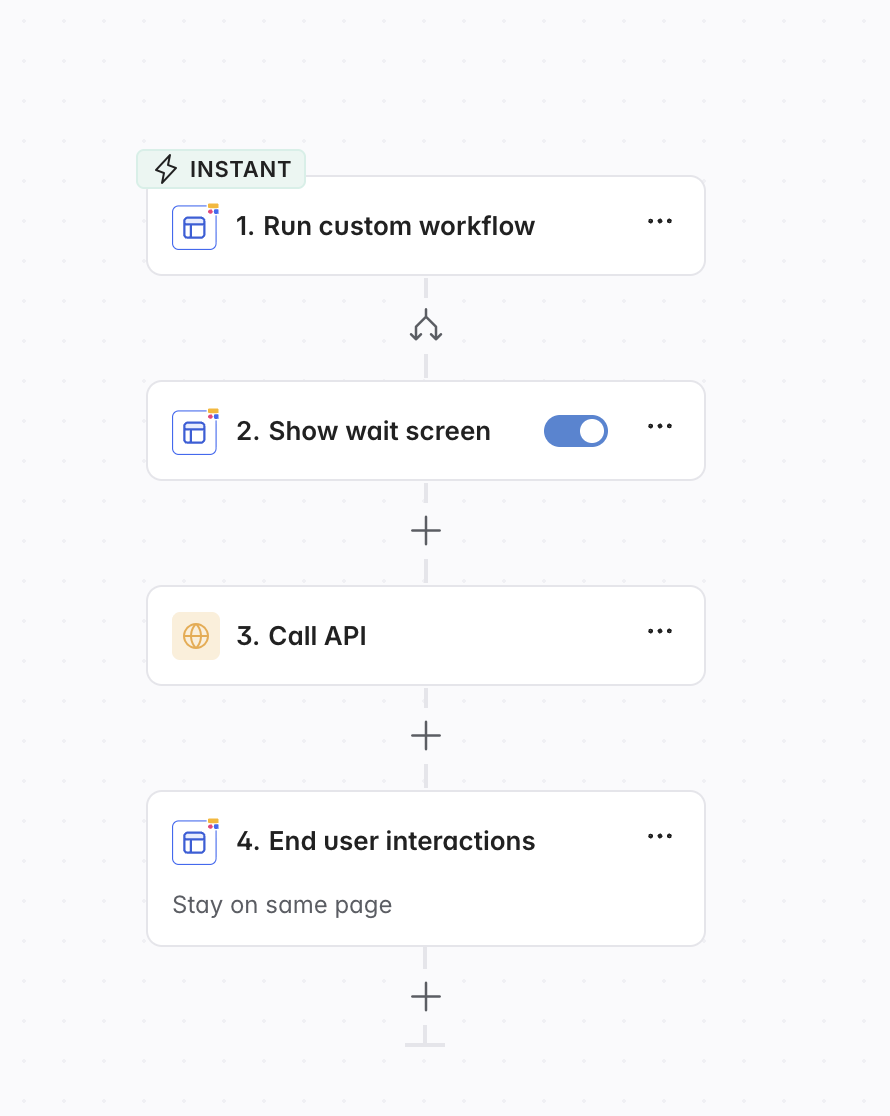
Softr Workflow
Native Softr automation
Use Softr's built-in workflows to automatically trigger PDF generation when records are created, updated, or when buttons are clicked.
Best for:
- Automatic generation on triggers
- Native Softr integration
- No external tools needed
- Button-triggered workflows
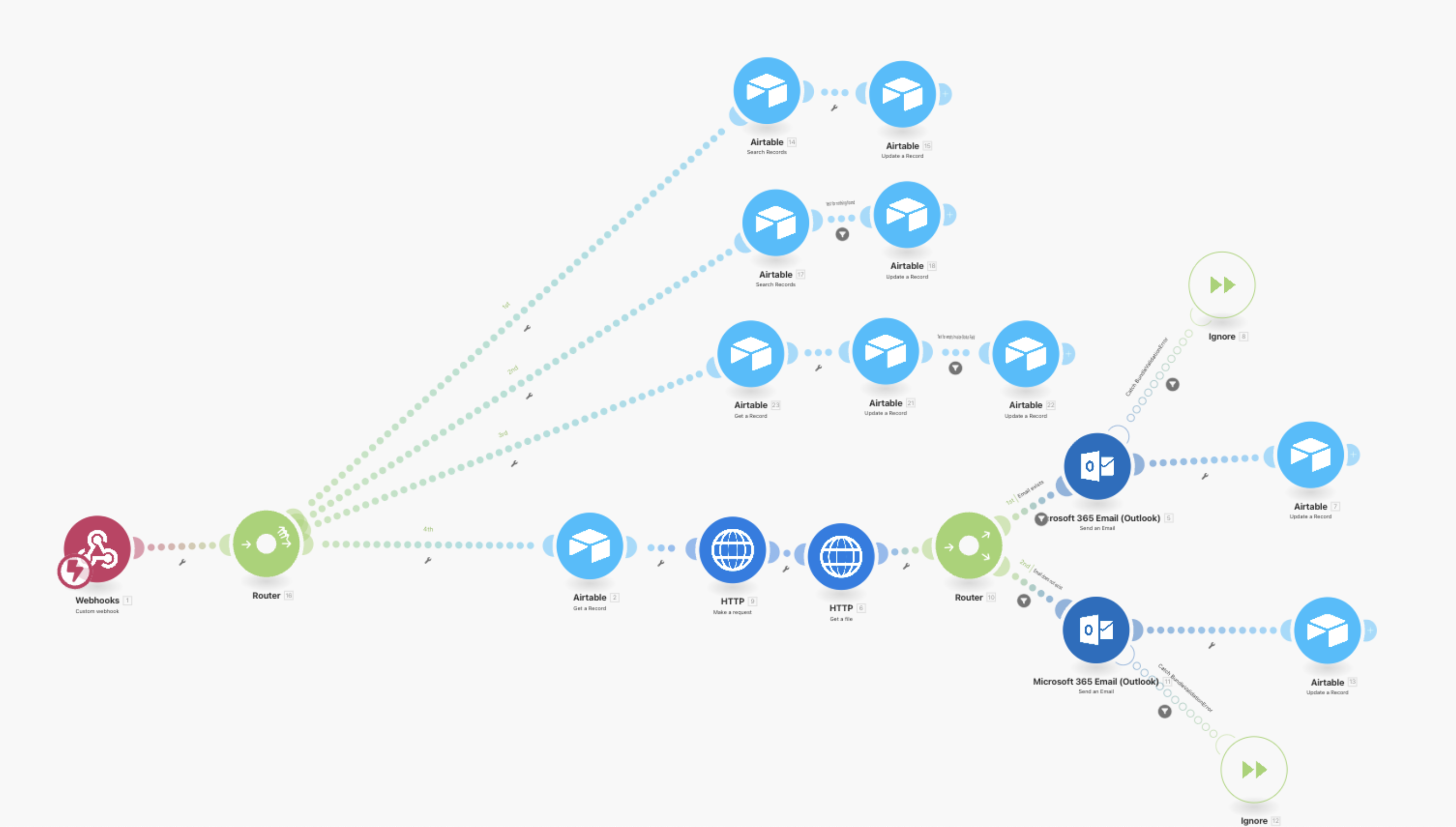
Make & Zapier
External automation platforms
Connect TypeFlow to Make or Zapier to trigger PDF generation from any event. Perfect for complex multi-step workflows.
Best for:
- Complex automation scenarios
- Multi-step workflows
- Connecting with other apps
- Advanced trigger conditions
Teams Using TypeFlow with Softr
See how teams generate professional documents from their Softr apps.
Michael
Founder
12 staff • United States
"We built our client portal in Softr but had no way to generate invoices. TypeFlow solved this in an afternoon."
The Challenge
The agency needed to generate branded invoices from their Softr-based client portal but Softr has no PDF generation.
The Solution
- Connected TypeFlow to Softr database via API key
- Created invoice template with line items in Google Docs
- Set up Make automation to generate invoices on record update
The Results
Sarah
Operations Lead
Small team • Canada
"Our students complete courses in Softr and now automatically receive their certificates. It's completely hands-off."
The Challenge
Needed to automatically generate and email certificates when students completed courses tracked in Softr.
The Solution
- Created certificate template with student data placeholders
- Connected to Softr course completion database
- Automated email delivery of certificates via Make
The Results
James
CEO
8 agents • UK
"We generate rental agreements directly from our Softr property management app. Clients sign digitally and it's all saved automatically."
The Challenge
Real estate team needed to generate rental agreements from property listings in their Softr app with e-signature support.
The Solution
- Built rental agreement template with property and tenant data
- Integrated TypeFlow e-signature for digital signing
- Signed documents automatically save back to Softr
The Results
Want to see your story here?
Start your free trialFrequently Asked Questions
Get answers to the most common questions about using TypeFlow with Softr.
Most Popular Questions
More Questions
Still have questions?
Start Generating Documents from Softr
Add professional PDF generation to your Softr apps. Start your free trial today.