How to Build Advanced Contracts in Airtable with Clause-Level Control
Managing complex contracts in Word or Google Docs creates template sprawl: one version per client, jurisdiction, product line, or negotiation. With Airtable, you can manage the contract as structured data - select the right clauses for a deal, generate the agreement, send it for e-signature, and track the signed version in the same workflow.
This guide shows how to build that workflow for agreements with reusable clauses, nested chapters, and exhibits. Each clause, chapter, and exhibit is a record in Airtable, so teams assemble custom contracts per deal and generate signed agreements automatically.
If you need standard 3-10 page contracts, see our guide to generating contracts from Airtable. This article covers the advanced case: configurable agreements where each deal assembles a unique contract from reusable clause blocks.
When to Use This Workflow
Use this approach when:
- Each deal needs a different combination of clauses, schedules, or exhibits
- You manage multiple contract types, jurisdictions, products, or entity structures
- Legal terms need to be reused and maintained centrally
- Your documents contain nested sections and routinely reach 20+ pages
- You need the signed PDF and signature status back in Airtable
Use a standard Airtable contract template instead when:
- You generate one mostly fixed contract with a few fields like client name, dates, and amount
- Your agreement is usually under 10 pages
- You do not need clause-level selection or nested structures
For the standard approach, see how to generate contracts from Airtable.
How the Airtable Contract Workflow Works
Instead of starting from a Word file every time, your team manages the agreement from one Airtable record. The record determines which clauses apply, TypeFlow generates the correct version, and Airtable remains the source of truth after signing.
1. Start with the agreement record Create a record for the supplier, client, employee, or partner agreement. Store deal-specific data such as the legal entities, effective date, jurisdiction, payment terms, renewal date, and agreement owner.
2. Select the clauses that apply Link the relevant clause, chapter, schedule, and exhibit records to that agreement. For example, a supplier agreement may include a confidentiality clause, a regional tax exhibit, and a product-specific quality schedule, while another deal uses a different combination.
3. Generate the correct contract version When the agreement is ready for review, TypeFlow reads the linked Airtable records and assembles the full document. The selected chapters appear in the right order, conditional sections are included or excluded, and the cover page pulls the deal-specific fields.
4. Review and approve before sending Your legal, operations, or account team reviews the generated PDF. If a clause needs changing, update the clause record or agreement configuration in Airtable, then regenerate - without editing a separate Word document.
5. Send for signature Send the generated agreement to the right signers from the same workflow. Both parties sign the PDF, and TypeFlow records the signature status and completion details.
6. Track the signed agreement in Airtable The signed PDF returns to the agreement record. Update the record to "Signed", store the execution date, and use Airtable views or automations to track renewal dates, amendments, and contracts waiting for signature.
Your team does not manage templates. It manages agreements in Airtable. Airtable decides what belongs in the agreement; TypeFlow generates and signs the right version.
Why Airtable Works for Clause-Based Contracts
Airtable works as a contract builder because every clause is a record, not a paragraph in a document. Teams select which chapters, clauses, and exhibits apply to each deal, and the contract assembles itself automatically from reusable blocks.
Traditional contract management means maintaining dozens of Word or Google Docs templates - one per contract type, client, or jurisdiction. One wrong clause, one outdated address, and the whole document needs rework. This workflow reduces that template sprawl:
- Clause-level reuse. Write a confidentiality clause once. Link it to every agreement that needs it. Update it in one place - every future contract gets the updated version.
- Deal-specific assembly. Each agreement links to the specific chapters, exhibits, and terms that apply. No template surgery required.
- Version history at the data level. Keep versions, effective dates, and clause records in Airtable instead of duplicating Word or Google Docs files.
- One master template, many controlled variations. Conditional sections show or hide clauses based on Airtable field values - deal type, jurisdiction, client tier.
This is what contract management in Airtable looks like when the agreements are complex. Traditional approaches work for simple contracts, but fall apart when documents grow to 20-100+ pages with nested chapters, exhibits, and multi-party signatures.
Example: A Supplier Agreement Workflow
A new supplier record enters Airtable. The operations team selects the jurisdiction, product category, applicable confidentiality terms, payment schedule, and required exhibits. Airtable links the corresponding clause records to the agreement version. TypeFlow generates the agreement, sends it to both parties for signature, and updates the Airtable record to "Signed" when complete.
This is the pattern: deal data → clause selection → generation → signature → lifecycle status - all from one Airtable base.
Step 1: Model Reusable Clauses and Contract Structure
Clause-level control means each chapter, sub-section, and exhibit is a linked record in Airtable that you include or exclude per deal. Three levels of nesting let you configure contracts down to individual legal definitions without creating a separate template for each variation.
A real company uses this Airtable structure for their Master Manufacturing Agreements. The same pattern works for MSAs, service contracts for agencies, SaaS enterprise agreements, and real estate agreements.
- Agreement List table - the main record (client name, effective date, expiration, status, registration number)
- Agreement Version table - linked to the agreement (recitals as rich text, version number)
- Chapters table - linked to the version (chapter title, chapter number, content)
- Clauses table - linked to each chapter (section reference, heading, body text)
- Definitions & Sub-clauses table - linked to each clause (deeply nested legal definitions and terms)
- Exhibits table - linked to the version, each with its own chapters, clauses, and definitions
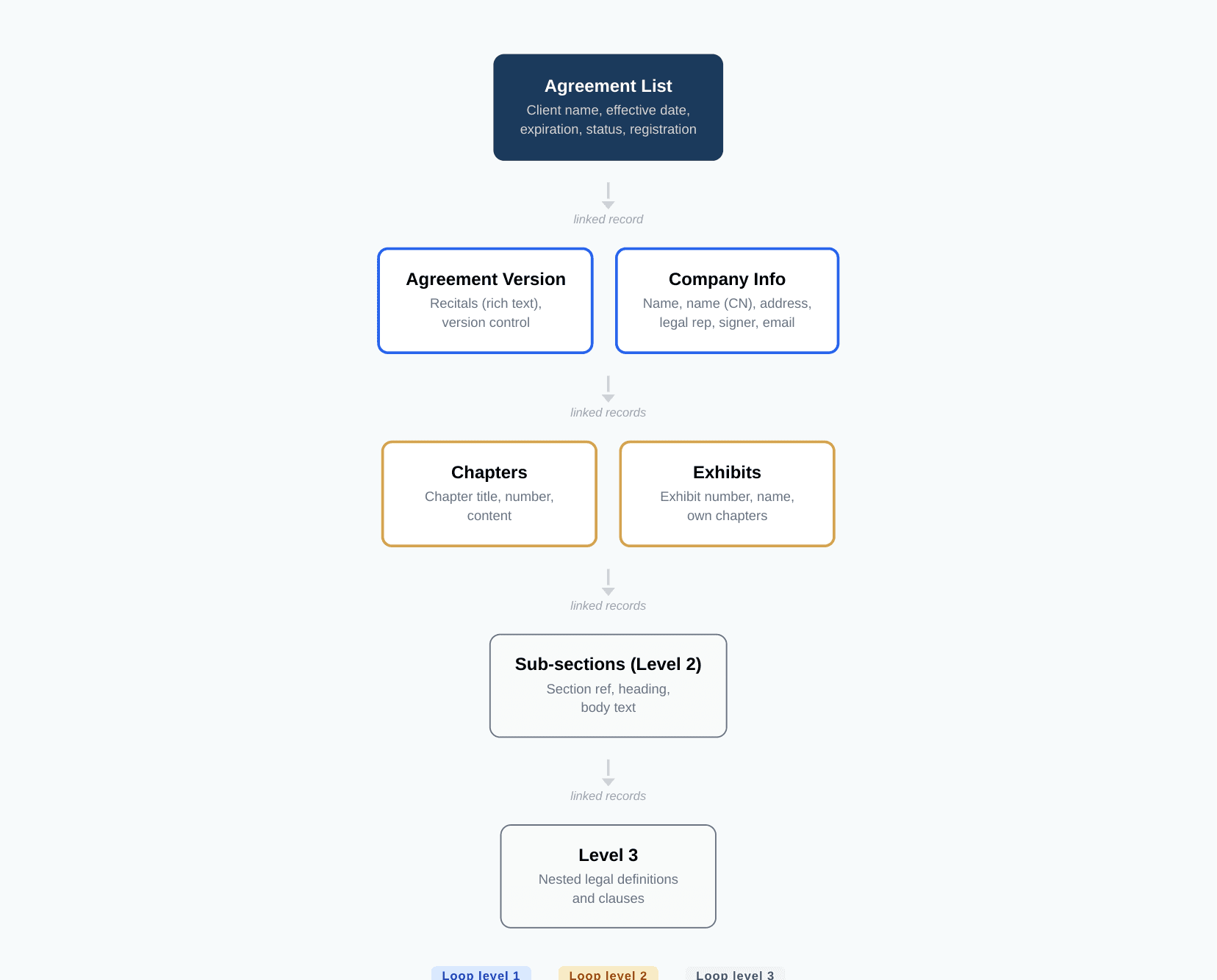
Each chapter, sub-section, and exhibit is a record you can include or exclude per deal. Changes happen at the data level: update a clause in one record, and every future agreement that links to it includes the updated version.
For simpler linked-record setups, see linked records in PDF generation.
Step 2: Assemble the Right Agreement for Each Deal
TypeFlow reads the linked record structure and assembles the full contract automatically - three levels of nested loops generate chapters, clauses, and definitions in the correct order, with exhibits as parallel structures that have their own chapter hierarchies.
TypeFlow handles this with five key features:
- 3-level nested loops - the template contains a chapter loop. Inside each chapter, a nested loop repeats clauses. Inside each clause, a third level repeats definitions and sub-clauses. For simpler cases, see multi-page PDF generation.
- Exhibits as parallel structures - each Exhibit gets its own intro paragraph, chapters, clauses, and definitions. Conditional sections show or hide signature blocks per Exhibit.
- Cover page - company names (with bilingual support for EN/CN), addresses, dates, registration numbers, and status fields pulled from the main record.
- Conditional sections - show or hide entire clauses, chapters, or exhibit sections based on Airtable field values. One master template adapts to every deal type.
- Headers and footers - recurring on every page with company names and page numbering (Page 1 of 22).
The template is built in TypeFlow's HTML/CSS template builder with nested loops. Variables like {{Vendor Legal Name}}, {{Notice Address}}, and {{National Register Nr}} are mapped to Airtable fields. Chapter content flows through nested item loops, with clauses and definitions nested inside.
Step 3: Generate a Production-Ready Contract
A configurable contract built from Airtable linked records generates in seconds - from a 22-page Master Manufacturing Agreement to a 100+ page version with additional exhibits, all from one Airtable record. One company migrated from Documint specifically because they needed exhibit-level chapter structures that their previous tool could not handle.
The generated document includes:
- Professional cover page with both party details (bilingual EN/CN)
- Recitals section from rich text fields
- Structured chapters with clauses and definitions
- Exhibits with their own chapter structures
- Company information tables with bilingual fields
- Confidentiality footer and page numbering on every page
- E-signature blocks for both parties
Scroll through the full 22-page document below:
Step 4: Send, Sign, and Track the Agreement
TypeFlow includes built-in e-signatures in all plans with no per-signature fees - both parties sign directly from the generated PDF, with OTP email verification and a certificate of completion to support traceable signing workflows. The signed PDF saves back to Airtable automatically.
- Both parties sign directly from the generated PDF. No DocuSign integration, no Zapier automation, no third-party tool needed.
- OTP email verification. Each signer receives a one-time password before signing.
- Certificate of completion with timestamps, IP addresses, and signer identity to support traceable signing workflows.
- Signed PDFs return to Airtable. The completed document is saved back to the record automatically, with signature status synced to Airtable fields.
Combined with Airtable's built-in views and automations, this gives you a complete contract lifecycle management system: draft, review, send for signature, track status - all from Airtable. For a deeper look at when you need a dedicated CLM vs Airtable-native contract management, see our contract management vs CLM comparison.
For the complete e-signature workflow guide, see how to generate documents with e-signature from Airtable. For teams evaluating alternatives to PandaDoc or DocuSign for their Airtable integration, this approach eliminates per-signature costs and keeps the contract data inside Airtable instead of a separate system. See our DocuSign alternative and PandaDoc alternative comparisons, or browse all contract generation tools for Airtable.
Related Airtable Contract Workflows
- Standard contracts: Need a contract with client details, dates, and pricing? See how to generate contracts from Airtable.
- Contract management: Need to manage approvals, renewals, and signed agreements? Learn about Airtable contract management.
- Contract lifecycle: Need to track contracts from draft through renewal? See the Airtable contract lifecycle management workflow.
- E-signatures: Ready to collect signatures? Learn how to send documents for electronic signature from Airtable.
- Quote to Invoice: Need quotes that convert to invoices on signature? See the quote-to-invoice workflow.
Build Your Airtable Contract Workflow
Assemble complex agreements from reusable Airtable clauses, generate the right version for every deal, and send it for signature.
- Structure your Airtable base with a main Agreements table, linked Chapters, Clauses, and (optionally) Definitions tables. The same pattern works for vendor and supplier contracts, SaaS agreements, and real estate contracts.
- Create a TypeFlow account and connect your Airtable base.
- Build one master contract template that repeats chapters and clauses from your linked Airtable records. Use TypeFlow's HTML/CSS template builder for the most complex nested structures, or a Google Docs template for simpler layouts. For manufacturing document automation, this same approach handles BOMs, spec sheets, and QC reports.
- Map your fields, configure conditional sections, and generate. Each deal assembles its own contract from the linked records.
For help setting up nested loops, see our guide on linked records in PDF generation. For the complete contract generation guide covering simpler agreements, see how to generate contracts from Airtable.
Automate your document generation
Start with 20 free documents. Built for businesses using Airtable.
Frequently Asked Questions About Building Contracts in Airtable
Find answers to the most common questions about this feature.
Popular Questions
All Questions
Need more help?
Our team is here to help you solve all your problems and answer your questions.
Contact Us
Kevin from TypeFlow
•AuthorKevin Rabesaotra is a growth engineer and automation specialist with 8+ years of experience building no-code solutions. As Founder & CEO of TypeFlow, he has helped hundreds of businesses automate document generation and streamline workflows with Airtable integrations. Previously, Kevin was a Product Lead specializing in growth engineering, running experiments to drive revenue, retention, and lead generation.
More articles
How to Print Labels from Airtable with Quantity Control (Step by Step)
Print multiple labels per Airtable record based on a quantity field. Step-by-step guide for linked records mode and quantity repeat mode with barcodes and Avery sheets.
Read articleHow to Print Avery Mailing Labels from Airtable
Print Avery mailing labels (5160, 5161, 5162) from Airtable without Word mail merge. Step-by-step guide with print label mode, automation, and bulk generation.
Read articleHow to Create Inventory Labels with Barcodes in Airtable
Create inventory labels with Code 128, EAN-13, or QR barcodes from Airtable. Step-by-step guide for warehouse, retail, and asset tracking with thermal and Avery printers.
Read article