Airtable Contract Management vs CLM Software: Which One Do You Actually Need
For most SMBs and agencies, Airtable + TypeFlow covers 80% of what a dedicated CLM does - contract generation, e-signatures, redlining, and renewal tracking - at $29-49/month instead of $500+/month for Juro or Ironclad. You only need dedicated CLM software if your legal team requires advanced AI review, complex multi-party negotiations, or enterprise compliance features.
For a complete overview of contract workflows, see our contracts solution page. To compare document generation tools, see our best contract generation tools for Airtable. For advanced contracts with clause-level control and 3 levels of nesting, see how to build advanced contracts in Airtable. This guide breaks down the real differences so you can pick the right approach.
Generate contracts from Airtable in minutes
Use Google Docs templates, add e-signatures, and automate the entire workflow. No coding required.
Start free with 20 documentsKey Takeaways
- Airtable is a flexible database you build yourself for tracking contracts. CLM software is a ready-made platform designed for legal teams.
- Small teams with standard contracts can use Airtable plus tools like TypeFlow to generate documents, collect signatures, and handle redlining.
- Dedicated CLM software makes sense when you negotiate contracts with frequent edits or require compliance audit trails.
- The cost difference is significant. Airtable uses workspace pricing while CLM tools charge per user.
- You can add most CLM features to Airtable through integrations without switching platforms.
What Is Airtable Contract Management
Airtable contract management means using Airtable as a customizable database to store, track, and automate contracts - without paying for dedicated CLM software. You track every contract, deadline, party, and status in one place by building a custom contracts base. Airtable is a customizable database that sits somewhere between a spreadsheet and a full database, and Airtable contract management means using it as your central hub for agreements.
The approach is DIY. You create custom tables, add the fields you want, and link related records together. There is no contract-specific functionality built in. Think of it as a blank canvas you shape to fit how your business handles agreements.
Many teams already use Airtable for projects or client management. Adding contract tracking to an existing base keeps everything in one place, which is why this approach appeals to operations teams and small businesses.
What Is CLM Software
CLM (Contract Lifecycle Management) software is a dedicated platform that manages contracts end-to-end - from first draft through negotiation, signing, and renewal - with built-in templates, redlining, e-signatures, and audit trails. CLM stands for Contract Lifecycle Management, and according to Gartner, these platforms handle the entire agreement lifecycle. Tools like Juro, Ironclad, and ContractWorks fall into this category.
Unlike Airtable, CLM software comes with features designed for legal workflows:
- Template editors. Build contract documents inside the platform.
- Redlining tools. Track edits during negotiation.
- E-signatures. Collect signatures without external tools.
- Audit trails. See who changed what and when.
The trade-off is flexibility. CLM software works well for contracts but does not adapt to other business processes the way Airtable does.
Airtable vs CLM Software at a Glance
| Feature | Airtable + TypeFlow | CLM Software |
|---|---|---|
| Best For | Small teams, ops workflows | Legal departments |
| Setup Time | Hours to days | Weeks to months |
| Contract Drafting | Via Google Docs or TypeFlow template builder | Built-in |
| E-Signatures | Built-in with TypeFlow | Native |
| Redlining | Built-in with TypeFlow (Scale plan) | Included |
| Price Range | Workspace-based | Per-user |
| Learning Curve | Familiar interface | New platform |
Pros and Cons of Airtable Contract Management
Airtable is cheaper, more flexible, and works with tools you already know - but it requires setup and external tools for document generation and e-signatures.
Pros of Using Airtable for Contracts
- Flexible structure. You design the exact fields, views, and relationships your workflow requires.
- Lower cost. No per-user CLM fees eating into your budget as the team grows.
- Familiar tool. Teams already in Airtable avoid learning new software.
- Strong integrations. Connect to Google Docs, Slack, email, and document generation tools like TypeFlow.
- Multi-purpose. The same base can handle contracts, projects, and client data together.
Cons of Using Airtable for Contracts
- No built-in drafting. You need external templates and a generation tool like TypeFlow.
- E-signatures require integration. Use TypeFlow's built-in e-signatures or connect DocuSign.
- Redlining requires TypeFlow Scale plan. Available through TypeFlow but not native to Airtable itself.
- Manual setup. Everything from scratch takes time upfront.
Pros and Cons of Dedicated CLM Software
CLM software handles everything in one platform out of the box - but costs significantly more and is less flexible for non-contract workflows.
Pros of CLM Software
- End-to-end workflow. Drafting, negotiation, signing, and storage live in one place.
- Built-in e-signatures. No extra tools or integrations to manage.
- Redlining tools. Track every change during back-and-forth negotiation.
- Compliance features. Audit trails, version history, and role-based permissions come standard.
- Pre-built templates. Start creating contracts on day one.
Cons of CLM Software
- Higher cost. Per-user pricing adds up fast with growing teams.
- Less flexible. The platform handles contracts and not much else.
- Learning curve. Your team adopts yet another piece of software.
- Overkill for simple needs. Many features go unused by smaller operations.
- Long implementation. Enterprise CLM deployments can take months.
Feature by Feature Comparison of Airtable and CLM
Airtable + TypeFlow matches CLM software on contract generation, e-signatures, storage, and renewals. CLM software wins on built-in redlining, AI analysis, and compliance audit trails.
Contract Drafting and Templates
Airtable stores data but does not create documents. You can track that a contract exists, but you cannot build the contract itself inside Airtable.
This is where TypeFlow comes in. You map Airtable fields to merge variables in a Google Docs template or use TypeFlow's built-in template builder. When you trigger the flow, TypeFlow pulls the data and creates a finished PDF.

CLM software includes template editors where you build and manage contract documents inside the platform. No external tools required.
E-Signatures
Airtable has no signature functionality on its own. TypeFlow includes built-in e-signatures at no extra cost - the signer receives a link, signs, and the completed document returns to your Airtable record.
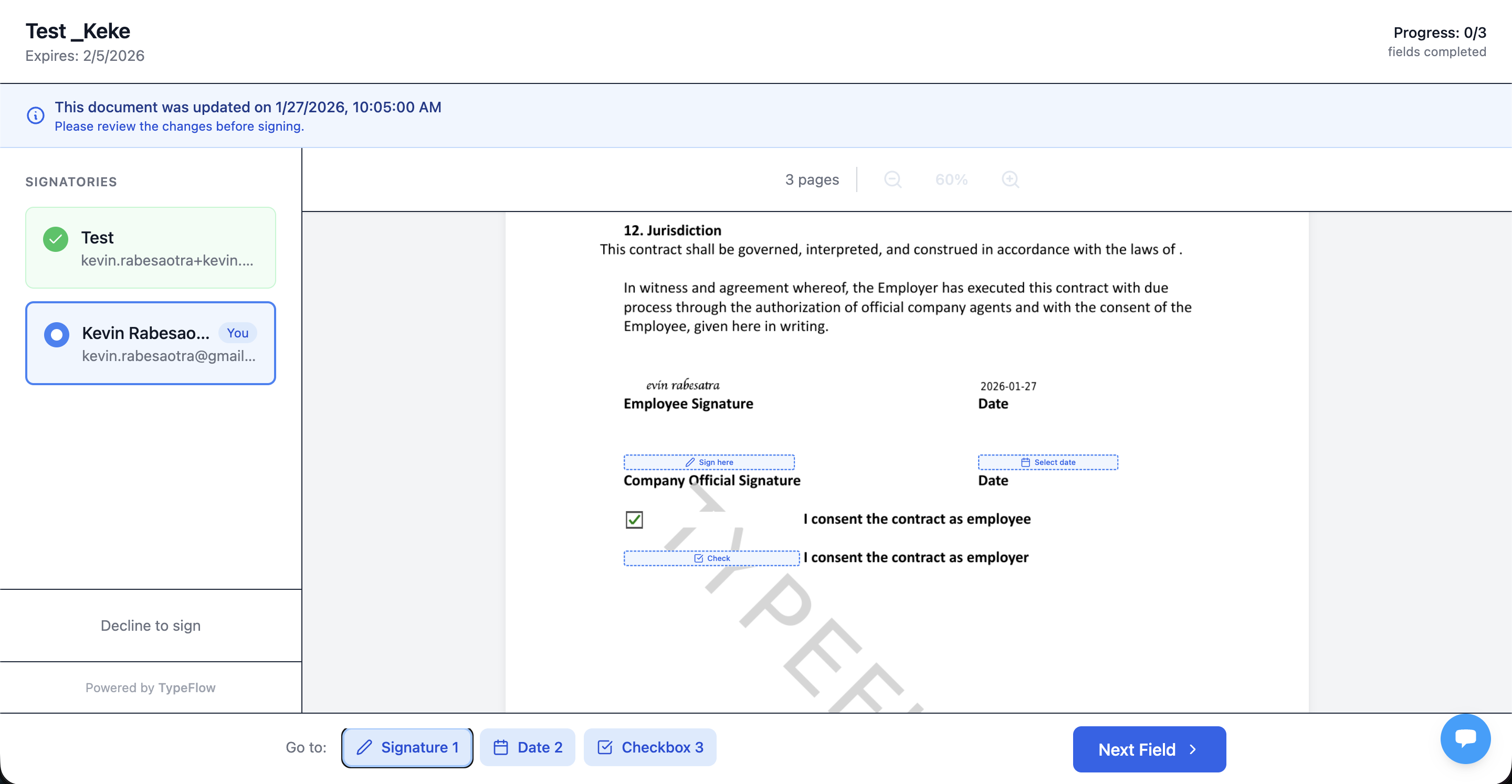
Alternatively, you can integrate DocuSign or HelloSign through Zapier. CLM platforms typically offer native e-signature capabilities with the signed document and signature data in the same system.
Redlining and Negotiation
TypeFlow includes contract redlining on the Scale plan. Signers can suggest changes directly on the document during the signing process. You accept or reject changes with one click, and the contract regenerates automatically.
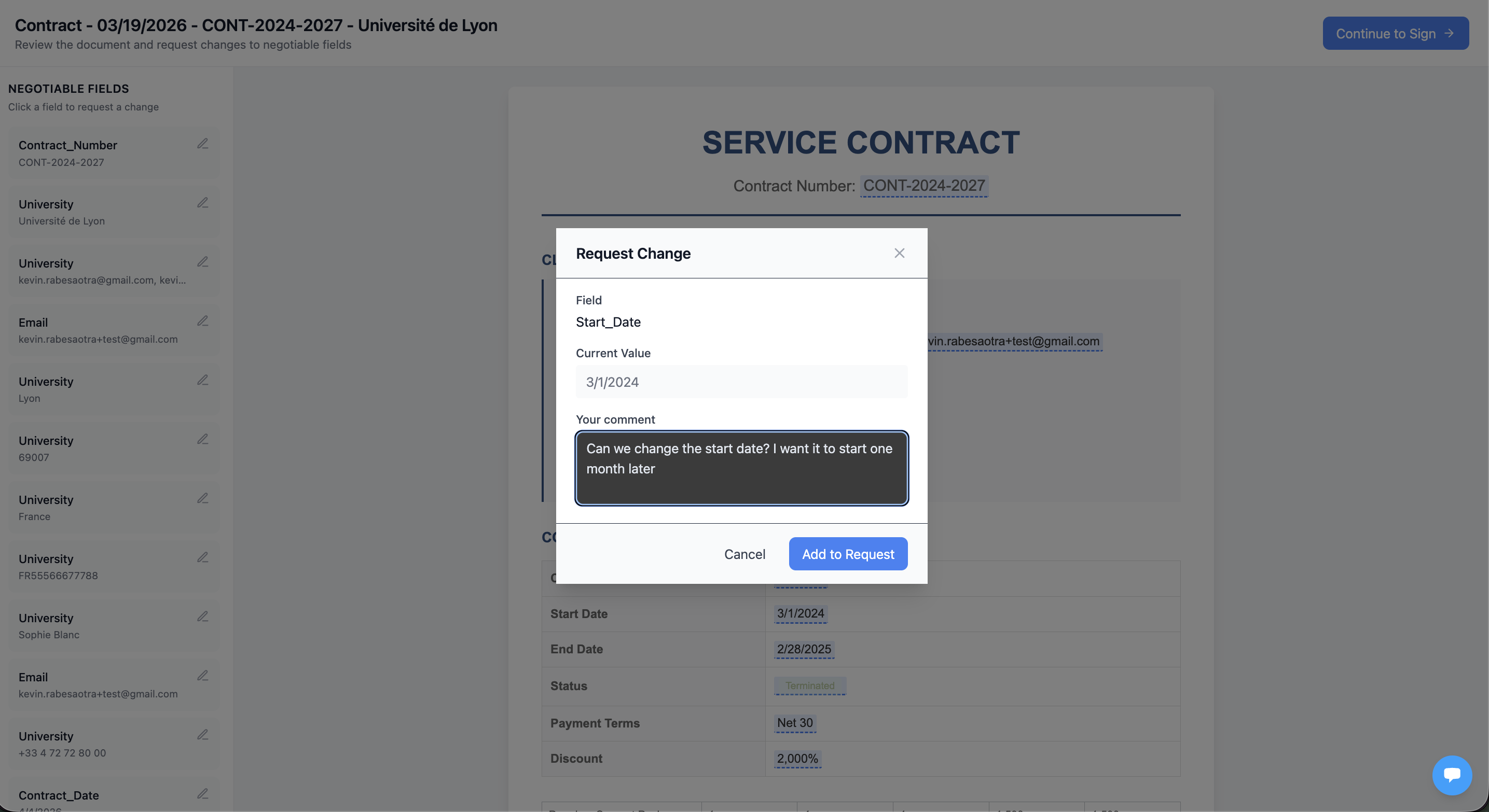
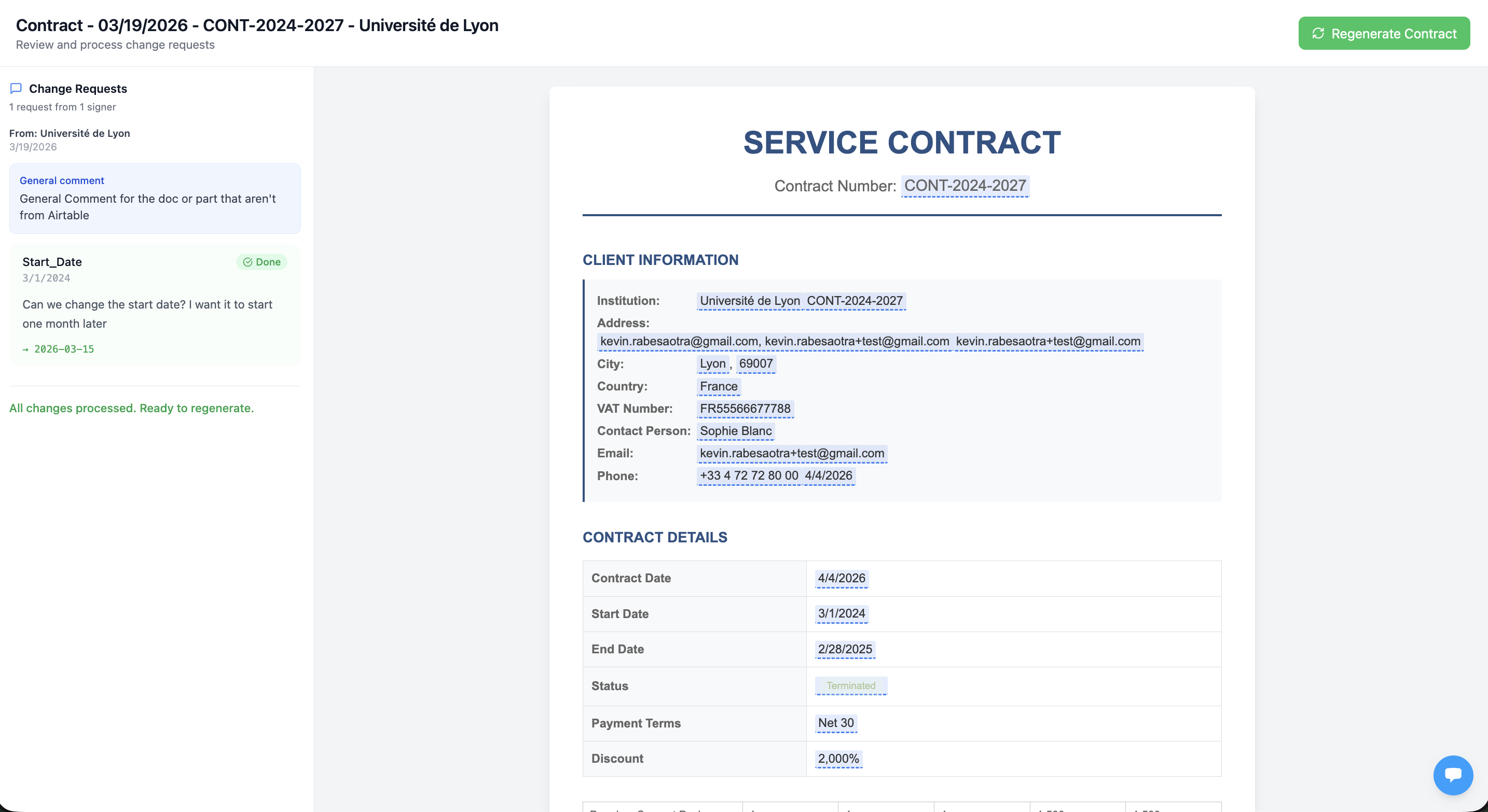
CLM software provides more advanced redlining tools that show exactly what changed and who changed it, with full version history. For teams that negotiate contracts with external parties across multiple rounds, dedicated CLM redlining is more powerful.
Storage and Search
Both options store your contracts. Airtable uses attachment fields and linked records. You search through filters and views you create yourself.
CLM software often includes more advanced search. Some platforms offer OCR for scanned documents and AI-powered search across contract text. Finding a specific clause across hundreds of contracts becomes faster.
Renewal Tracking and Alerts
Both handle renewals well. In Airtable, you set up automations that send email reminders based on date fields. A formula calculates days until expiration, and an automation triggers when that number hits your threshold.
CLM software includes built-in renewal calendars and notification systems. The functionality exists without configuration, which saves setup time.
Reporting and Analytics
Airtable offers custom views, charts, and extensions for reporting. You build the dashboards you want, which means more control but more work.
CLM software provides pre-built reports on metrics like contract cycle time, value by category, and approval bottlenecks. Less setup, but also less customization.
Integrations and Automations
Airtable connects to hundreds of tools through native integrations, Zapier, and Make. You can build complex workflows across your entire tech stack.
CLM software integrations vary by vendor. Most connect to popular CRMs and cloud storage, but the ecosystem is smaller than what Airtable offers.
Cost of Airtable Contract Management vs CLM Software
Airtable + TypeFlow costs $29-49/month for document generation and e-signatures. Dedicated CLM software like Juro starts at $500/month, and enterprise tools like Ironclad don't publish pricing. Airtable uses workspace-based pricing - you pay for the plan level, not per user. Add the cost of document generation tools - TypeFlow starts free - and you have a complete system without per-seat fees.
CLM software typically charges per user per month. According to World Commerce & Contracting, organizations spend an average of $6,900 per user per year on contract management technology. That number grows with every new team member who needs access.
For small teams and startups, the math favors Airtable. For enterprise legal departments processing thousands of contracts, CLM software may justify the investment through time savings on features like redlining and compliance tracking.
When Airtable Is Enough for Contract Management
Airtable is enough when your contracts follow standard templates, your team is small, and you don't need multi-round external redlining or AI analysis. For service contract agencies, Airtable + TypeFlow is usually enough when you work with standard MSAs, SOWs, retainers, and NDAs and your team is under 50 people. See our guide on how agencies use Airtable to manage service contracts for a full workflow example. Airtable works well when:
- You manage fewer than a hundred active contracts.
- Your contracts follow standard templates with minor variations.
- You already use Airtable for other business processes.
- Your team does not need multi-round external redlining.
- You want to avoid per-user software fees.
- Basic renewal reminders and status tracking meet your needs.
Adding TypeFlow to your Airtable base gives you contract generation from templates and e-signature collection. You get core CLM functionality without the platform switch.
When to Switch From Airtable to a CLM
Switch to dedicated CLM software when you have a legal team negotiating contracts daily, need AI-powered risk analysis, or manage thousands of contracts across multiple entities. Consider dedicated CLM software when:
- You have a legal team that lives in contracts daily.
- Negotiations involve frequent redlines with counterparties across multiple rounds.
- Compliance requirements demand detailed audit trails and version history.
- Contract volume is high and growing fast.
- You want AI-powered analysis of contract terms and risks.
- Multiple departments require different permission levels.
The transition makes sense when the cost of manual workarounds exceeds the cost of the software. McKinsey research suggests digital contract workflows reduce cycle times by 50% - but whether you achieve that with Airtable + TypeFlow or a dedicated CLM depends on your complexity.
How to Get CLM Features Inside Airtable
You can add most CLM features to Airtable without switching platforms: TypeFlow handles contract generation from Google Docs templates or the HTML/CSS template builder, built-in e-signatures, and contract redlining.
Generate Contracts From Airtable Data
Map your Airtable fields to variables in a Google Docs template or use the HTML/CSS template builder. TypeFlow pulls the data and creates a finished PDF with one click or one automation trigger.

You maintain templates in Google Docs, which your team already knows. No new editor to learn, and updates to the template apply to all future contracts. For the full workflow, see our guide on managing the contract lifecycle in Airtable.
Add E-Signatures to Your Airtable Workflow
TypeFlow includes e-signatures at no extra cost. Send the generated contract for signature and track status from your Airtable record. TypeFlow e-signatures comply with eIDAS and ESIGN regulations.
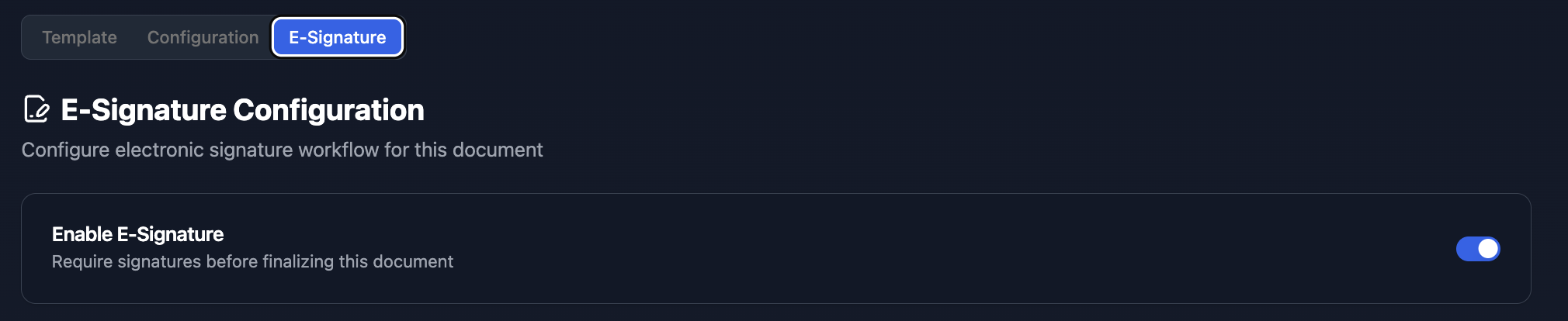
If you prefer a different signature tool, you can integrate DocuSign or HelloSign through Zapier. The signed document returns to Airtable as an attachment. For a full comparison, see our DocuSign alternative for Airtable and PandaDoc alternative for Airtable guides.
Automate Renewals and Status Updates
Create a formula field that calculates days until contract expiration. Then set up an Airtable automation to send email reminders at 30, 14, and 7 days out.
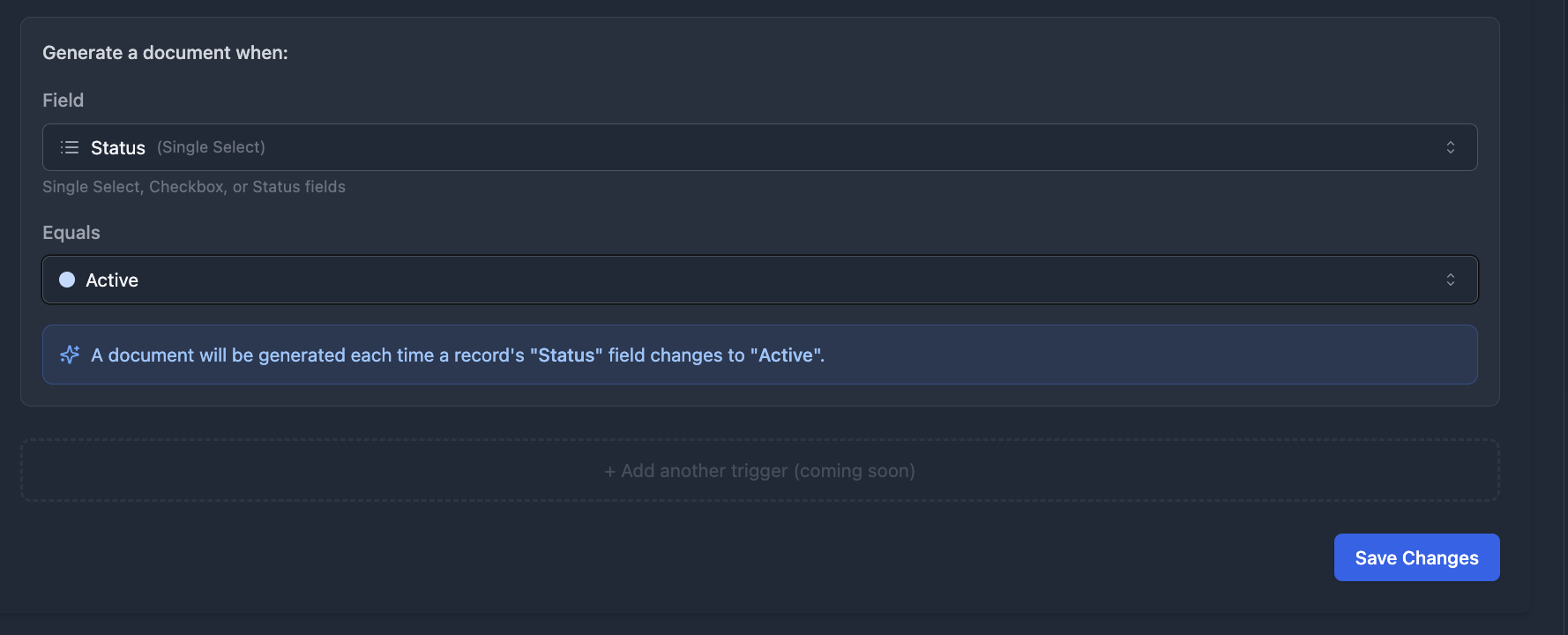
You can also use TypeFlow Automation to generate contracts automatically when a status field changes - no manual trigger needed.
Centralize Contract Storage and Access
Attach generated PDFs directly to Airtable records. Each contract lives with its related data - the client, the project, the renewal date.
Build views filtered by status, party, or expiration date. Your team sees exactly what they need without digging through folders or searching email.
Turn Airtable Into Your Contract Hub With TypeFlow
You do not need expensive CLM software to generate contracts, collect signatures, and track renewals. Airtable paired with TypeFlow handles these workflows at a fraction of the cost.
If your team already uses Airtable, adding contract management takes an afternoon, not a procurement cycle. See what users say about TypeFlow on G2.
Ready to automate your contract workflow?
Connect your Airtable base, map your template, and generate your first contract in minutes.
Start free with 20 documentsFrequently Asked Questions About Airtable Contract Management vs CLM
Find answers to the most common questions about this feature.
Popular Questions
All Questions
Need more help?
Our team is here to help you solve all your problems and answer your questions.
Contact Us
Kevin from TypeFlow
•AuthorKevin Rabesaotra is a growth engineer and automation specialist with 8+ years of experience building no-code solutions. As Founder & CEO of TypeFlow, he has helped hundreds of businesses automate document generation and streamline workflows with Airtable integrations. Previously, Kevin was a Product Lead specializing in growth engineering, running experiments to drive revenue, retention, and lead generation.
More articles
How to Print Labels from Airtable with Quantity Control (Step by Step)
Print multiple labels per Airtable record based on a quantity field. Step-by-step guide for linked records mode and quantity repeat mode with barcodes and Avery sheets.
Read articleHow to Print Avery Mailing Labels from Airtable
Print Avery mailing labels (5160, 5161, 5162) from Airtable without Word mail merge. Step-by-step guide with print label mode, automation, and bulk generation.
Read articleHow to Create Inventory Labels with Barcodes in Airtable
Create inventory labels with Code 128, EAN-13, or QR barcodes from Airtable. Step-by-step guide for warehouse, retail, and asset tracking with thermal and Avery printers.
Read article