How Agencies Use Airtable to Manage Service Contracts
Airtable gives agencies a central place to store, track, and generate every service contract - MSAs, SOWs, retainers, and NDAs. Connect TypeFlow for PDF generation, e-signatures, and contract redlining, and your agreements stay linked to your clients and projects. For the full contract workflow, see our contracts solution page. This guide walks through the complete setup.
Generate agency contracts from Airtable in minutes
Use Google Docs templates, add e-signatures, and automate client onboarding. No coding required.
Start free with 20 documentsWhat Is Airtable Contract Management for Agencies
Agencies can store, track, and generate every service agreement - MSAs, SOWs, retainers, and NDAs - in one place by using Airtable contract management. Instead of digging through email threads or shared drives to find a contract, you keep every agreement linked to the client it belongs to.
According to Deloitte, 65% of organizations still rely on manual processes for contract management, and World Commerce & Contracting estimates that poor contract management costs companies 9% of annual revenue. For agencies juggling dozens of client agreements, that adds up fast. Airtable's relational structure connects everything - your contracts live alongside your clients, projects, and invoices.
You can filter by status, sort by renewal date, or trigger automations when something changes. The platform adapts to how your agency works instead of forcing you into a fixed workflow.
What You Need Before Starting
Before building your contract system, gather four things.
An Airtable Account With Client Data
A Pro or Team plan gives you access to automations, which you will want later. If you already track clients in Airtable, you are ready. If not, you can import them from a spreadsheet in a few minutes.
A Contract Template
You have two options:
- Google Docs. Write your contract and add merge variables. Free, familiar, and works well for most agencies.
- TypeFlow Template Builder. Design contracts in TypeFlow's HTML editor with drag-and-drop. Better for complex layouts or branded documents.
A PDF Generation Tool like TypeFlow
Airtable stores your data but does not create documents on its own. TypeFlow connects your Airtable fields to your template and produces a finished PDF. This is the bridge between your database and your final contract.
A List of Service Contracts You Send
Pull together your existing contracts. Look at what fields they contain - client name, scope, pricing, dates. This exercise helps you decide what to build in your base.
How to Set Up Your Airtable Base for Agency Service Contracts
Let me walk you through the base structure step by step.
Step 1: Create Your Contracts Table
Start by creating a dedicated table called "Contracts" or "Service Contracts." This table becomes the central record for every agreement your agency sends.
Step 2: Add Fields for Client, Scope, and Pricing
Here are the essential fields to include:
- Contract name. Identifies the agreement at a glance.
- Client. A linked field that connects to your Clients table.
- Service type. A dropdown for retainer, project, or other categories.
- Start date and end date. Date fields for tracking duration.
- Contract value. A currency field for the total amount.
- Status. A dropdown with options like Draft, Sent, Signed, or Expired.
You can add more fields later, but start with the basics.
Step 3: Link Contracts to Clients and Projects
Linked records are one of Airtable's best features. When you link a contract to a client, you can pull in their address, contact info, or billing details without retyping anything. The same works for projects - link a contract to the project it covers, and you see the full picture in one view.
Step 4: Build Views for Status and Renewals
Create filtered views to organize your contracts. A view called "Active Contracts" shows only signed agreements. "Pending Signature" filters for contracts waiting on the client. "Expiring Soon" catches renewals before they slip through.
Step 5: Set Up Deadline and Renewal Alerts
Airtable automations can send email reminders before contract end dates. A simple automation notifies you 30 days before expiration, so you never miss a renewal conversation.
Types of Service Contracts Agencies Can Manage in Airtable
Agencies send several contract types. Here are the most common ones.
Master Service Agreements
An MSA is the umbrella contract that governs your client relationship. It covers general terms, liability, and payment conditions. Other contracts, like statements of work, reference the MSA instead of repeating the same legal language. For complex MSAs that span 50-100+ pages with structured chapters, see our guide on generating long documents from Airtable.
Statements of Work
A SOW describes specific project scope, deliverables, and timeline. It lives under an MSA and defines what you will deliver for a particular engagement. When the project ends, the SOW is complete, but the MSA continues.
Retainer Agreements
A retainer is an ongoing monthly arrangement. The client pays for a set number of hours or deliverables each month, and you provide consistent support. Retainers work well for maintenance, strategy, or ongoing creative work.
NDAs and Confidentiality Agreements
NDAs are often signed before sharing strategy documents or proprietary information. They protect both parties and set expectations about what stays private.
Change Orders
A change order amends an existing SOW when scope changes mid-project. It documents the new work and any pricing adjustments, so everyone agrees before moving forward.
| Contract Type | When to Use | Typical Duration |
|---|---|---|
| MSA | New client relationship | Multi-year |
| SOW | New project under MSA | Project-based |
| Retainer | Ongoing services | Monthly or quarterly |
| NDA | Before sharing confidential info | Varies |
| Change Order | Scope changes | Linked to SOW |
How to Build Agency Contract Templates in Google Docs
Templates save time and keep your contracts consistent across clients.
Step 1: Draft Your Base Service Contract
Start with your most-used contract. Include standard sections: parties, scope, payment terms, and termination clause. Write it once, and you will reuse it for every similar engagement.

Step 2: Add Merge Variables for Airtable Fields
Merge variables are placeholders that pull data from Airtable. Use formats like {{Client Name}}, {{Contract Value}}, and {{Start Date}}. When you generate the document, TypeFlow fills in the real data.
Common variables to include:
{{Client Name}}{{Client Address}}{{Service Description}}{{Contract Value}}{{Start Date}}{{End Date}}
The variable names in your template have to match your Airtable field names exactly. Spaces and capitalization matter.
Step 3: Format Your Template for Clean PDF Output
Use consistent fonts throughout the document. Add page breaks between major sections. Include signature lines at the end with space for date and printed name. The template becomes your final PDF, so formatting matters more than you might expect.
How to Generate Service Contract PDFs from Airtable
This is where your data becomes a ready-to-send contract.
Step 1: Connect TypeFlow to Your Airtable Base
In TypeFlow, select your base and contracts table. The connection takes a few clicks, and you authorize access through Airtable's standard permissions.
Step 2: Map Airtable Fields to Template Variables
Match each Airtable field to the corresponding variable in your template. TypeFlow shows both side by side, so you can confirm everything lines up before generating.

Step 3: Test Your Contract Generation
Run a test with real data from one of your contract records. Check that all fields populate and the formatting looks correct. Fix any mismatches before going live.
Step 4: Deliver the Signed PDF Back to Airtable
Store the final signed PDF in an attachment field on the contract record. Everything stays in one place - the contract data, the generated PDF, and the signed version. No more searching through email.
How to Automate Agency Contract Workflows in Airtable
Automations remove manual steps from your contract process. Once set up, they run without you thinking about them.
Trigger Contract Generation on New Client Records
When a new client is added and marked ready, you can trigger TypeFlow to generate the contract automatically. Use TypeFlow Automation to watch for a status change - when the Status field changes to "Approved," the PDF generates without anyone clicking a button.
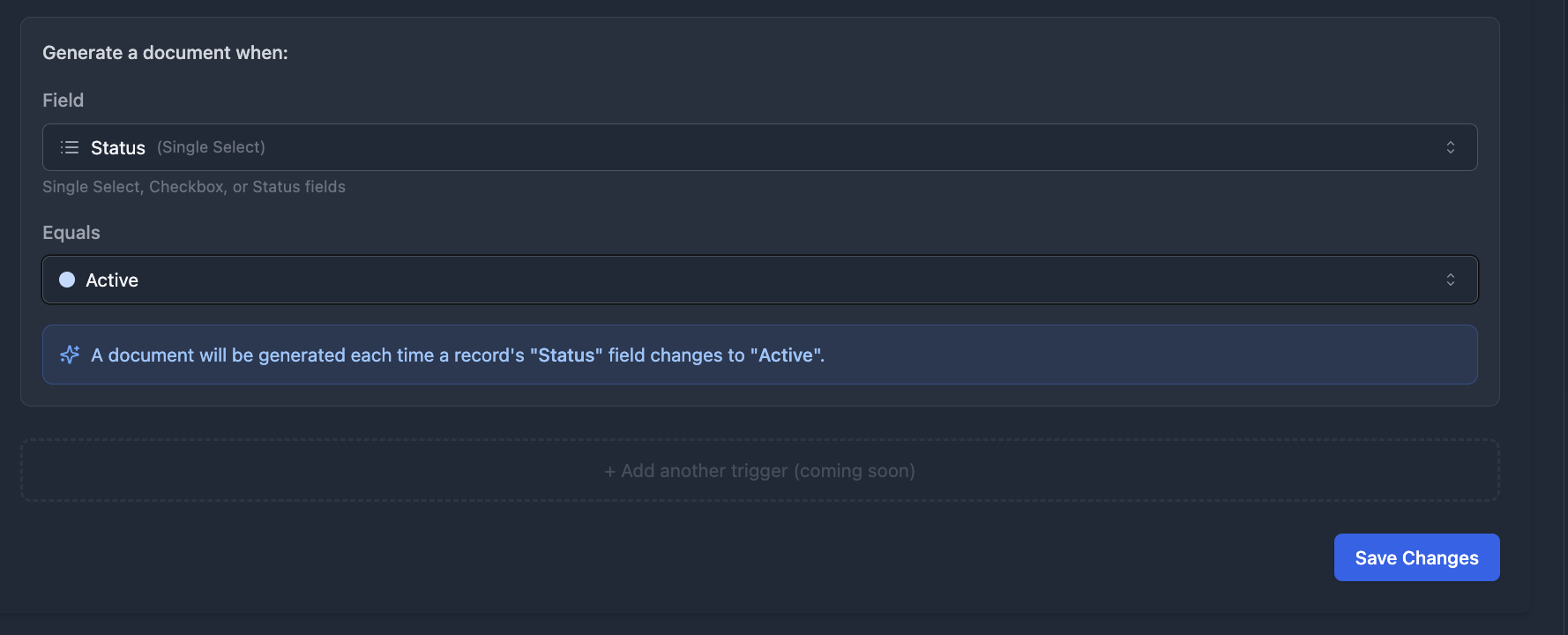
Send Contracts for Signature on Status Change
When status changes to "Ready to Send," an automation emails the contract to the client. You update one field, and the rest happens on its own.
Update Contract Status After Signature
When e-signature is complete, the status updates to "Signed" without manual tracking. This keeps your views accurate and your team informed.
Send Renewal Reminders for Retainers
Set an automation to notify your team or the client 30 or 60 days before the contract expires. Renewal conversations happen on time instead of after the fact. For the full workflow, see our guide on managing the contract lifecycle in Airtable.
How to Add E-Signatures to Agency Contracts in Airtable
E-signatures make contracts legally binding without printing, signing, scanning, and emailing back. McKinsey research shows digital contract workflows reduce cycle times by 50%. TypeFlow e-signatures comply with eIDAS and ESIGN regulations.
Built-in TypeFlow E-Signatures
TypeFlow includes e-signatures at no extra cost. Clients sign from a link you send them, and the signature and date are captured and stored in Airtable. The signed PDF attaches to the contract record.
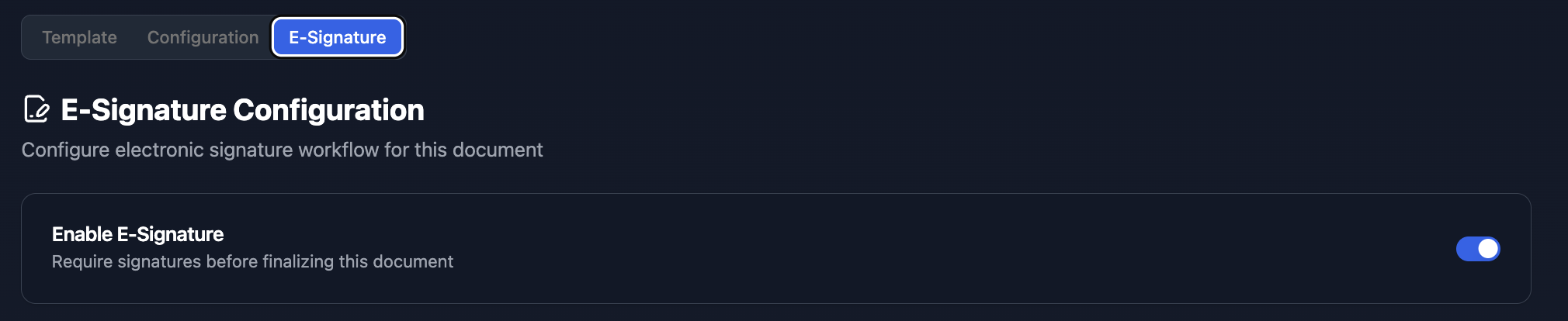
For contracts that require negotiation, TypeFlow also includes contract redlining on the Scale plan. Signers can suggest changes directly on the document, and you accept or reject with one click before the contract regenerates.
DocuSign or HelloSign Integration
If your agency already uses DocuSign or HelloSign, both integrate with Airtable through Zapier. The workflow is similar, but the signature happens in the external platform. For a detailed comparison, see our guide on DocuSign vs TypeFlow for Airtable.
| Feature | TypeFlow E-Signatures | DocuSign/HelloSign |
|---|---|---|
| Cost | Included with TypeFlow | Separate subscription |
| Setup | Built-in | Requires integration |
| Redlining | Available (Scale plan) | Available |
| Signature storage | Airtable attachment | External platform |
| Best for | Agencies using TypeFlow | Agencies with existing contracts |
Best Practices for Managing Agency Service Contracts in Airtable
A few habits keep your contract system clean and useful over time.
Use Consistent Naming Conventions
Try a format like "ClientName_ContractType_Date" for your contract names. Consistent naming makes records easy to search and sort, especially as your base grows.
Standardize Your Service Contract Templates
Limit template variations. Fewer templates mean less maintenance and fewer errors. If you find yourself creating a new template for every client, look for ways to consolidate.
Link Contracts to Projects and Invoices
Connected records let you see the full client picture. From a single contract record, you can see the project it covers and the invoices it generated. This context helps when questions come up months later.
Audit Your Base Each Quarter
Review fields, templates, and automations every few months. Remove unused items. Update terms if your services change. A clean base is easier to maintain than a cluttered one.
Common Issues and Solutions
A few problems come up often. Here is how to fix them.
Merge Fields Not Populating
Check that variable names match exactly between Google Docs and Airtable field names. A space or capital letter in the wrong place breaks the connection.
Automations Failing to Trigger
Verify trigger conditions in your automation settings. Check that the record meets all criteria. Review automation history for error messages that point to the problem.
Linked Records Showing Wrong Data
Confirm the correct lookup field is selected. Linked records reference the primary field of the linked table, so make sure that field displays what you expect.
Run Your Agency Service Contracts on Airtable With TypeFlow
TypeFlow connects your Airtable data to your templates and generates ready-to-sign contracts. E-signatures and redlining included - no extra tools needed. Rated by Airtable users on G2.
If your team already uses Airtable, adding contract management takes an afternoon. If you are evaluating whether Airtable is enough or you need dedicated CLM software, check our comparison guide.
Ready to automate your agency contracts?
Connect your Airtable base, map your template, and generate your first contract in minutes.
Start free with 20 documentsFAQs About Airtable Service Contracts for Agencies
Find answers to the most common questions about this feature.
Popular Questions
All Questions
Need more help?
Our team is here to help you solve all your problems and answer your questions.
Contact Us
Kevin from TypeFlow
•AuthorKevin Rabesaotra is a growth engineer and automation specialist with 8+ years of experience building no-code solutions. As Founder & CEO of TypeFlow, he has helped hundreds of businesses automate document generation and streamline workflows with Airtable integrations. Previously, Kevin was a Product Lead specializing in growth engineering, running experiments to drive revenue, retention, and lead generation.
More articles
How to Print Labels from Airtable with Quantity Control (Step by Step)
Print multiple labels per Airtable record based on a quantity field. Step-by-step guide for linked records mode and quantity repeat mode with barcodes and Avery sheets.
Read articleHow to Print Avery Mailing Labels from Airtable
Print Avery mailing labels (5160, 5161, 5162) from Airtable without Word mail merge. Step-by-step guide with print label mode, automation, and bulk generation.
Read articleHow to Create Inventory Labels with Barcodes in Airtable
Create inventory labels with Code 128, EAN-13, or QR barcodes from Airtable. Step-by-step guide for warehouse, retail, and asset tracking with thermal and Avery printers.
Read article