How to Manage the Full Contract Lifecycle in Airtable
Airtable can manage the full contract lifecycle - draft, approve, sign, store, and renew - without dedicated CLM software like Juro or Ironclad. Use linked tables to track contract status through each stage, generate the agreement as a PDF, send it for e-signature, and store the signed copy back on the record.
For a complete overview of contract workflows, see our contracts solution page. To compare all the tools, see our best contract generation tools for Airtable. This guide covers the complete lifecycle workflow.
Generate contracts from Airtable in minutes
Use Google Docs templates, add e-signatures, and automate the entire workflow. No coding required.
Start free with 20 documentsWhat Contract Lifecycle Management Looks Like in Airtable
Contract lifecycle management in Airtable means tracking every contract from draft to renewal in one base, with automations handling status changes, reminders, and document generation at each stage. According to World Commerce & Contracting, poor contract management costs organizations an average of 9% of their annual revenue.
Airtable gives you a flexible, customizable framework for contract lifecycle management. You can track contracts from drafting and approvals through obligation tracking and renewals, all without paying for expensive enterprise CLM software. The key is combining structured data with Airtable's built-in automations.
Now, Airtable is not a dedicated CLM tool. It is a database you configure to match your contract workflow. This means you control the fields, views, and automations. You decide what gets tracked and how.
With the right setup, here is what becomes possible:
- Centralized storage. All contract data lives in one place.
- Status tracking. You see where each contract sits in the lifecycle.
- Automated reminders. Renewals and deadlines trigger alerts.
- Document generation. Contracts populate from your data.
The 5 Stages of the Contract Lifecycle
The five stages are drafting, review, signature, storage, and renewal. Understanding this flow helps you design your Airtable base in a way that makes sense.
1. Drafting and Requesting
This is where it starts. Someone on your team requests a contract or creates an initial draft. Often, this draft pulls from a template that already contains client or deal information.
2. Review and Approval
Next, internal stakeholders review the terms. Legal, finance, or management may weigh in before the contract goes out. This stage can involve multiple rounds of feedback.
3. Signature
Once approved, both parties sign. This makes the contract legally binding.
4. Storage and Tracking
After signing, the contract gets stored. Key dates like start date, end date, and payment terms are tracked so nothing slips through.
5. Renewal and Expiration
Contracts either renew, expire, or get terminated. This stage often triggers new drafts or renegotiations, and the cycle begins again.
Why Use Airtable for Contract Lifecycle Management
Airtable gives you full control over fields, views, and automations so your CLM process matches how your team actually works - not the other way around.
- Flexibility. Customize fields, views, and workflows to match your process.
- Familiar tools. Airtable integrates with Google Docs, so you use templates you already know.
- Lower cost. No per-seat fees from enterprise CLM vendors.
- Quick onboarding. Your team can start using it without weeks of training.
Airtable vs Dedicated Contract Lifecycle Management Software
Airtable with TypeFlow handles most CLM tasks for small to mid-sized teams, while dedicated CLM software targets larger organizations with complex requirements.
| Airtable + TypeFlow | Juro | Ironclad | PandaDoc | |
|---|---|---|---|---|
| Starting price | From $29/mo | From $500/mo | Enterprise only | From $19/mo per seat |
| E-signatures | Built-in, no extra cost | Built-in | Built-in | Built-in, extra on lower tiers |
| Template engine | Google Docs + HTML/CSS template builder | Native editor | Native editor | Native editor |
| Airtable integration | Native | No | No | Via Zapier |
| Contract redlining | Built-in (Scale plan) | Native | Native with AI | Native |
| Best for | SMBs already on Airtable | Legal teams | Enterprise legal ops | Sales teams |
When to pick each option:
- Airtable + TypeFlow: You want flexibility, already use Airtable, and want document generation with e-signatures in one workflow. Best for teams managing under 500 contracts per year.
- Dedicated CLM: You require advanced AI review, complex approval chains, enterprise compliance features, or manage thousands of contracts across multiple legal entities.
For a deeper comparison, see Airtable contract management vs CLM software. For signing tools specifically, see our DocuSign alternative for Airtable guide.
What You Need Before Starting
You need an Airtable account (Pro or Team plan), a contract template with merge variables, a document generation tool like TypeFlow, and an e-signature provider.
An Airtable Account
You want a Pro or Team plan. These plans include automations, which are essential for reminders and status updates.
A Contract Template
Your template uses merge variables - placeholders like {{Client Name}} or {{Contract Value}}. When you generate the document, these placeholders get replaced with data from Airtable.
You have two options for templates:
- Google Docs. Write your contract in Google Docs and add variables. Best if you already have contract templates in Google Drive.
- HTML/CSS template builder. Design your contract directly in TypeFlow's drag-and-drop builder. Better for complex layouts or if you do not use Google Docs. For advanced contracts with nested chapters, configurable clauses, and 3 levels of linked records, see how to build advanced contracts in Airtable.
Here is what a Google Docs contract template with merge variables looks like:

A Document Generation Tool Like TypeFlow
TypeFlow connects your Airtable base to your template. It maps your fields to the template variables and generates a PDF in seconds. No coding involved.
An E-Signature Provider
You can use TypeFlow's built-in e-signatures or connect external tools like DocuSign. TypeFlow's option keeps everything in one workflow without extra fees.
How to Set Up Your Airtable Base for the Full Contract Lifecycle
Set up a Contracts table with status, dates, and value fields, then link it to Clients and Approvers tables. This three-table structure is the core of your CLM system and makes everything else easier.
Step 1: Create Your Contracts Table
Start with a table called "Contracts." Each record represents one contract. Keep it simple at first.
Step 2: Add Fields for Each Lifecycle Stage
Your fields capture the data you track at each stage. Here are the essentials:
- Contract Name. A clear identifier like "Acme Corp - Service Agreement 2024."
- Status. A single select field with options matching your lifecycle stages (Draft, In Review, Approved, Signed, Active, Expired).
- Start Date and End Date. Date fields for tracking duration.
- Contract Value. A currency field.
- Attachments. For storing the signed PDF.
The Status field is your pipeline. It shows where each contract sits in the lifecycle at a glance.
Step 3: Link Tables for Parties, Templates, and Approvers
Create linked tables for Clients or Vendors, Contract Templates, and Team Members who approve contracts. Linked records keep your data organized. They also reduce duplication since you enter client details once and reference them across multiple contracts. For generating PDFs from linked records without lookup fields, see our linked records PDF guide.
Step 4: Build Kanban and Calendar Views by Stage
A Kanban view groups contracts by Status. You see your pipeline visually. A Calendar view shows renewal and expiration dates, so upcoming deadlines are obvious.
Step 5: Set Up Deadline and Renewal Alerts
Use Airtable automations to send email reminders before expiration dates. You can trigger alerts 30, 60, or 90 days before the deadline. This keeps renewals from sneaking up on you.
How to Draft Contracts from Templates
Create a contract template in Google Docs or the HTML/CSS template builder with merge variables like {{Client Name}} or {{Contract Start Date}}. TypeFlow replaces these placeholders with Airtable data when generating the PDF.
Keep your template simple and use consistent variable names that match your Airtable field names exactly. When you generate the document, TypeFlow replaces each variable with the corresponding data from your record. A small typo in the variable name breaks the connection, so double-check spelling.
If you use Google Docs, write your contract and wrap each dynamic field in double curly braces. If you prefer more control over the layout, use TypeFlow's built-in template builder to design contracts in HTML with drag-and-drop.
How to Generate Contract PDFs from Airtable
Connect TypeFlow to your Airtable base, map fields to template variables, and generate contract PDFs in minutes - manually via button or automatically via Airtable automations. Here are the steps:
- Connect TypeFlow to your Airtable base. Authorize access and select the table that holds your contracts.
- Select your template. Pick your Google Docs template or open the TypeFlow template builder.
- Map Airtable fields to template variables. TypeFlow detects the variables in your template and lets you assign each one to an Airtable field. For linked records (like a client name from a separate Clients table), TypeFlow traverses the relationship automatically.

- Generate the PDF. Click generate and TypeFlow produces a ready-to-sign PDF. The document gets stored back in your Airtable record as an attachment.
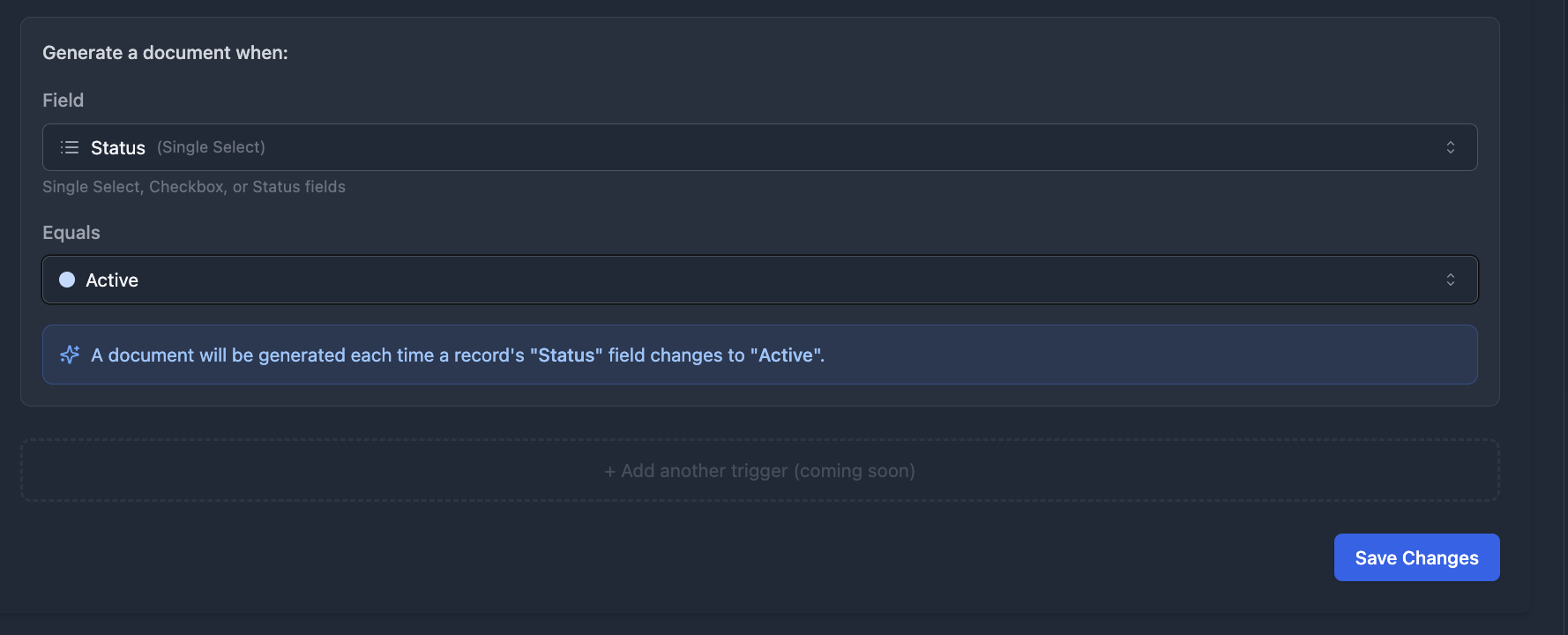
You can also automate this step entirely. Set up a TypeFlow Automation that triggers when the Status field changes to "Approved" - the contract generates without anyone clicking a button.
How to Route Contracts for Review and Approval in Airtable
You can build a full contract approval workflow in Airtable by linking contracts to approvers, using status fields for each step, and triggering email or Slack notifications when a contract moves to "Ready for review", "Approved", or "Rejected". Use your Status field to move contracts through review. When a contract enters "In Review," an automation can notify the assigned approver by email or Slack.
Consider a linked Approvers table. This lets you assign specific reviewers to each contract and track who approved what. You get a clear audit trail without extra effort.
How to Add E-Signatures to Airtable Contracts
TypeFlow includes built-in e-signatures at no extra cost, with ESIGN and eIDAS-compliant signatures that attach the signed PDF back to the Airtable record automatically - no per-signature fees, no external tools needed. You have two main options for collecting signatures.
| Option | Setup Effort | Extra Cost | Where Signing Happens |
|---|---|---|---|
| TypeFlow E-Signatures | Low | None | Within TypeFlow |
| DocuSign or HelloSign | Medium | Yes | External platform |
TypeFlow's built-in e-signatures work without leaving your workflow. Here is how it works:
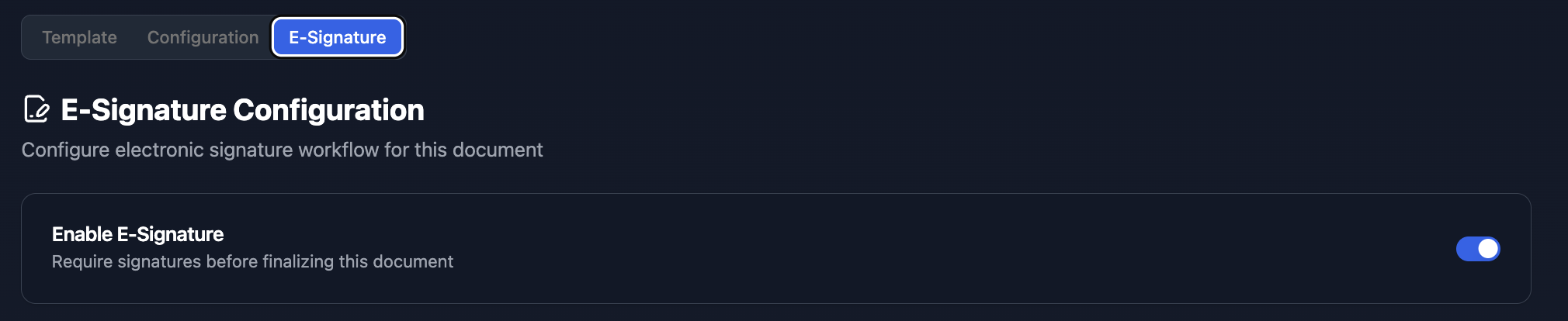
- Enable e-signatures on your flow. Toggle the e-signature option and configure your signers.
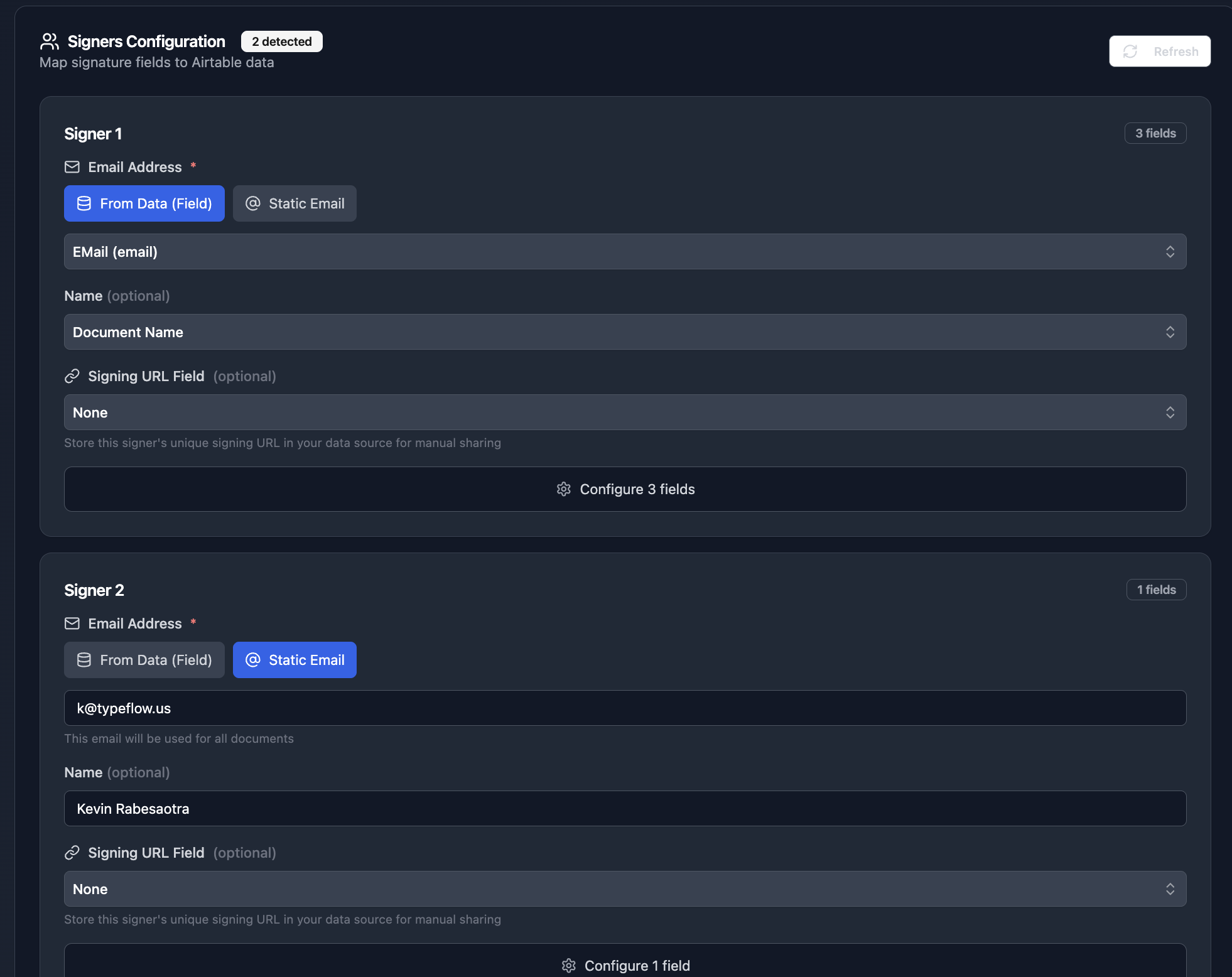
- Configure your signers. Add each party that needs to sign. Set the signing order if signatures need to be sequential.
- Add signature placeholders to your template. Place
{{signature}}and{{date}}fields where you want signatures to appear. - Generate the contract. TypeFlow creates the PDF and sends a signing link to each signer by email.
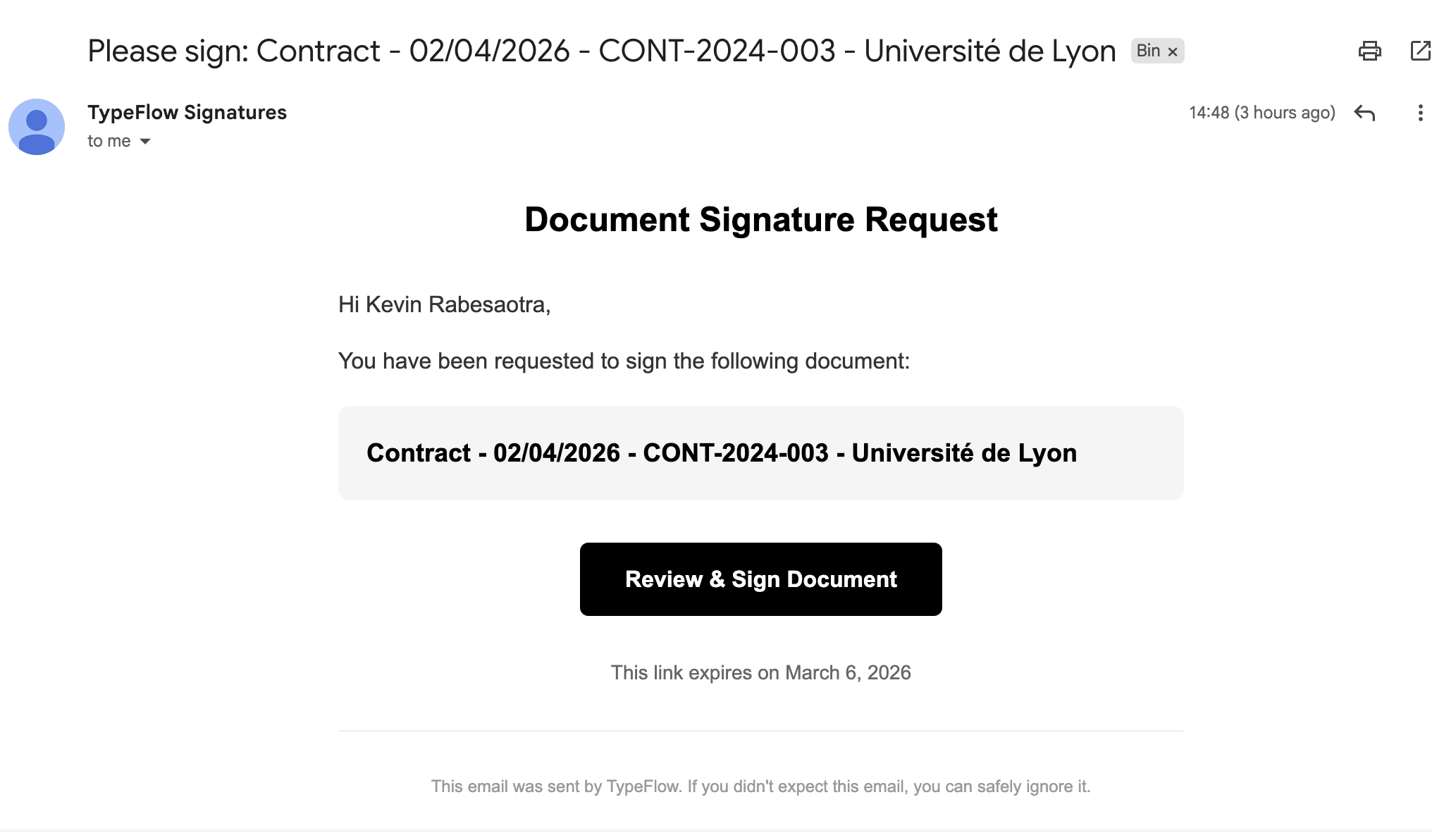
- Signers open the link and sign. They see the full document, fill in any required fields, and draw or type their signature.
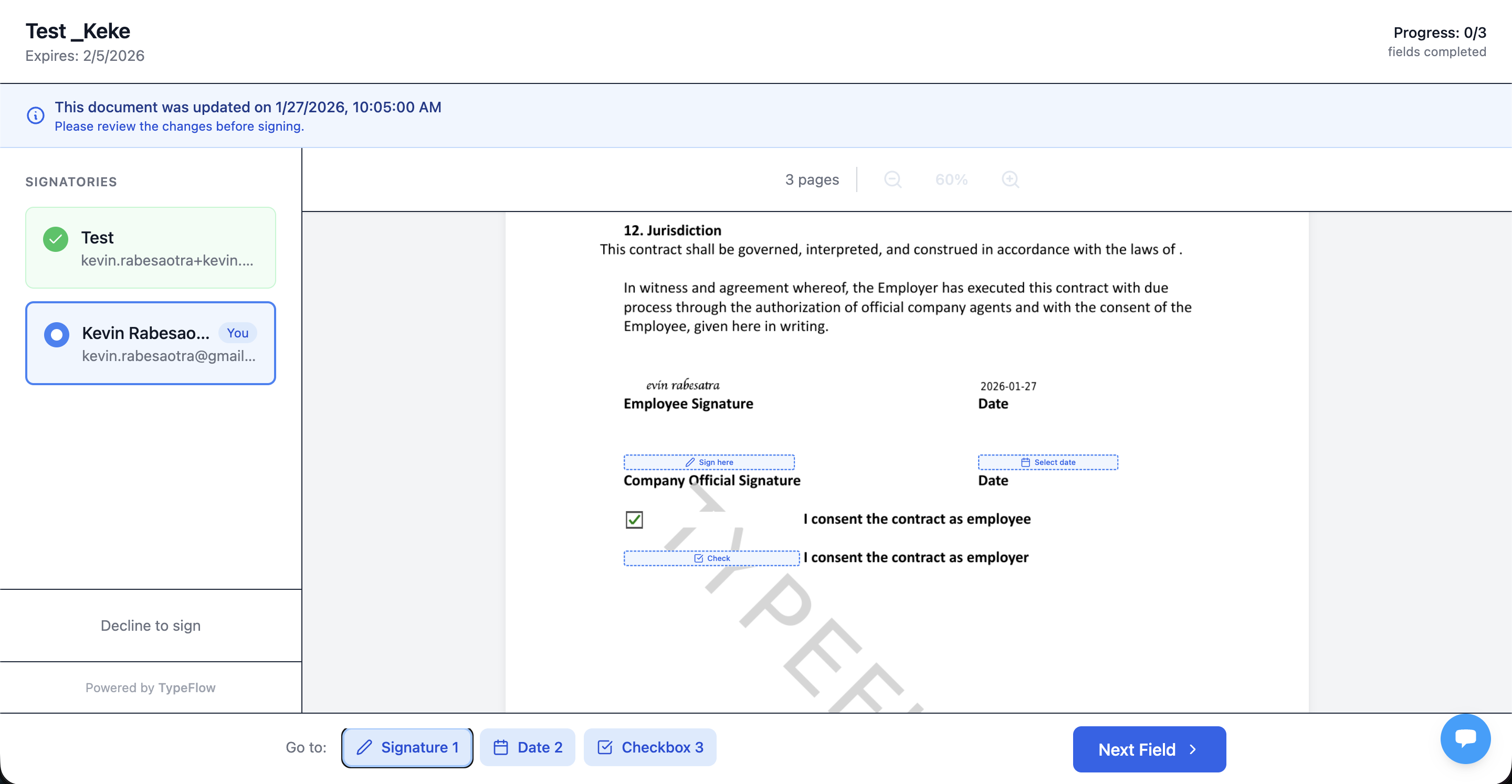
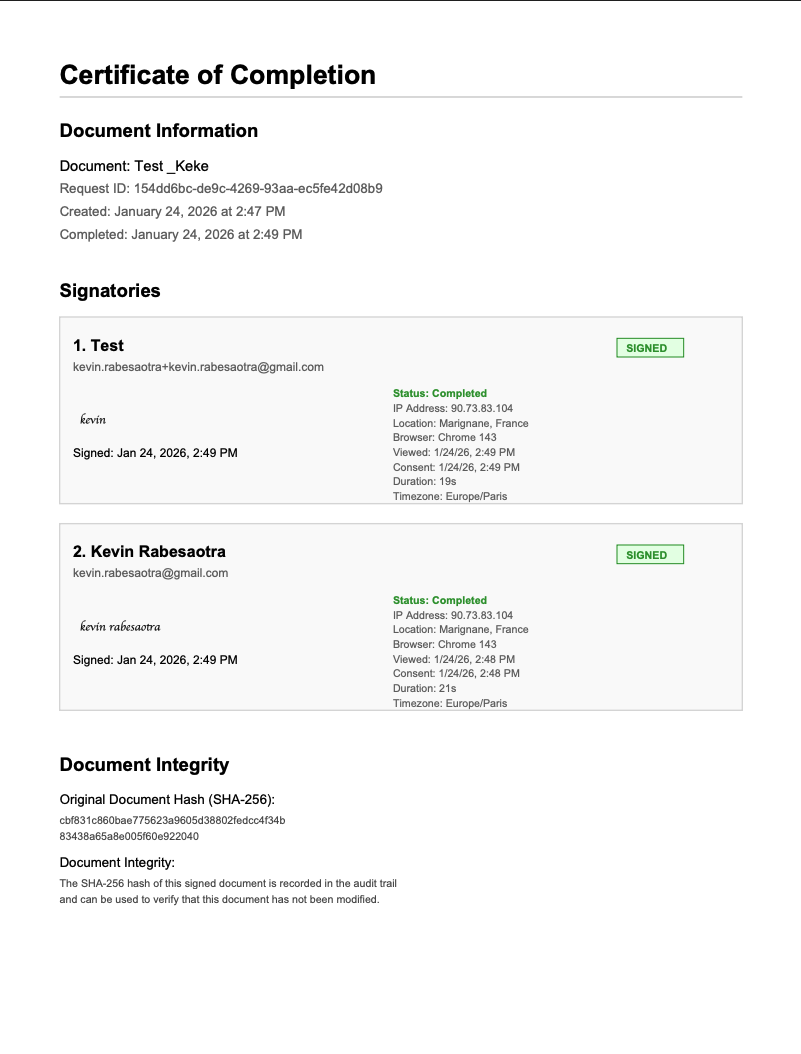
- Signed PDF returns to Airtable. The completed document with all signatures and a certificate of completion gets attached to the original record automatically.
No per-signature fees. No switching between platforms. The entire flow happens from one place. If you also need to email the generated contract PDF automatically, see our guide on how to generate and email PDFs from Airtable.
How to Store and Track Signed Contracts in Airtable
TypeFlow automatically attaches the signed PDF to the Airtable record after signing. Update the Status to "Active" or "Signed" - manually or via automation.
Then create a filtered view that shows only active contracts. This gives you a quick reference for what is currently in force. You can also create views for contracts expiring in the next 30, 60, or 90 days.
How to Automate Renewals and Deadline Alerts
Airtable automations can send renewal reminders 30, 60, or 90 days before contract expiration, update statuses automatically, and trigger new contract generation for renewals. Set triggers based on days before the End Date field.
- Renewal reminder. Send an email 60 days before expiration.
- Expiration warning. Notify the contract owner 30 days out.
- Auto-status update. Change Status to "Expiring Soon" when the deadline approaches.
These automations run in the background. You do not have to remember to check dates manually.
Airtable vs Dedicated Contract Lifecycle Management Software
Airtable with TypeFlow handles most CLM tasks for small to mid-sized teams. Dedicated CLM software targets larger organizations with complex requirements. Here is how they compare:
| Airtable + TypeFlow | Juro | Ironclad | PandaDoc | |
|---|---|---|---|---|
| Starting price | From $29/mo | From $500/mo | Enterprise only | From $19/mo per seat |
| E-signatures | Built-in, no extra cost | Built-in | Built-in | Built-in, extra on lower tiers |
| Template engine | Google Docs + HTML builder | Native editor | Native editor | Native editor |
| Airtable integration | Native | No | No | Via Zapier |
| Contract redlining | Built-in (Scale plan) | Native | Native with AI | Native |
| Approval workflows | Airtable automations | Built-in | Built-in with AI | Built-in |
| Best for | SMBs already on Airtable | Legal teams | Enterprise legal ops | Sales teams |
Airtable and TypeFlow vs Juro
Juro is built for legal teams with advanced negotiation, collaboration, and in-browser contract editing. Airtable is more flexible and costs significantly less. TypeFlow includes contract redlining (Scale plan) so signers can suggest changes directly on the document. If your team manages fewer than 500 contracts per year and does not need in-document collaboration, Airtable + TypeFlow covers the workflow at a fraction of the cost. For a full comparison of signing tools, see our DocuSign alternative for Airtable guide.
Airtable and TypeFlow vs Ironclad
Ironclad targets enterprise teams with AI-powered contract review, clause extraction, and compliance automation. Airtable suits teams who want control without complexity or long implementation timelines. Ironclad does not publish pricing - expect enterprise-level costs with multi-month onboarding.
Airtable and TypeFlow vs PandaDoc
PandaDoc focuses on sales documents, proposals, and quotes. Airtable is better for managing diverse contract types across departments like HR, legal, and operations. PandaDoc integrates with Airtable only through Zapier, while TypeFlow connects natively. See our PandaDoc alternative for Airtable comparison for more details.
When to Pick Each Option
- Airtable + TypeFlow. You want flexibility, already use Airtable, and want document generation with e-signatures in one workflow. Best for teams managing under 500 contracts per year.
- Dedicated CLM. You require advanced AI review, complex approval chains, enterprise compliance features, or manage thousands of contracts across multiple legal entities.
For a deeper comparison, see Airtable contract management vs CLM software.
Security and Compliance for Airtable Contracts
Airtable provides SOC 2 compliance, encryption at rest and in transit, and granular permission controls. TypeFlow's e-signatures comply with ESIGN Act, UETA, and eIDAS for legal validity. Airtable's security features cover enterprise-grade requirements.
E-signatures through TypeFlow meet legal standards for most contracts. TypeFlow complies with eIDAS and ESIGN regulations. According to McKinsey, digital contract workflows reduce cycle times by 50% and lower processing costs by up to 90%.
Note GDPR considerations if you store EU personal data in Airtable. Review Airtable's data processing agreement for compliance.
Best Practices for Airtable Contract Lifecycle Management
Use consistent naming, standardize templates, audit stages quarterly, and back up contract data outside Airtable. These habits keep your CLM system running well over time.
Use Consistent Naming and Status Conventions
Standardize how you name contracts. Define what each status means so everyone interprets them the same way. "In Review" and "Under Review" might seem similar, but pick one and stick with it.
Standardize Your Contract Templates
Fewer templates mean fewer errors. Maintain a small set of approved templates and update them in one place. When you change a clause, it flows through to all future contracts.
Audit Stages and Owners Quarterly
Review contracts stuck in stages. Reassign orphaned records. This prevents contracts from falling through the cracks when someone leaves the team or changes roles.
Back Up Contract Data Outside Airtable
Export your data or use synced backups. This protects you from accidental deletions and gives you a safety net.
Common Issues and Solutions
The most common problems are stages not updating (check automation triggers and field types), merge fields missing (match variable names exactly), and renewal reminders not firing (confirm the End Date is a date type, not text).
Stages Not Updating Automatically
Check your automation triggers and conditions. Make sure the Status field is a single select type, not a text field. Automations rely on exact field types.
Merge Fields Missing in Generated Contracts
Verify that field names in Airtable match the merge variables in Google Docs exactly. A small typo or extra space breaks the connection.
Renewal Reminders Not Firing
Confirm the End Date field is a date type, not a text field. Check that the automation is active and not paused. Airtable pauses automations when you hit plan limits.
Start Managing Your Contract Lifecycle in Airtable With TypeFlow
Airtable handles your data and workflow. TypeFlow handles document generation and e-signatures. Together, they give you a complete CLM system without the cost or complexity of enterprise software. See what users say on G2.
Ready to automate your contract workflow?
Connect your Airtable base, map your template, and generate your first contract in minutes.
Start free with 20 documentsFAQs About Airtable Contract Lifecycle Management
Find answers to the most common questions about this feature.
Popular Questions
All Questions
Need more help?
Our team is here to help you solve all your problems and answer your questions.
Contact Us
Kevin from TypeFlow
•AuthorKevin Rabesaotra is a growth engineer and automation specialist with 8+ years of experience building no-code solutions. As Founder & CEO of TypeFlow, he has helped hundreds of businesses automate document generation and streamline workflows with Airtable integrations. Previously, Kevin was a Product Lead specializing in growth engineering, running experiments to drive revenue, retention, and lead generation.
More articles
How to Print Labels from Airtable with Quantity Control (Step by Step)
Print multiple labels per Airtable record based on a quantity field. Step-by-step guide for linked records mode and quantity repeat mode with barcodes and Avery sheets.
Read articleHow to Print Avery Mailing Labels from Airtable
Print Avery mailing labels (5160, 5161, 5162) from Airtable without Word mail merge. Step-by-step guide with print label mode, automation, and bulk generation.
Read articleHow to Create Inventory Labels with Barcodes in Airtable
Create inventory labels with Code 128, EAN-13, or QR barcodes from Airtable. Step-by-step guide for warehouse, retail, and asset tracking with thermal and Avery printers.
Read article