Mapping Google Docs Variables with Linked Records in Airtable
Access fields from linked records directly in your Google Docs templates - no rollup fields required.
Overview
When you have linked records in Airtable, TypeFlow gives you the flexibility to select which fields to display from those linked records. You can:
- Access any field from the linked record (not just the primary field)
- Navigate up to 3 levels of linked records
- Eliminate rollup fields for simple data retrieval
Default Behavior
When you map a variable to a linked record field, TypeFlow automatically selects the primary field of that linked record.
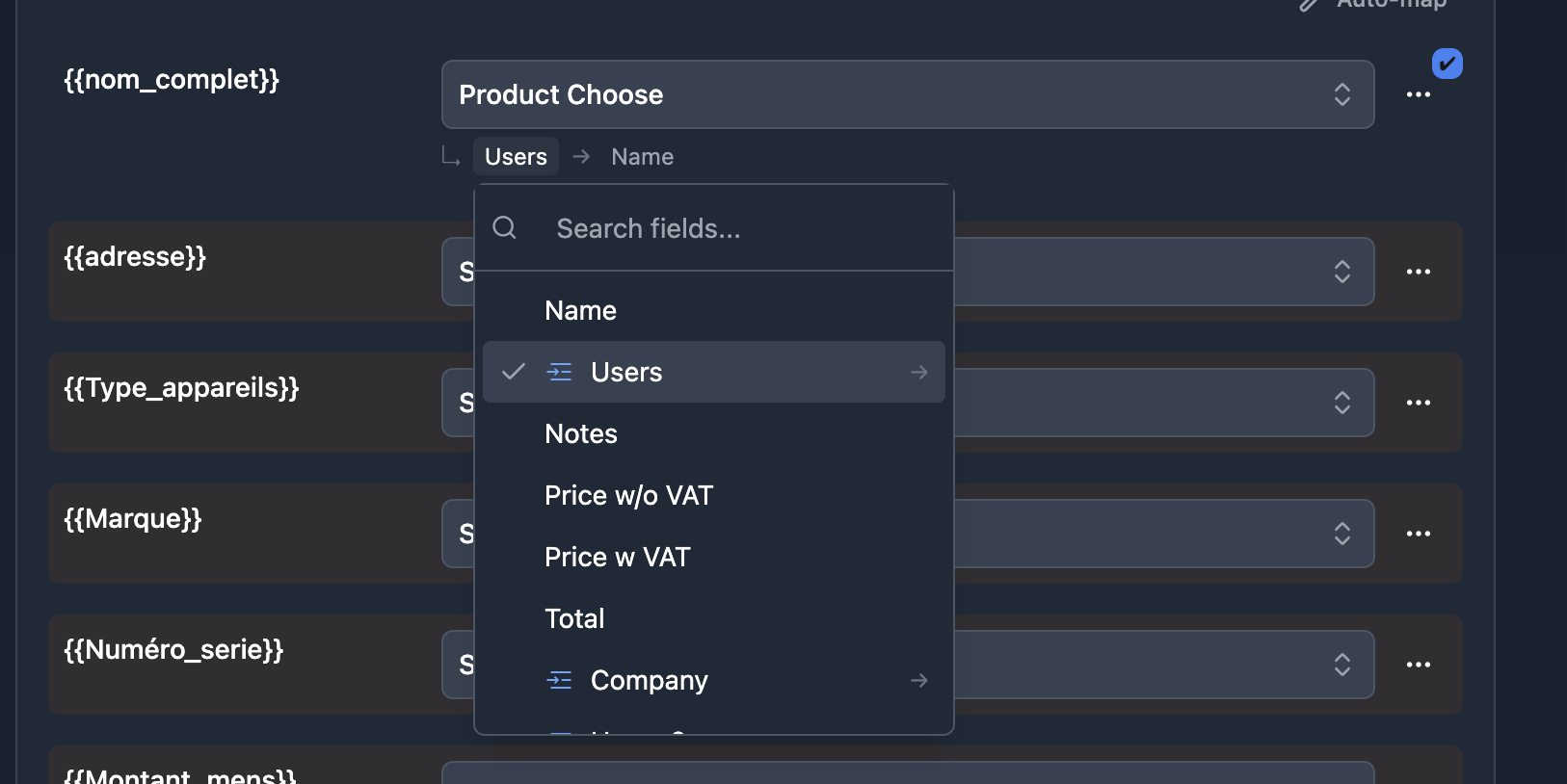
A breadcrumb selector appears below the field dropdown, showing your current selection:
↳ Client → Name
This breadcrumb makes it easy to see exactly which field will be used in your generated document.
Select a Different Field
To select a different field from the linked record:
- Select the linked record field from the dropdown
- Click the breadcrumb that appears below
That's it - just 2 clicks to access any field from a linked table.
The breadcrumb dropdown shows all available fields from the linked table. Linked record fields are marked with an icon and arrow (→), allowing you to navigate deeper.
Multi-Level Linked Records
If a linked record contains another linked record, you can continue navigating deeper. TypeFlow supports up to 3 levels of nested linked records.
How it works
- Select a linked record field - the breadcrumb appears
- Click the breadcrumb and select another linked record field (marked with 🔗)
- Continue navigating up to 3 levels deep
Data Structure Example
Invoice
  └── Client (linked record)         ← Level 1
        └── Company (linked record)  ← Level 2
              └── Company Name       ← Level 3
The breadcrumb shows your full path:
↳ Client → Company → Company Name
Example
Scenario
You have three tables:
| Table | Contains |
|---|---|
| Invoices | Linked field to Clients |
| Clients | Linked field to Companies |
| Companies | Company Name, Address, etc. |
Goal
On an invoice document, display the Company Name of the client.
Solution
- In your Google Doc template, add:
{{company_name}} - In TypeFlow mapping:
- Select Client (linked record) - breadcrumb shows:
↳ Client → [Primary Field] - Click the breadcrumb, select Company (linked record)
- Click again, select Company Name
- Final breadcrumb:
↳ Client → Company → Company Name
- Select Client (linked record) - breadcrumb shows:
No rollup fields needed in Airtable!
FAQ
What is returned by default from a linked record?
When you select a linked record field, TypeFlow automatically selects the primary field and displays it in a breadcrumb. You can click the breadcrumb to change it to any other field.
How many levels deep can I go?
You can navigate up to 3 levels deep through linked records. For example: Invoice → Client → Company → Company Name.
Do I still need rollup fields?
No. TypeFlow can access fields from linked records directly, eliminating the need for rollup fields in many cases.
What if I have multiple linked records?
If a field links to multiple records, the values will be concatenated. For detailed control over multiple linked records, use Line Items.
Related Articles
- Line Items - Display linked records as table rows
- Nested Line Items - Multi-level line items
Need More Help?
- Email: support@typeflow.us
- Chat: Click the chat icon in the app