Sorting & Grouping
Control the order of your line items in generated PDFs. TypeFlow uses your Airtable views to preserve sorting and filtering.
Overview
When you have line items in your documents (invoices, reports, etc.), you often need them in a specific order:
- Products sorted by name or SKU
- Line items sorted by date
- Tasks grouped by status
TypeFlow lets you use Airtable views to control this sorting - whatever order you see in your view is what appears in your PDF.
Sort Data in Airtable
Step 1: Go to Your Linked Table
Navigate to the Airtable table that contains your line items (the table your main record links to).
Step 2: Create or Select a View
Click the View dropdown and either:
- Select an existing view
- Create a new Grid view
Step 3: Add Sorting
- Click the Sort icon (two arrows)
- Select the field to sort by
- Choose Ascending or Descending
- Click Add sort for multiple sort levels
Step 4: Save the View
Give your view a descriptive name like "By Date (Newest First)" or "By Product Name A-Z".
Example Sort Configurations
| Use Case | Sort By | Order |
|---|---|---|
| Invoice line items | Date | Newest first |
| Product catalog | Product Name | A-Z |
| Task list | Priority, then Due Date | High to Low |
| Time entries | Date, then Start Time | Chronological |
Apply Sorting in TypeFlow
Step 1: Set Up Line Items
Make sure you've already configured line items in your template using {{loop_0}} or {{nested_0}}.
Step 2: Select Your View
In TypeFlow's line items configuration:
- Find the linked record section
- Look for the View dropdown
- Select the Airtable view you created
Step 3: Generate
When you generate your PDF, TypeFlow will use the sorting from your selected view.
Tip: Create multiple views for different document types. Use "Invoice Order" view for invoices and "Report Order" view for reports.
Grouping in TypeFlow
Beyond sorting, TypeFlow lets you group your line items by any field. This creates visual sections in your document with headers for each group.
Enable Grouping
- In your flow, go to the Line Items section
- Find "Group by field (optional)"
- Select the field you want to group by (e.g., Category, Status, Assignee)
Grouping Options
Click the settings icon next to the grouping field to access options:
| Option | Description |
|---|---|
| Sort order | Sort groups ascending (A-Z) or descending (Z-A) |
| Group calculation | Add subtotals (sum) for each group |
| Keep all values | Show the grouping field value on every row |
| Keep first value | Show the grouping field value only on the first row of each group |
Example Output
Electronics (group header)
1 Laptop $999
2 Mouse $29
3 Keyboard $79
Furniture (group header)
1 Desk $299
2 Chair $199
Need more levels? For 2 or 3 grouping levels (e.g., Category → Subcategory), see Multiple Grouping Levels.
Auto-Numbering with Grouping
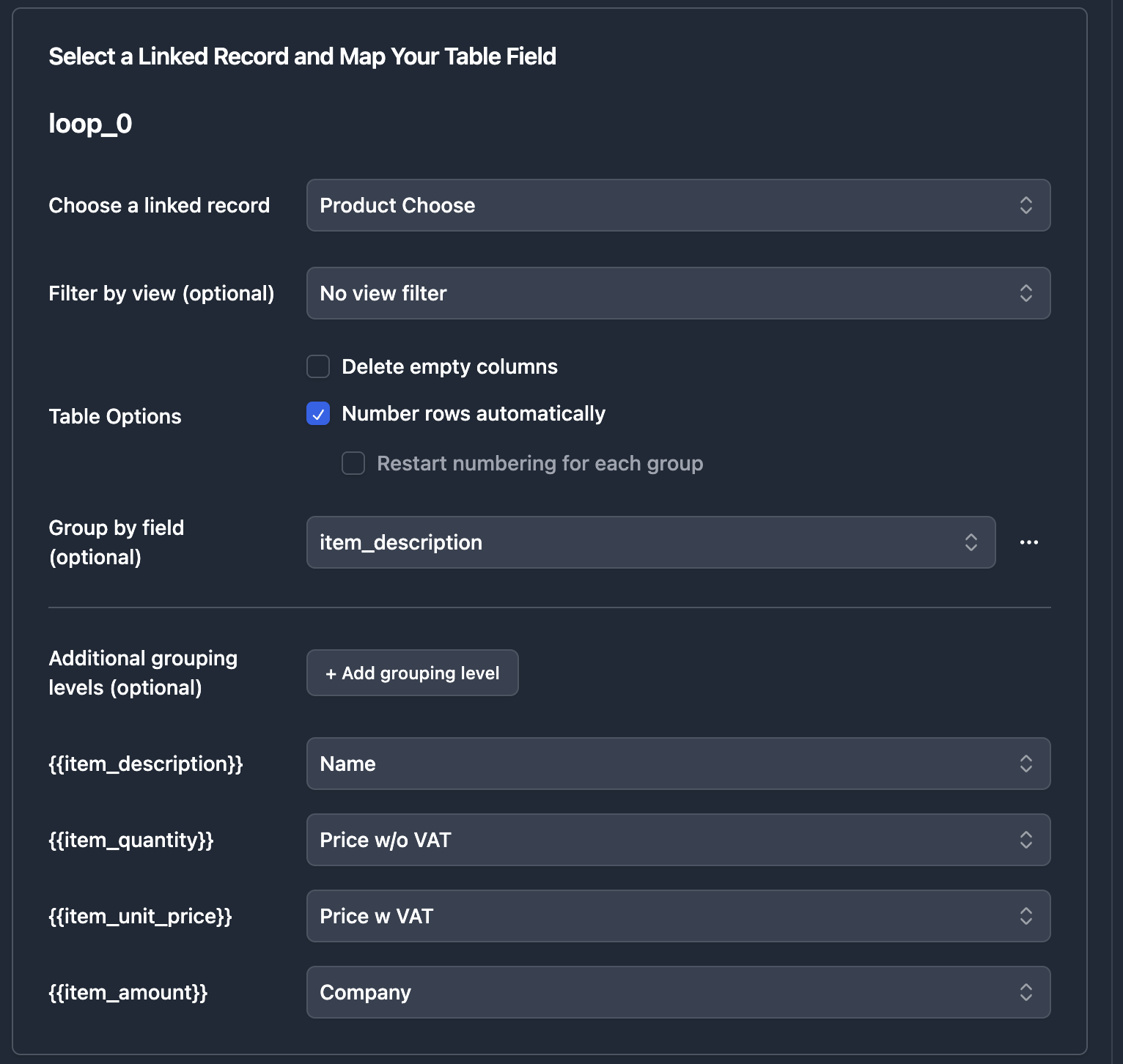
You can combine automatic row numbering with grouping. By default, the numbering restarts at 1 for each group.
Enable Auto-Numbering
- In the Line Items section, check "Number rows automatically"
- If grouping is also enabled, a new option appears: "Restart numbering for each group"
Numbering Options
| Option | Behavior | Example |
|---|---|---|
| Restart per group (default) | Numbers reset to 1 for each group | Group A: 1, 2, 3 - Group B: 1, 2, 3 |
| Continue numbering | Numbers continue across groups | Group A: 1, 2, 3 - Group B: 4, 5, 6 |
Example: Restart per Group
Sales
1 Deal A $10,000
2 Deal B $15,000
3 Deal C $8,000
Marketing
1 Campaign X $5,000
2 Campaign Y $3,000
Example: Continue Numbering
Sales
1 Deal A $10,000
2 Deal B $15,000
3 Deal C $8,000
Marketing
4 Campaign X $5,000
5 Campaign Y $3,000
FAQ
Does TypeFlow preserve my Airtable sorting?
Yes. TypeFlow uses your Airtable views to maintain sorting and filtering when generating PDFs.
Can I sort by multiple fields?
Yes. Create a view in Airtable with multiple sort conditions, then select that view in TypeFlow.
How do I filter which line items appear?
Create a filtered view in Airtable that shows only the records you want, then select that view in TypeFlow.
What if I don't select a view?
TypeFlow will use the default record order from Airtable, which may not be what you expect. Always select a specific view for consistent results.
Can I use automatic row numbering with grouping?
Yes. Enable both "Number rows automatically" and grouping. By default, numbering restarts at 1 for each group. You can change this to continue numbering across groups.
Can I have continuous numbering across groups?
Yes. Uncheck "Restart numbering for each group" to have numbers continue across all groups (1, 2, 3... then 4, 5, 6...).
Related Articles
- Line Items - Basic line items setup
- Multiple Grouping Levels - 2 or 3 levels of grouping
- Nested Line Items - Multi-level line items
Need More Help?
- Email: support@typeflow.us
- Chat: Click the chat icon in the app