Airtable Invoice Automation: Complete Guide to Automated Invoicing
Key Takeaways:
- The average organization spends $9.40 to process a single invoice (Ardent Partners, 2024) - at 50 invoices a month, that's about $470 in processing cost, most of which automation removes.
- Airtable + TypeFlow handles the full invoice lifecycle: generate, send, track, and follow up - without the overhead of accounting software like QuickBooks or FreshBooks.
- Line items from linked records (products, services, hours) populate dynamically in your invoice template - no manual entry per invoice.
- Automated email delivery sends the invoice PDF to your client the moment the status changes. Overdue reminders follow up without you lifting a finger.
Last reviewed July 2026.
You can generate and send invoices directly from your Airtable client and project data - without copying data into a separate template every time. With TypeFlow, your Airtable records merge into a Google Docs (or HTML/CSS template builder) template to generate a PDF automatically. No manual copy-paste per invoice. See our complete invoice and quote solution for the full workflow.
- What you'll build: A repeatable workflow that generates, emails, and stores invoice PDFs from Airtable records.
- What you'll eliminate: Manual data entry, formatting, and "did I attach the PDF?" mistakes.
According to Ardent Partners, the average organization spends $9.40 to process a single invoice - covering receipt, processing, approval, and the staff and overhead behind them. This guide covers how to set it up, which tools to use, and where Airtable invoicing makes sense versus dedicated accounting software.
Automate your invoices from Airtable
Generate professional invoices with line items, email delivery, and payment tracking. No coding required.
Start free with 20 documents →What Is Airtable Invoice Automation?
Connect a document tool like TypeFlow to your Airtable base to automatically generate, send, and track invoices using your records as the source of truth. Airtable can't natively create PDFs, so the tool merges your data into a template and outputs the invoice.
- Input: Client, invoice, and line item records in Airtable.
- Template: A Google Docs (or HTML/CSS template builder) invoice layout with {{variables}}.
- Output: A generated PDF that saves back to Airtable and can be emailed automatically.
Why Automate Invoicing from Airtable
Because manual invoicing costs 5-10x more per invoice than automated generation, and Airtable's built-in Page Designer can't handle dynamic line item tables, automated email delivery, or status-based triggers. A dedicated tool eliminates the repetitive work.
The cost of manual invoicing
Automation is what separates a $2.78 invoice from a $12.88 one. Best-in-class accounts-payable teams spend $2.78 to process a single invoice, while everyone else spends $12.88 - an 80% gap, per Ardent Partners and their 2025 AP Metrics That Matter research. When your team manually creates invoices, here's where the time goes:
- Data entry: Copying client name, address, project details from Airtable to a template
- Line items: Adding each product or service, calculating quantities and totals
- Formatting: Adjusting the layout, checking for errors, matching your branding
- Delivery: Exporting to PDF, attaching to an email, writing the message
- Follow-up: Checking if the client received it, sending reminders for overdue invoices
At 10-15 minutes per invoice and 50 invoices per month, that's 8-12 hours of work that automation handles in seconds.
When Airtable invoicing makes sense
Airtable + TypeFlow is the right fit when:
- Your data is already in Airtable - clients, projects, products, or time tracking
- You need custom templates - your invoice format, your branding, your layout
- Any volume - from 20 invoices per month to 10,000+, with bulk generation and automation
- You don't need full accounting - tax filing, bank reconciliation, and payroll live elsewhere
It's not the right fit if you need double-entry bookkeeping, tax calculation, or bank feeds. That's what QuickBooks, FreshBooks, or Xero are for. But many teams use both: Airtable for operations and invoice generation, accounting software for the books.
Real-World Invoice Automation Examples
Freelancers, agencies, consultants, and construction firms all use Airtable invoice automation to eliminate manual PDF creation. Here are the most common patterns:
- Freelance designers: Generate an invoice when a project is marked Complete.
- Small agencies: Create monthly retainer invoices on the 1st for all active clients.
- Consulting businesses: Click a button to generate an invoice per project phase.
- Construction firms: Convert approved estimates into invoices. (See our Airtable construction quote guide.)
Prerequisites
| Tool | Purpose | Notes |
|---|---|---|
| Airtable account | Store client, invoice, and line item data | Your base should already contain (or be ready to contain) real records. |
| Google account | Create the invoice template | Google Docs is the fastest way to design and iterate. |
| TypeFlow account | Generate PDFs + email delivery | You can start free to test the workflow. |
How to Structure Your Airtable Base for Invoicing
Use four linked tables: Clients, Invoices, Line Items, and Products (optional). The Invoices table is where you generate PDFs from, and Line Items link to each invoice to create dynamic rows in your template.
We've built a ready-to-use invoicing base you can copy and start with:
Copy the Invoice Automation base →
Clients Table
Your client database. Every invoice links back here.
- Client name, company, email, phone
- Billing address (for the invoice header)
- Payment terms (Net 15, Net 30, Net 60)
- Default currency
Invoices Table
One record per invoice. This is the table you generate PDFs from.
- Invoice number (auto-number or formula)
- Client (linked to Clients table)
- Invoice date, due date
- Status (Draft, Sent, Paid, Overdue)
- Subtotal, tax rate, total (formulas or rollups from line items)
- PDF attachment (TypeFlow saves the generated PDF here)
- Notes / payment instructions
Line Items Table
Linked to Invoices. Each line item is a product or service on the invoice.
- Description
- Quantity, unit price, total (formula: quantity x unit price)
- Linked to: Invoice, Product (optional)
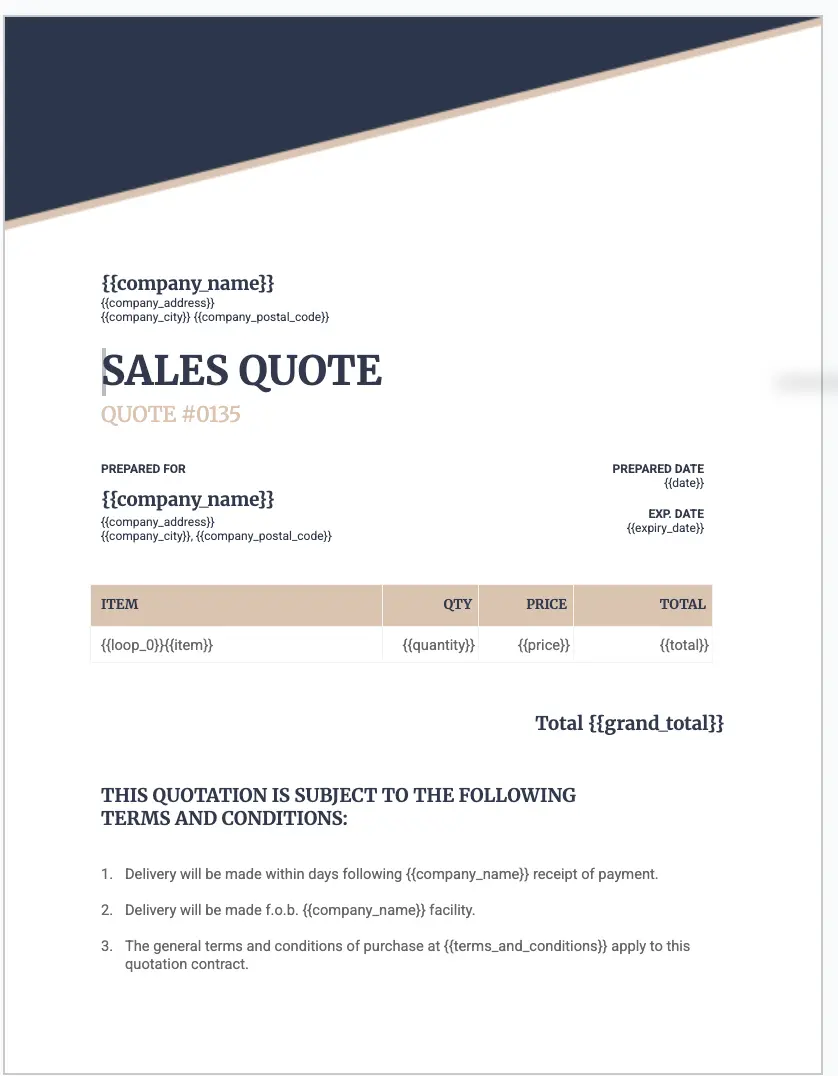
These become {{loop_0}} line items in your template - the table grows dynamically based on how many items are on each invoice.
Products Table (optional)
A catalog of your products or services. Linked to line items for quick selection.
- Product name, description, default price
- Category, SKU
Key Relationships
Clients
  └── Invoices
        └── Line Items
              └── Products (optional)
Views That Power Your Workflow
- "Ready to Send" - Invoices with status = Draft, all fields complete
- "Sent - Awaiting Payment" - Invoices sent but not yet paid
- "Overdue" - Due date passed, status still Sent
- "This Month" - All invoices for the current month (for reporting)
Types of Invoices You Can Generate
Standard invoices, recurring invoices, pro-forma invoices, credit notes, and quote-to-invoice conversions - all from the same Airtable base with different templates or status triggers.
Standard Invoices
The most common type. Client details at the top, line items in a table, totals at the bottom, payment instructions in the footer. Generated on demand or when a project is completed.
Step-by-step tutorial: How to Create Automated Invoices →
Recurring Invoices
Monthly retainers, subscriptions, or ongoing services. Set up an Airtable Automation that triggers on the first of each month, creates a new invoice record from a template, and generates the PDF automatically.
The trick: use a "Recurring" checkbox on the client record and an automation that duplicates the last invoice record for all recurring clients each month.
Pro-Forma Invoices
Pre-payment invoices sent before work begins. Same template as a standard invoice but with "Pro-Forma" in the header and no payment terms. Useful for deposits, advance payments, or international orders.
Credit Notes
Refunds or adjustments linked to an original invoice. Add a "Related Invoice" linked record field to trace the credit back to the original transaction.
Quotes to Invoices
You keep the quote and invoice as the same linked records in Airtable, so converting is a status change plus a template swap. You reuse the same client and line-item data instead of retyping it.
Here is the flow when a quote is accepted:
- Set Status to "Accepted".
- Swap to the invoice template.
- Carry over the same linked line-item records.
- Trigger generation with a button or an automation.
TypeFlow customer Diederick, founder of a custom furniture company in Rotterdam, generates 150-200 quotations per month from Airtable and had his workflow live in about 15 minutes.
Guide: How to Create Quotes from Airtable →
For the full end-to-end workflow from quote acceptance to invoice delivery, see our quote-to-invoice workflow guide.
Creating Your Invoice Template in Google Docs
Create a Google Docs document with {{variable}} placeholders for client data, line items, and totals. TypeFlow replaces each placeholder with the corresponding Airtable field value when the PDF is generated.
Example Invoice Template
Here's what a real invoice template looks like in Google Docs with {{variable}} placeholders. The {{loop_0}} row repeats for each linked line item record.
Template Tips
- Keep it clean - consistent fonts, adequate margins, your logo at the top
- Use Airtable formula fields for calculated values (subtotal, tax, grand total) rather than trying to calculate in the template
- Test with invoices that have 1 line item and 20 line items - the table should expand cleanly
For more design control, use the HTML/CSS template builder - headers, footers, page numbers, and precise pixel layouts.
How to Trigger Invoice Generation
Use a Button field for on-demand invoices (one click per invoice) or an Airtable Automation for fully automated generation when a status changes to "Ready to Send."
| Method | Best For | Tradeoff |
|---|---|---|
| Button field | On-demand invoices, one-off projects | Requires a manual click per invoice |
| Airtable Automation | Recurring invoices, status-based workflows | Runs automatically - less control per invoice |
Method 1: Button-Triggered Invoice Generation
Add a Button field to your Invoices table. Set the action to "Open URL" and paste the TypeFlow generation URL for your template. When you click the button, the invoice PDF generates and attaches to the record.
Method 2: Fully Automated Invoice Generation
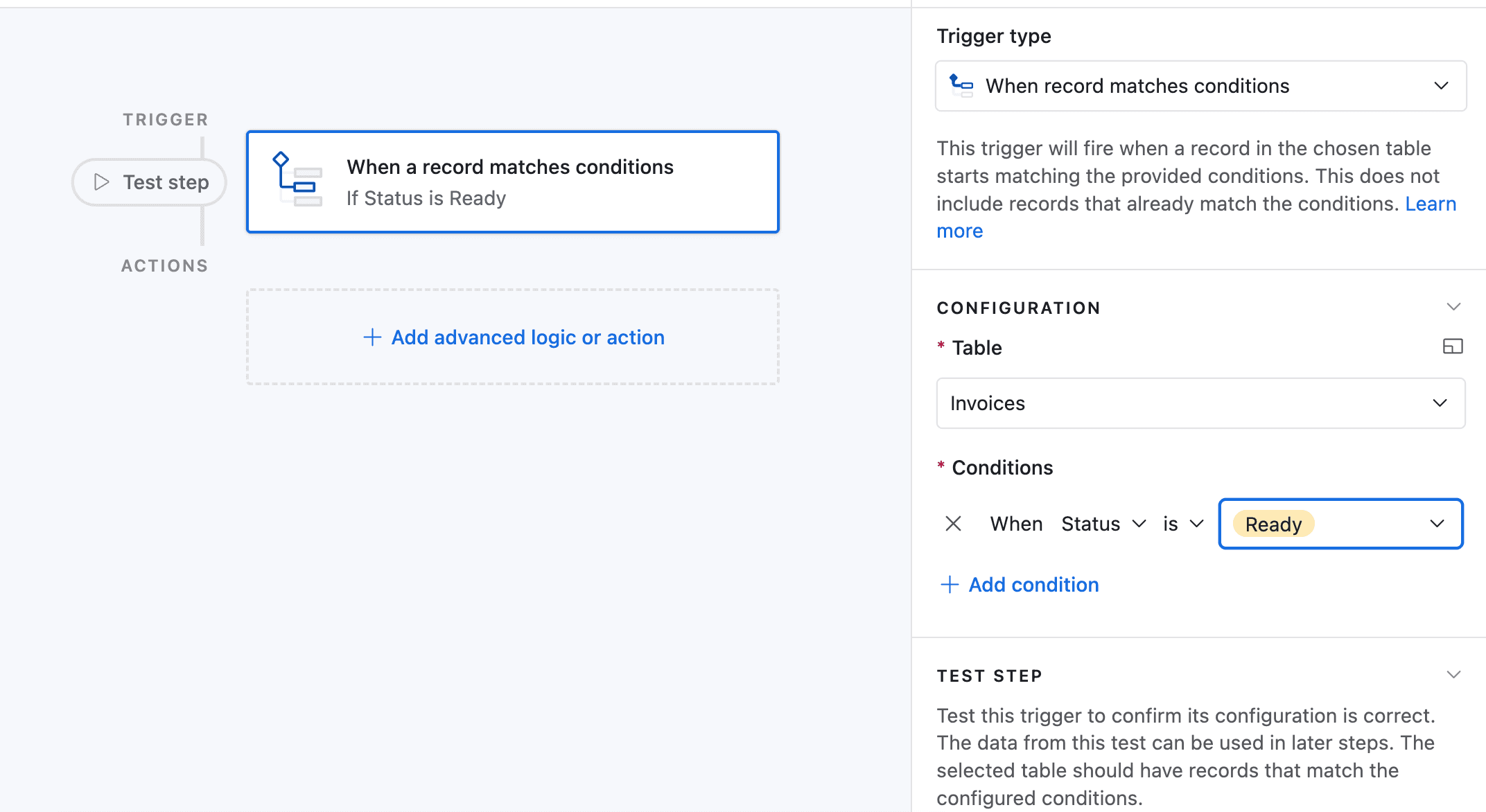
Set up an Airtable Automation that triggers when an invoice status changes to "Ready to Send":
- Trigger: When Status = "Ready to Send"
- Action: Run Script (TypeFlow generation)
- Result: PDF generates and attaches to the record
Configuring Your Invoice Workflow
Connect TypeFlow to your Airtable base, map fields to template variables, set up line item loops from linked records, and configure email delivery to send the PDF to the client automatically.
Connecting TypeFlow to Your Airtable Base
In TypeFlow, select your Airtable base and table. TypeFlow reads your field names and makes them available as template variables.
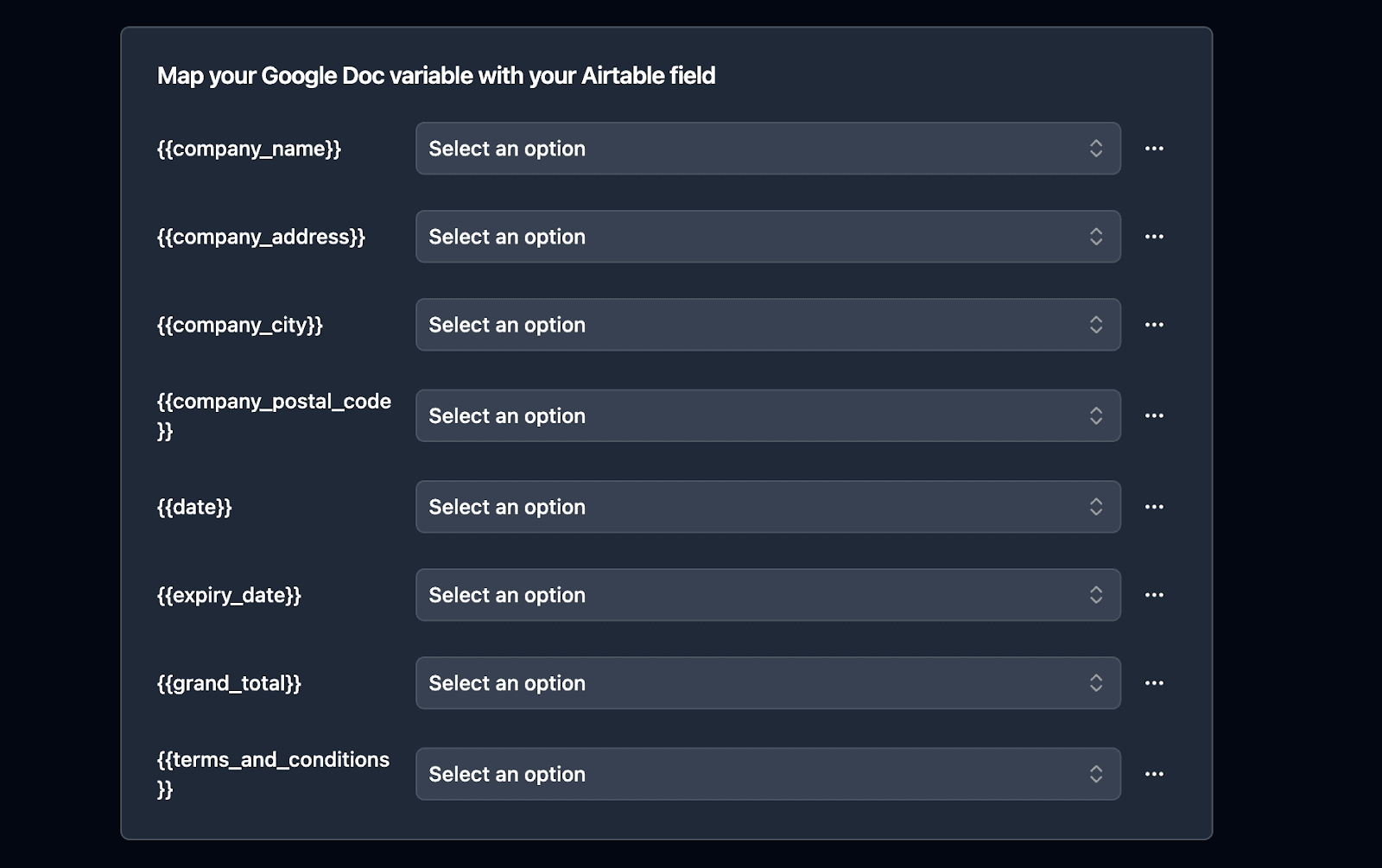
Mapping Fields to Template Variables
Map each Airtable field to the corresponding {{variable}} in your template. TypeFlow shows a preview so you can verify the data before generating.
Setting Up Line Items
Link your Line Items table to the Invoices table. In TypeFlow, configure the {{loop_0}} block to pull from the linked records. Each line item row in your template repeats for every linked record.
Email Delivery Configuration
TypeFlow's email delivery sends the invoice PDF to your client automatically:
- To: Client email (from linked Clients table)
- Subject: "Invoice {{Invoice Number}} from {{Company Name}}"
- Body: Custom message with payment instructions
- Attachment: The generated PDF
No manual email writing. No forgetting to attach the PDF. For a broader look at this workflow beyond invoices, see our guide on generating and emailing PDFs from Airtable automatically.
How to Track and Manage Invoice Status
Add a Status field (Draft, Ready to Send, Sent, Paid, Overdue), create filtered views for each stage, and set up automated overdue reminders at 7, 14, and 30 days.
Status Field Setup
Add a Single Select field called "Status" with these options: Draft, Ready to Send, Sent, Paid, Overdue. Color-code each status for quick scanning in Grid view.
Creating Filtered Views
- "Ready to Send" - Status = Draft, all required fields filled
- "Sent - Awaiting Payment" - Status = Sent
- "Overdue" - Due date passed, status still Sent
- "This Month" - All invoices for the current month
Payment Tracking
Add a "Payment Received" date field and a "Payment Method" single select (Bank Transfer, Check, Credit Card, PayPal). When payment arrives, update the record and the status changes to "Paid."
Use a formula field for "Days Outstanding": IF({Status} = "Paid", "", DATETIME_DIFF(TODAY(), {Due Date}, 'days')). This powers your overdue view.
Setting Up Overdue Reminders
Set up a second automation:
- Trigger: When "Days Outstanding" > 7 (runs daily)
- Condition: Status is still "Sent"
- Action: Send reminder email to client
- Optional: Escalate to a different email template at 14 days and 30 days
Bulk Invoice Generation
End-of-month invoicing: open the TypeFlow bulk generate page, select all invoices with status "Ready to Send", and generate all PDFs in one batch. Filter by Airtable view to control which invoices are included.
The Complete Workflow
Client completes project / month ends
    ↓ (invoice record created, line items added)
Status changes to "Ready to Send"
    ↓ (automation triggers)
PDF generates with all data populated
    ↓ (email delivery)
Client receives invoice by email
    ↓ (payment tracking)
Payment received → Status = "Paid"
    OR
7 days overdue → Reminder email sent automatically
How to Automate Agency and Client Invoicing
You bill every client from one Airtable base, then generate and email their invoices in a monthly batch. Here is how the base fits together.
- A Billable Hours table logs each task: description, date, hours, an hourly-rate snapshot copied from the client, and a calculated billable amount. Those records roll up into an invoice.
- A Billed Projects table tracks fixed-scope deliverables billed at a lump sum. These records also link to invoices.
- The Clients table holds per-client rollups: lifetime revenue and an outstanding unpaid balance, so your account team sees what each client owes.
- Each month, a bulk run gathers a client's unbilled hours and projects into a draft invoice, so no data gets re-entered.
This setup works for retainers and per-project agency billing. For the full build, see our invoicing base guide.
Airtable + TypeFlow vs Accounting Software
Use Airtable + TypeFlow for invoice generation (custom templates, automation, bulk) and QuickBooks/Xero for accounting (tax, bank reconciliation, reporting). They complement each other - you don't have to choose one.
| Feature | Airtable + TypeFlow | QuickBooks | FreshBooks | Xero |
|---|---|---|---|---|
| Monthly cost | ~$49 | $30+ | $19+ | $29+ |
| Custom invoice templates | ✅ Full design control (Google Docs + HTML/CSS template builder) | Limited customization | Limited customization | Limited customization |
| Line items from linked records | ✅ Dynamic from Airtable | Manual entry | Manual entry | Manual entry |
| Bulk generation | ✅ | ❌ | ❌ | ❌ |
| Email delivery | ✅ Automated | ✅ | ✅ | ✅ |
| Payment tracking | Basic (manual update) | ✅ Bank feeds, auto-match | ✅ Online payments | ✅ Bank feeds |
| Tax calculation | Formula fields | ✅ Automatic | ✅ Automatic | ✅ Automatic |
| Bank reconciliation | ❌ | ✅ | ✅ | ✅ |
| Payroll | ❌ | ✅ (add-on) | ❌ | ✅ (add-on) |
| E-signatures on invoices | ✅ Built-in | ❌ | ❌ | ❌ |
| Best for | Teams on Airtable needing custom invoices | Full accounting + invoicing | Freelancers + small service businesses | Growing businesses needing accounting |
The sweet spot: Use Airtable + TypeFlow for invoice generation (custom templates, automation, bulk) and QuickBooks/Xero for accounting (tax, bank reconciliation, reporting). They work well together - generate the invoice in TypeFlow, record the transaction in QuickBooks.
When Airtable is enough: If you're a small team that tracks payments manually and doesn't need bank feeds or tax filing, Airtable handles the entire invoicing workflow without a second tool. For a detailed feature-by-feature comparison, see our Airtable invoicing vs QuickBooks guide. If you are a freelancer, see our guide on sending and tracking freelance invoices in Airtable.
How to Sync Invoices to QuickBooks or Xero
If you need invoices recorded in your accounting software as well, add a second step to your Airtable Automation after the PDF generates:
- Trigger: Status changes to "Ready to Send" (same trigger as PDF generation)
- Action 1: TypeFlow generates the PDF and emails the client
- Action 2: Send a webhook to Zapier or Make
- Action 3 (in Zapier/Make): Create a matching invoice record in QuickBooks or Xero using the same field values
This keeps TypeFlow as your document layer (custom templates, bulk generation, branding) and your accounting software as your financial layer (tax, bank reconciliation, reporting). The two tools work in parallel - you are not replacing one with the other.
Airtable Invoice Tools Compared
TypeFlow, Airtable Invoice Maker, DocsAutomator, MiniExtensions, Documint, and Plumsail all generate invoices from Airtable. TypeFlow is the only one with Google Docs + HTML templates, built-in e-signatures, and automated email delivery included.
| Tool | Template Editor | Line Items | Email Delivery | E-Signature | Price |
|---|---|---|---|---|---|
| TypeFlow | Google Docs + HTML/CSS template builder | ✅ loop_0 from linked records | ✅ Built-in | ✅ Included | From $29/mo |
| Airtable Invoice Maker | Built-in | ✅ | ✅ | ❌ | Free / paid tiers |
| DocsAutomator | Google Docs | ✅ | ✅ | ✅ | From $29/mo |
| MiniExtensions | Built-in | Limited | ❌ | ❌ | From $15/mo |
| Documint | Web editor | ✅ | ✅ | ❌ | From $49/mo |
| Plumsail | Microsoft Word | ✅ | Via Zapier | ❌ | From $29/mo |
TypeFlow advantage for invoicing: Google Docs templates (no new editor to learn), dynamic line items from linked records, automated email delivery with PDF attached, and e-signatures included at no extra cost. Useful when invoices need client sign-off before payment.
Airtable Invoice Maker is worth considering if you want a lightweight, invoice-only tool. It's purpose-built for Airtable invoicing but doesn't handle other document types (contracts, reports, etc.). For a broader comparison of every major invoicing option for Airtable, see our Best Invoicing Tools for Airtable in 2026 guide.
Best Practices for Airtable Invoicing
Use auto-number for invoice IDs, keep line items granular (one per product/service), create a template record for recurring clients, and test with edge cases (1 line item, 20+ line items, 0% tax) before going live.
Use auto-number for invoice numbers
Set your Invoice Number field to Auto Number or use a formula like "INV-" & DATETIME_FORMAT({Invoice Date}, 'YYYYMM') & "-" & RECORD_ID(). Never rely on manually entered invoice numbers - they lead to duplicates and gaps.
Create a "template" record for recurring invoices
For monthly clients, create a base invoice record with the standard line items pre-filled. Your automation duplicates this record each month and updates the date. Less setup per cycle.
Track invoice status religiously
Your "Sent - Awaiting Payment" and "Overdue" views are your cash flow dashboard. Check them daily. The automation handles reminders, but a human glance catches edge cases.
Keep line items granular
One line item per product or service, not "Various services - $5,000." Granular line items help with disputes, reporting, and converting quotes to invoices.
Test with edge cases
Before going live, test with:
- An invoice with 1 line item
- An invoice with 20+ line items
- An invoice with a 0% tax rate
- An invoice with a long client name that might overflow
Troubleshooting Common Issues
The most common invoice automation issues are mismatched placeholder names (case-sensitive), automations not triggering (wrong conditions), PDFs not attaching (field mapping), and line items not looping (template structure). Here's how to fix each one.
- Incorrect data in the PDF: Make sure placeholders in your template match your mapped fields exactly (including capitalization).
- Automation not triggering: Check the trigger conditions against a real test record.
- PDF not attaching: Confirm the attachment field mapping in TypeFlow and review Airtable automation run history.
- Line items not looping: Verify the {{loop_0}} loop is placed inside the line items table.
TypeFlow Pricing
- Free: 20 documents lifetime (ideal for testing)
- Starter: $29/month for 200 documents
- Pro: $59/month for 1,000 documents
- Enterprise: $199/month for unlimited documents ($159/month billed annually)
Get Started with Airtable Invoice Automation
Sign up for TypeFlow (free, 20 documents included), connect your Airtable base, create a Google Docs template with placeholders, and generate your first invoice in under 30 minutes. TypeFlow is rated by quality and operations teams on G2. McKinsey ranks invoicing among the highest-exposure, most automatable skills in its Skill Change Index. Its 2025 research also projects that AI and automation could technically handle 60 to 70% of today's global work hours in an early-adoption scenario.
Next steps:
Start for Free - 20 documents included, no credit card required.
Automate your document generation
Start with 20 free documents. Built for businesses using Airtable.
Frequently Asked Questions
Find answers to the most common questions about this feature.
Popular Questions
All Questions
Need more help?
Our team is here to help you solve all your problems and answer your questions.
Contact UsThis guide is based on real-world invoicing workflows from Airtable teams using TypeFlow. For invoice processing benchmarks, see Ardent Partners. For Airtable documentation, see Airtable Automations and Linked Records. Last reviewed July 2026.

Kevin from TypeFlow
•AuthorKevin Rabesaotra is a growth engineer and automation specialist with 8+ years of experience building no-code solutions. As Founder & CEO of TypeFlow, he has helped hundreds of businesses automate document generation and streamline workflows with Airtable integrations. Previously, Kevin was a Product Lead specializing in growth engineering, running experiments to drive revenue, retention, and lead generation.
More articles
How to Print Labels from Airtable with Quantity Control (Step by Step)
Print multiple labels per Airtable record based on a quantity field. Step-by-step guide for linked records mode and quantity repeat mode with barcodes and Avery sheets.
Read articleHow to Print Avery Mailing Labels from Airtable
Print Avery mailing labels (5160, 5161, 5162) from Airtable without Word mail merge. Step-by-step guide with print label mode, automation, and bulk generation.
Read articleHow to Create Inventory Labels with Barcodes in Airtable
Create inventory labels with Code 128, EAN-13, or QR barcodes from Airtable. Step-by-step guide for warehouse, retail, and asset tracking with thermal and Avery printers.
Read article