Airtable Invoicing vs QuickBooks: Which One Is Right for You
Airtable with TypeFlow handles invoicing for teams that want custom templates, branded PDFs, and automation inside their existing Airtable workflow. QuickBooks handles invoicing plus full accounting - tax filing, bank reconciliation, and financial reports. See our complete invoice and quote solution for the full Airtable invoicing workflow. This guide compares features, pricing, and when to pick each.
Generate invoices from Airtable in minutes
Use Google Docs or the HTML/CSS builder, add line items and e-signatures. No coding required.
Start free with 20 documentsWhat Is Airtable Invoicing
You can generate custom, branded invoice PDFs from your existing Airtable data by connecting it to a document generation tool like TypeFlow. Airtable is a database platform where you organize clients, projects, and invoice data in connected tables, but it does not come with invoicing features built in.
To create actual invoice PDFs from Airtable, you connect it to TypeFlow. TypeFlow links your Airtable data to Google Docs templates or its built-in HTML/CSS template builder, so you produce professional invoices without switching between apps. You get complete control over how your invoices look and when they go out.
According to Deloitte, 73% of finance teams still spend significant time on manual document creation. Airtable with TypeFlow automates that step.
What Is QuickBooks Invoicing
QuickBooks lets you create invoices, accept payments, and manage your full accounting in one platform. Invoicing is one piece of a larger system that includes payment tracking, bank reconciliation, and tax reporting.
The invoicing features work right away. You create an invoice, send it to a client, accept payment, and see the status update in your dashboard. For businesses that want accounting and invoicing in one place, QuickBooks handles both. FreshBooks and Xero are similar alternatives.
Airtable Invoicing vs QuickBooks at a Glance
| Feature | Airtable + TypeFlow | QuickBooks |
|---|---|---|
| Invoice templates | Fully customizable via Google Docs or HTML/CSS builder | Pre-built templates with limited customization |
| Accounting features | None - invoicing only | Full accounting suite |
| E-signatures | Built-in with TypeFlow | Not included |
| Automation | TypeFlow Automation + Airtable automations + button field | Built-in recurring invoices |
| Line items | Full control with linked records | Built-in |
| Learning curve | Familiar tools (Airtable + Google Docs) | Requires learning QuickBooks interface |
| Best for | Custom workflows and branded invoices | Full financial management |
Feature Comparison for Invoicing
Invoice Templates and Branding
QuickBooks gives you pre-made invoice templates. You can add your logo and change colors, but the layout stays fixed.
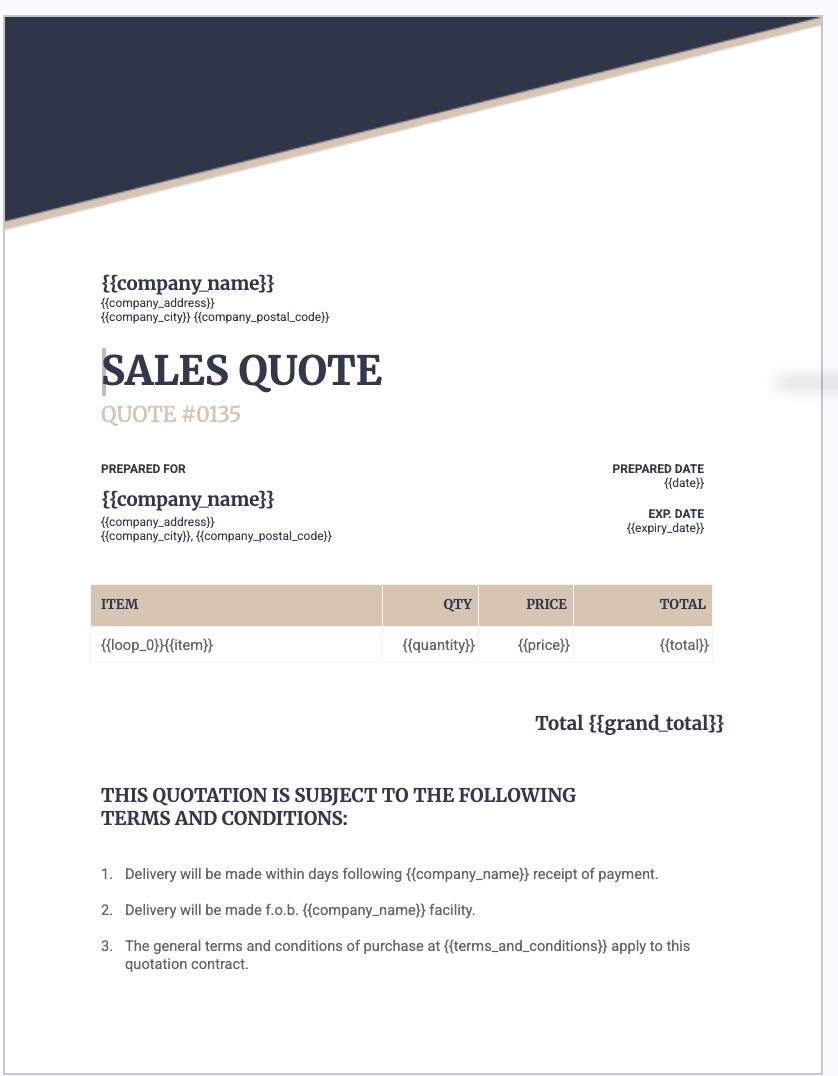
With Airtable and TypeFlow, you design your invoice in Google Docs or the HTML/CSS template builder. Every element is yours to adjust - fonts, spacing, tables, and branding. If your invoices include custom fields or follow a specific format, this flexibility makes a difference.
Recurring Invoices and Automation
QuickBooks handles recurring invoices out of the box. You set a schedule, and invoices go out on time.
In Airtable, you have three trigger options:
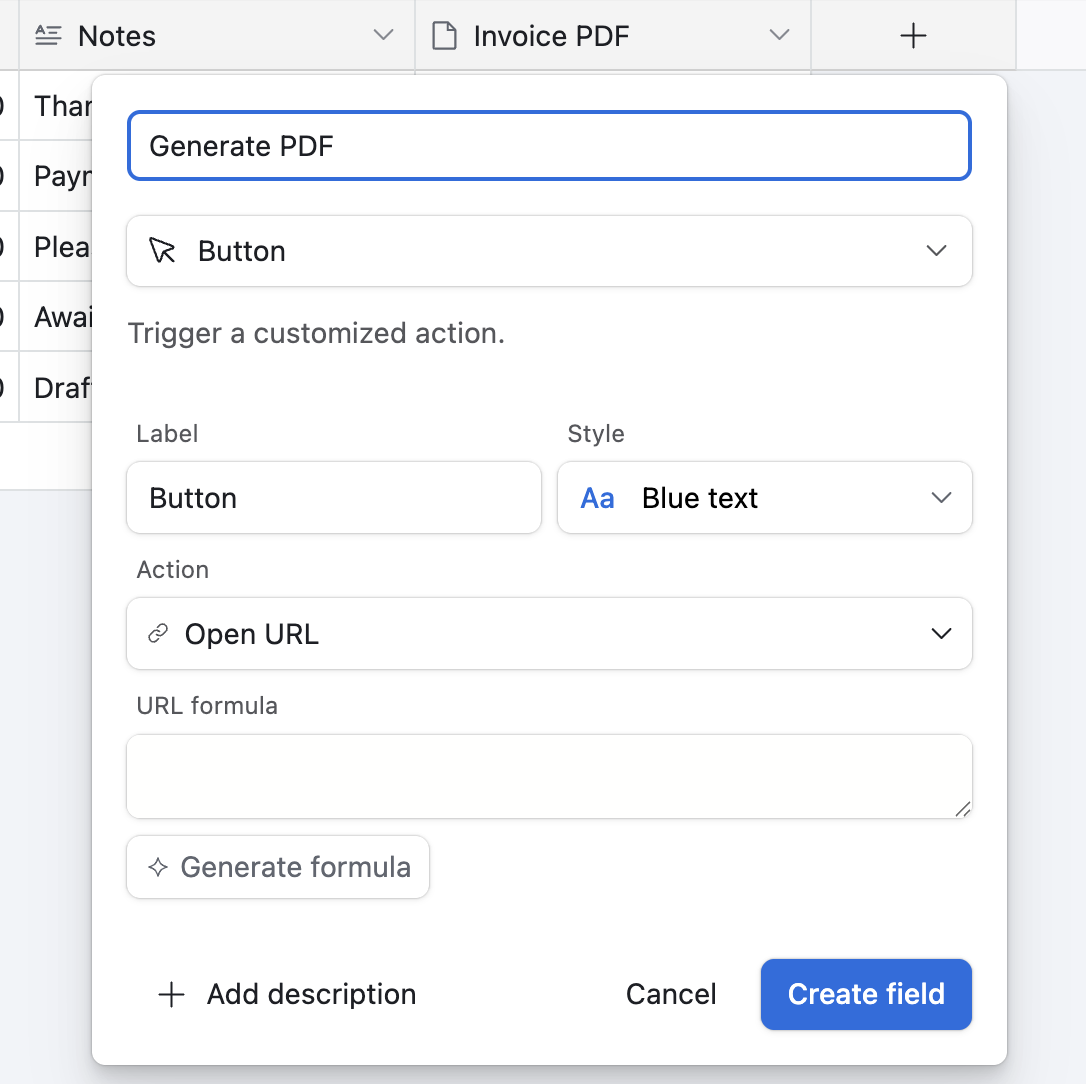
- Button field. Add a button to your Invoices table. Click to generate the PDF for that record.
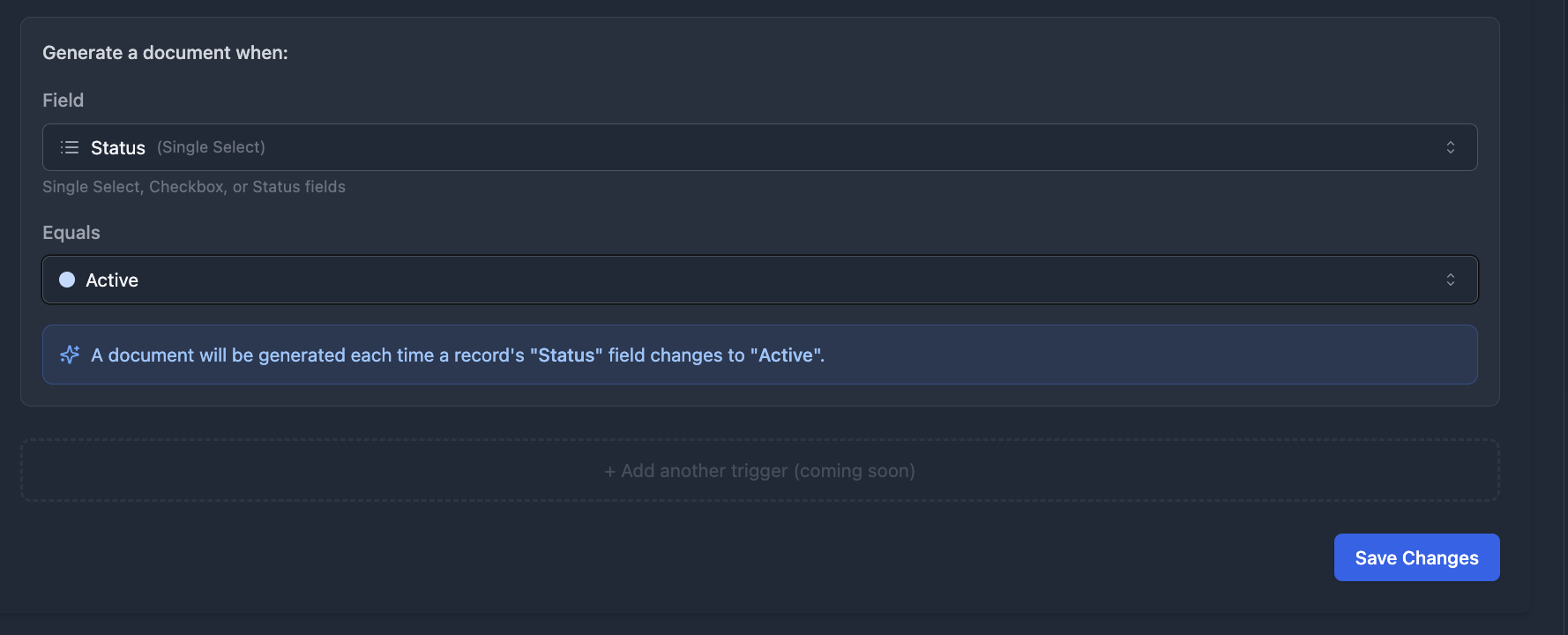
- TypeFlow Automation. Watches for field changes and triggers generation automatically - for example, when Status changes to "Ready to Send."
- Airtable Automations. Trigger on form submission, record creation, or schedule.
Payment Tracking and Reminders
QuickBooks tracks payments and sends reminders without configuration. According to World Commerce & Contracting, businesses that automate invoice processing reduce payment cycle times by 30-50%. You see which invoices are paid, pending, or overdue in one view.
Airtable tracks payment status through custom fields. You build views that show outstanding invoices and set up automations to send reminder emails. The workflow matches your exact process, though you build it yourself.
Tax and Accounting Features
This is where the two tools differ most.
QuickBooks supports sales tax, VAT, bank reconciliation, and tax reporting. It is built for businesses that file taxes and produce financial statements.
Airtable stores and organizes data. It does not calculate taxes for compliance, connect to bank accounts, or generate accounting reports. If you need these features, you use QuickBooks or similar software alongside Airtable.
Reporting and Dashboards
QuickBooks includes financial reports ready to use - profit and loss, balance sheets, cash flow statements.
Airtable offers custom views, interfaces, and charts. You can build a dashboard that shows outstanding amounts, payment trends, and client history. These are operational reports for tracking your invoicing, not accounting reports for tax purposes.
Pricing Comparison
Airtable Pricing
Airtable has a free plan with limits on records and automations. Paid plans start at $20 per seat per month (Team plan) and unlock more capacity.
TypeFlow pricing is separate. Paid plans start at $22/month (Starter, 200 docs/month). A free tier (20 documents) lets you test before upgrading.
QuickBooks Pricing
QuickBooks requires a paid subscription with no permanent free tier. Plans range from $30 to $200 per month depending on features. The Simple Start plan covers basic invoicing. Higher tiers add inventory, time tracking, and multi-user access.
For invoicing alone, Airtable + TypeFlow costs less. For full accounting, QuickBooks justifies its price.
When Airtable Invoicing Is the Better Choice
Airtable works well when:
- You already track projects or clients in Airtable. Adding invoicing keeps your data in one place instead of copying it between systems.
- You want custom invoice designs. Google Docs templates or the HTML/CSS builder let you control every detail.
- You want invoicing connected to your workflow. Automations trigger invoice generation when a project completes or a status changes.
- You need e-signatures on invoices. TypeFlow includes built-in e-signatures at no extra cost - clients approve invoices with a click.
- You handle accounting separately. You work with an accountant or use different software for taxes.
For the complete setup, see our step-by-step invoice generation guide.
When QuickBooks Is the Better Choice
QuickBooks fits when:
- You want complete accounting. Tax filing, bank reconciliation, payroll, and financial statements are built in.
- You prefer one tool for everything. No connecting apps or building custom workflows.
- You send many invoices with payment tracking. Built-in features handle volume and track payments natively.
- You want payment processing included. QuickBooks connects to payment gateways so clients pay directly from the invoice.
Can You Use Airtable and QuickBooks Together
Yes, and many businesses take this approach.
Use Airtable for project management, client tracking, and custom workflows. Sync invoice or client data to QuickBooks for accounting. Zapier, Make, or n8n connect the two systems.
This hybrid setup works when you want Airtable's flexibility for operations and QuickBooks' accounting features for compliance. The tradeoff is maintaining two systems and keeping data in sync.
How to Set Up Invoicing in Airtable
Step 1: Build Your Invoicing Base
Create three linked tables: Clients, Invoices, and Line Items. The Invoices table connects to both. Add fields for invoice number, invoice date, due date, status, subtotal, tax, and total.
Step 2: Design Your Invoice Template
You have two options:
- Google Docs. Add merge variables like
{{client_name}},{{invoice_number}}, and{{line_items}}. Design the layout, add your logo, format tables for line items. - TypeFlow HTML/CSS builder. Design directly in TypeFlow for full layout control without Google Docs.
Step 3: Generate Invoice PDFs from Airtable
Connect TypeFlow to your Airtable base. Map each field to the matching placeholder in your template.

Three ways to trigger generation:
- Button field. Add a button to your Invoices table. Click to generate the PDF for that record.
- TypeFlow Automation. Set a trigger on a field value change (e.g. Status = "Approved") and the PDF generates automatically.
- Airtable Automations. Trigger on form submission, record creation, or schedule.
Step 4: Automate Invoice Generation and Delivery
With TypeFlow, you configure everything in one place - no Airtable automation needed. Set up a TypeFlow Automation trigger (e.g. when Status changes to "Ready to Send") and enable Email Post Generation to send the invoice PDF to the client automatically. One config, fully hands-off.
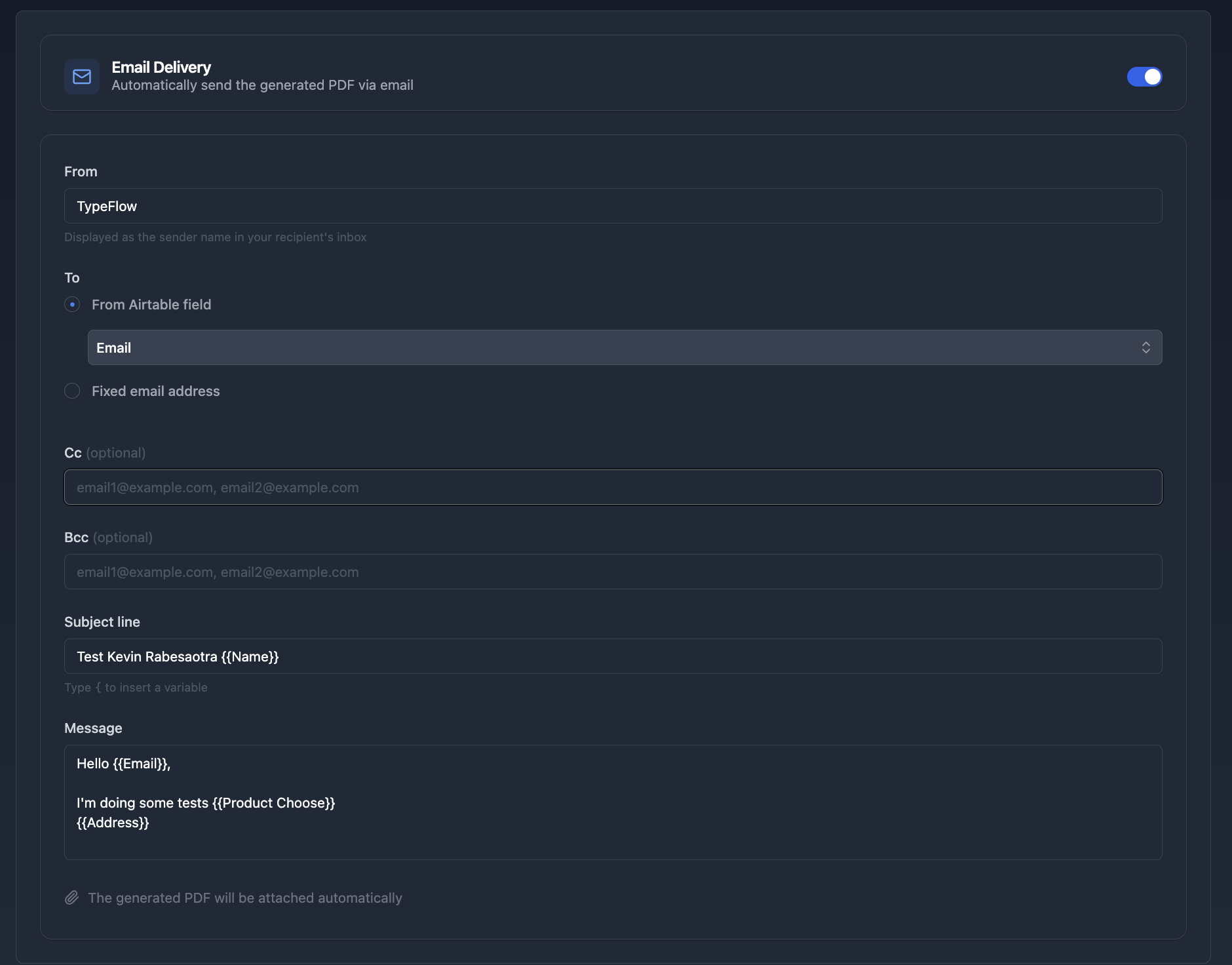
Of course, you can still use Airtable Automations or Make if you prefer. But TypeFlow handles the full workflow natively: generate PDF -> email to client -> attach to record.
For the full workflow including quote-to-invoice conversion, see our invoice automation guide.
Weaknesses of Airtable for Invoicing
- No native invoicing features. You build the system yourself or use tools like TypeFlow for document generation.
- No accounting capabilities. Cannot handle taxes, bank connections, or financial reports.
- Setup takes time upfront. Creating tables, templates, and automations requires initial effort.
- Complex tax scenarios need dedicated software. Multi-currency invoicing or VAT compliance works better in QuickBooks, FreshBooks, or Xero.
Picking the Right Invoicing Tool for Your Business
If you want accounting features - tax filing, bank reconciliation, financial statements - QuickBooks is the clearer choice.
If you want flexibility and already use Airtable, adding TypeFlow for invoice generation keeps your workflow simple. You stay in tools you know and keep full control.
Many teams start with Airtable and TypeFlow for invoicing, then add QuickBooks later when they need full accounting. McKinsey notes that digital document workflows reduce cycle times by 50%. The two approaches work together as your business grows. See what users say about TypeFlow on G2.
If you are also generating quotes, see our quote generator comparison and construction quote guide. For a comprehensive comparison of every invoicing tool available for Airtable, see our Best Invoicing Tools for Airtable in 2026 guide.
Ready to automate your invoicing?
Connect your Airtable base, design your template, and send your first invoice in minutes.
Start free with 20 documentsFrequently Asked Questions About Airtable Invoicing vs QuickBooks
Find answers to the most common questions about this feature.
Popular Questions
All Questions
Need more help?
Our team is here to help you solve all your problems and answer your questions.
Contact Us
Kevin from TypeFlow
•AuthorKevin Rabesaotra is a growth engineer and automation specialist with 8+ years of experience building no-code solutions. As Founder & CEO of TypeFlow, he has helped hundreds of businesses automate document generation and streamline workflows with Airtable integrations. Previously, Kevin was a Product Lead specializing in growth engineering, running experiments to drive revenue, retention, and lead generation.
More articles
How to Print Labels from Airtable with Quantity Control (Step by Step)
Print multiple labels per Airtable record based on a quantity field. Step-by-step guide for linked records mode and quantity repeat mode with barcodes and Avery sheets.
Read articleHow to Print Avery Mailing Labels from Airtable
Print Avery mailing labels (5160, 5161, 5162) from Airtable without Word mail merge. Step-by-step guide with print label mode, automation, and bulk generation.
Read articleHow to Create Inventory Labels with Barcodes in Airtable
Create inventory labels with Code 128, EAN-13, or QR barcodes from Airtable. Step-by-step guide for warehouse, retail, and asset tracking with thermal and Avery printers.
Read article