Airtable Invoice Template for Freelancers
Generate, send, and track freelance invoices directly from Airtable using TypeFlow for PDF generation and automated email delivery. Your Airtable base already holds client details, project hours, and rates - TypeFlow turns that data into professional invoices without leaving your workspace.
For all invoicing tools available for Airtable, see our Best Invoicing Tools for Airtable guide.
Generate freelance invoices from Airtable in minutes
Use Google Docs or the HTML/CSS builder, automate delivery, track payments. No coding required.
Start free with 20 documentsWhy Send Freelance Invoices From Airtable
Sending invoices from Airtable eliminates double data entry and keeps your entire freelance workflow in one place. Your client details, project hours, and rates already live there - generating invoices from that data takes seconds instead of hours.
- Single source of truth. Client details, project hours, and rates stay in one base.
- No double entry. Invoice fields pull from existing records.
- Automatic calculations. Formulas handle totals, taxes, and line item math.
What You Need Before You Start
- An Airtable base with client and project data (Pro or higher for automations).
- A Google account for your invoice template, or use TypeFlow's built-in HTML/CSS template builder.
- A TypeFlow account to generate PDFs from Airtable. Free tier includes 20 documents.
How to Set Up Your Airtable Base for Freelance Invoicing
Four linked tables form a relational database - records in one table connect to records in another, so you pull client info into an invoice without retyping it.
Clients Table
One record per client:
- Client Name (primary field).
- Email (for sending invoices).
- Billing Address.
- Payment Terms (Net 15, Net 30).
Projects Table
Track work separately from invoices. A project might span multiple invoices, or one invoice might cover several small projects.
Fields: Project Name, Client (linked record), Hourly Rate, Hours Logged. This structure lets you pull project data into invoices without hunting through old records.
Invoices Table
Each record is one invoice:
- Invoice Number (auto-number field).
- Client (linked to Clients table).
- Invoice Date and Due Date.
- Status (Draft, Sent, Paid, Overdue).
- Total (rollup or formula from Line Items).
The Status field drives your tracking and automations.
Line Items Table
Each row is one service or product on an invoice. Fields: Description, Quantity, Rate, Amount (formula: Quantity x Rate), Invoice (linked record).
Separating line items into their own table gives you flexibility when invoices have multiple entries.
How to Create Your Freelance Invoice Template
You have two template options:
- Google Docs. Add merge variables like
{{Client Name}}and{{Invoice Total}}. Familiar and free. - TypeFlow HTML/CSS template builder. Design directly in TypeFlow for full layout control.
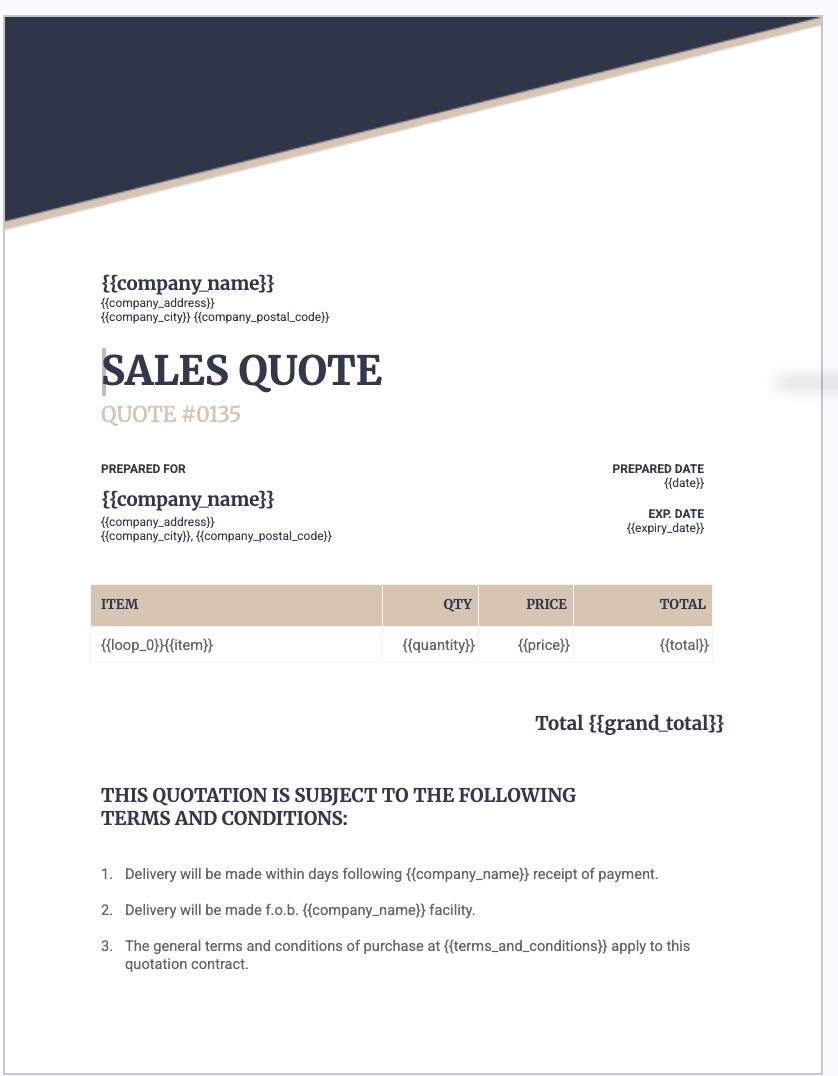
A basic freelance invoice template includes:
- Your business name and contact info at the top.
- Client name and address (using variables).
- Invoice number and date.
- A table for line items with columns for description, quantity, rate, and amount.
- Total amount due.
- Payment instructions or a link to pay online (Stripe, PayPal).
How to Generate Invoice PDFs From Airtable
Step 1: Connect TypeFlow to Your Base
Sign into TypeFlow and link your Airtable account. Select the Invoices table as your data source.
Step 2: Map Your Airtable Fields to the Template
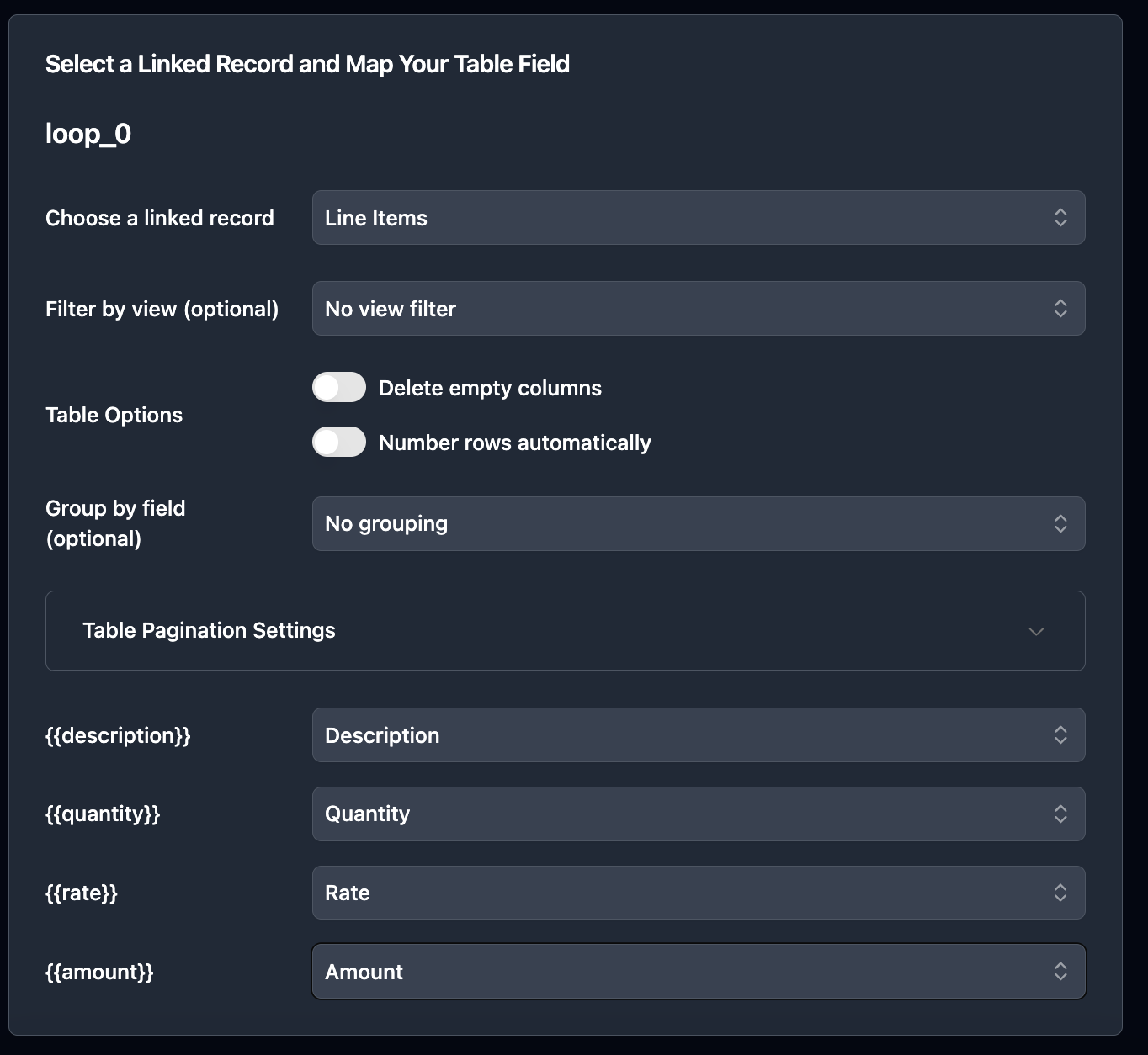
Each variable in your template matches a field in Airtable. TypeFlow shows a visual interface where you match fields to template variables.

For line items, TypeFlow handles repeating rows. Map the Line Items table, and it populates as many rows as each invoice contains.
Step 3: Test the PDF Output
Run a test with one invoice record. Check that client name, amounts, and line items appear correctly. Test with an invoice that has multiple line items - this catches formatting problems early.
How to Send Invoices to Clients Automatically
TypeFlow handles the full send workflow natively with TypeFlow Automation + Email Post Generation.
Set Up TypeFlow Automation
Set a trigger on a field value change - when Status changes to "Ready to Send," TypeFlow generates the PDF and emails it to the client automatically via Email Post Generation.
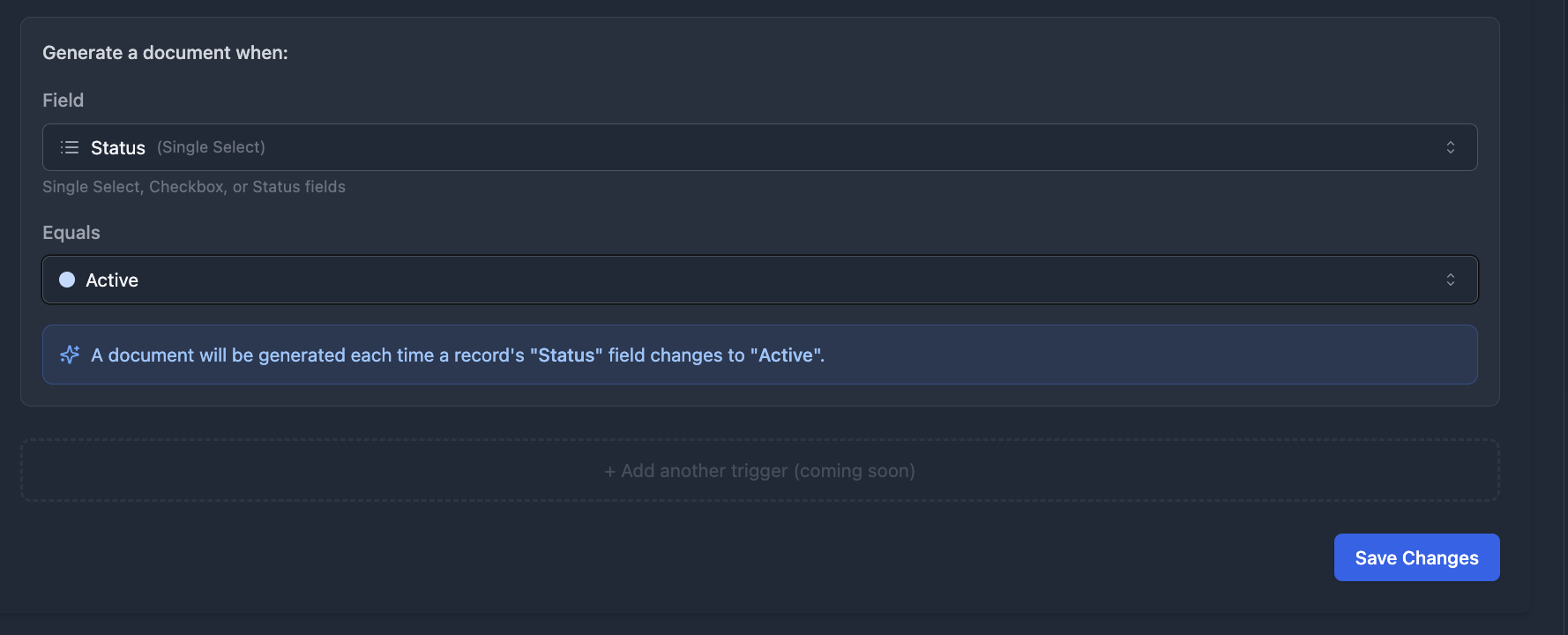
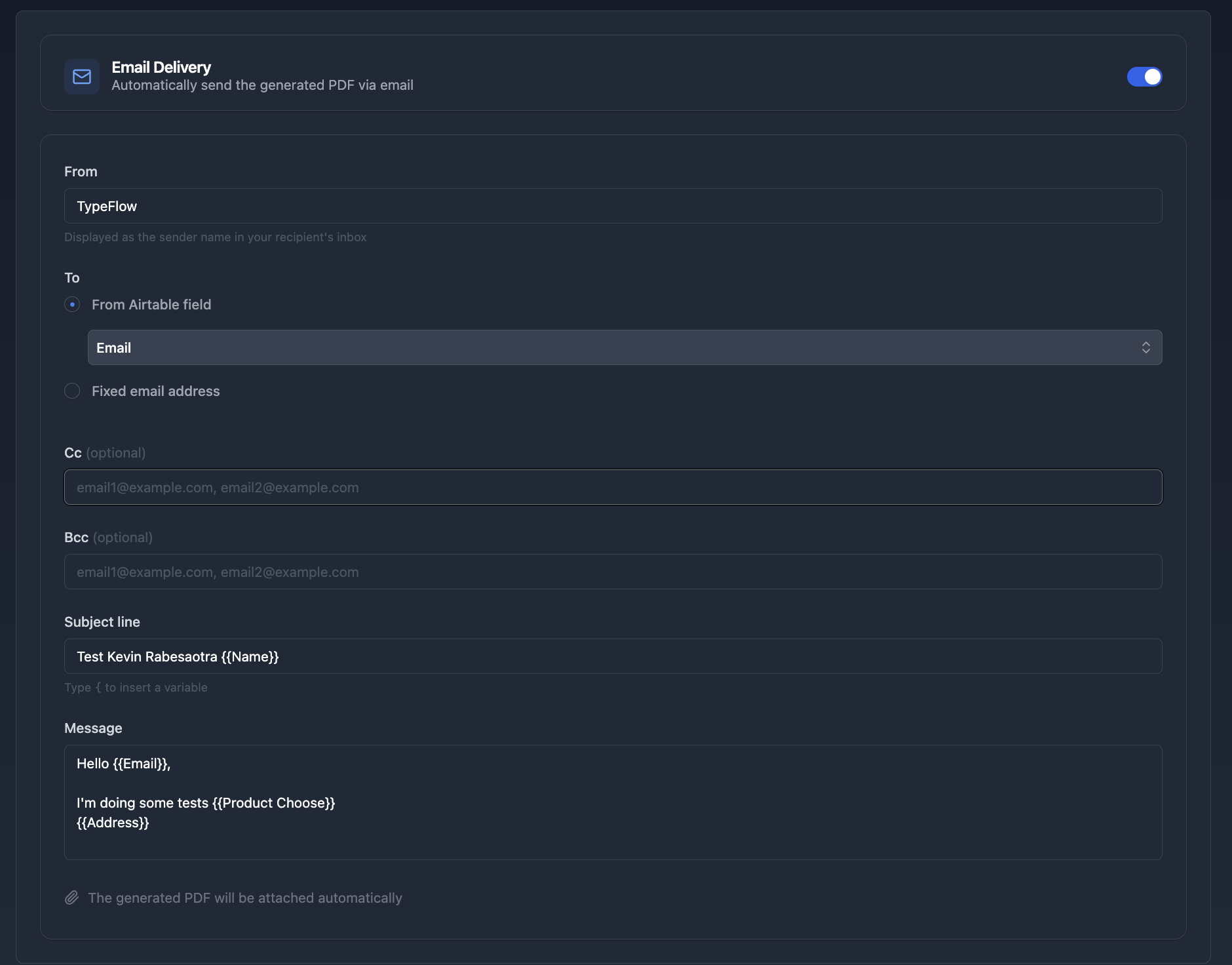
One config, fully hands-off. The client receives the invoice as a PDF attachment.
Of course, you can also use Airtable Automations or Make if you prefer a different approach.
Other Trigger Options
- Button field. Add a button to your Invoices table. Click to generate and send for that record.
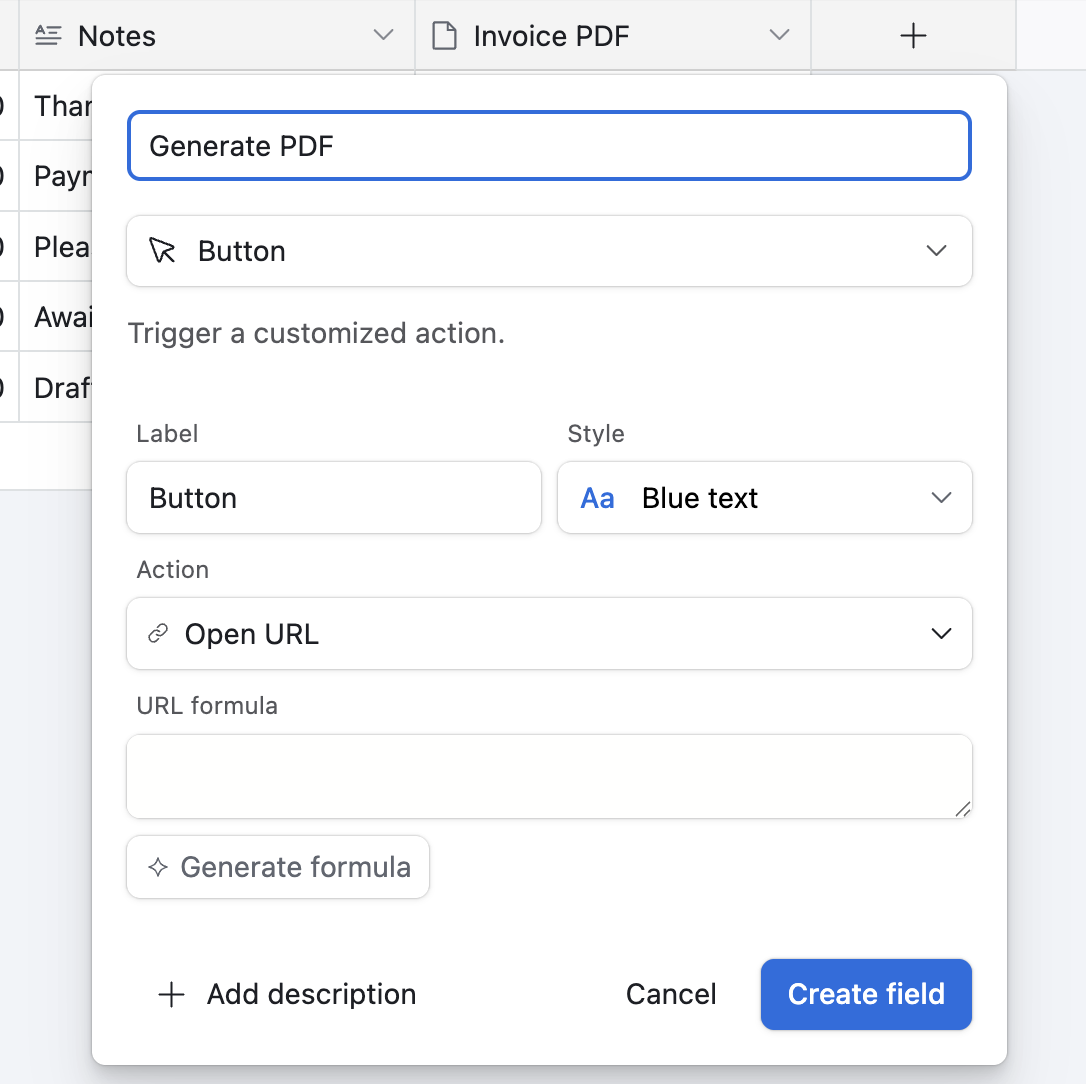
- Airtable Automations. Trigger on form submission, record creation, or schedule.
How to Track Invoice Status and Payments in Airtable
Track invoice payments in Airtable using a Status field and filtered views. This gives you instant visibility into paid, unpaid, and overdue invoices.
Status Field for Each Invoice
The single select Status field tracks where each invoice stands:
- Draft. Not yet sent to the client.
- Sent. Delivered, awaiting payment.
- Paid. Payment received.
- Overdue. Past due date, still unpaid.
Views for Paid, Unpaid, and Overdue
Create filtered views to see invoices by status:
- Unpaid view. Filter for Status = Sent.
- Overdue view. Filter for Due Date before today AND Status is not Paid.
- Paid view. Filter for Status = Paid.
Dashboard for Monthly Revenue
Use Airtable's summary bar at the bottom of a view to see totals. Filter by Invoice Date to show the current month, then check the sum of your Total field for a quick revenue snapshot.
How to Add E-Signatures to Freelance Invoices
TypeFlow includes built-in e-signatures at no extra cost. For invoices that need client approval before payment, enable e-signatures on your flow. The client receives the invoice, reviews it, and signs - the signed PDF returns to your Airtable record.
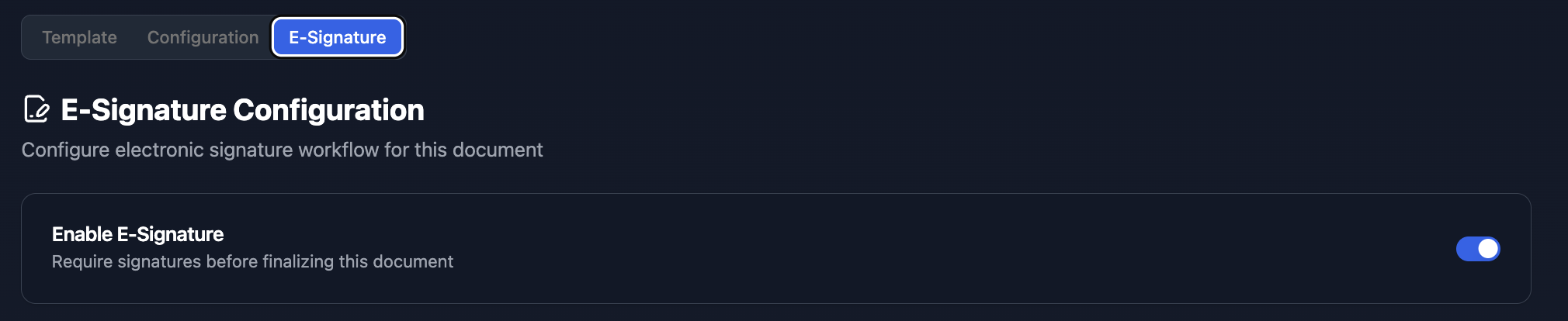
TypeFlow e-signatures comply with eIDAS and ESIGN regulations.
How to Follow Up on Late Payments
Automate payment reminders so you never chase invoices manually. Set a trigger for when Due Date passes and Status remains Sent - TypeFlow or Airtable Automations handles the rest.
- Trigger when Due Date passes and Status is still Sent.
- Include the original invoice PDF in the reminder email.
- Update Status to Overdue automatically.
According to World Commerce & Contracting, late payments cost businesses an average of 5% of revenue.
Best Practices for Freelance Invoicing in Airtable
- Use auto-number for invoice numbers. Sequential numbering without manual entry.
- Set payment terms in the Clients table. Pull them into each invoice automatically.
- Back up your base regularly. Export to CSV once a month.
- Test your template with edge cases. Long client names, multiple line items, different currencies.
Airtable Invoicing vs Accounting Software for Freelancers
| Feature | Airtable + TypeFlow | Accounting Software |
|---|---|---|
| Invoice generation | Yes (via TypeFlow) | Yes (built-in) |
| E-signatures | Yes (built-in) | No |
| Expense tracking | Manual | Built-in |
| Tax reports | No | Yes |
| Customization | Full control | Limited templates |
| Learning curve | Low if you know Airtable | Varies |
Airtable works well for freelancers who want flexibility and already use it for project management. Accounting software suits those who need tax reports and expense tracking in one tool. Many freelancers use both - Airtable for invoicing, QuickBooks for bookkeeping.
For a full breakdown of every invoicing tool available, see our Best Invoicing Tools for Airtable in 2026 guide. For the QuickBooks-specific comparison, see our guide on Airtable invoicing vs QuickBooks. For converting quotes into invoices, check the quote-to-invoice workflow.
Start Sending Freelance Invoices From Airtable for Free
TypeFlow offers a free tier (20 documents) to test invoice generation from your Airtable base. Create your first invoice PDF in minutes.
For the complete invoice setup, see our step-by-step guide. For automation workflows, check the invoice automation guide.
Ready to automate your freelance invoicing?
Connect your Airtable base, design your template, and send your first invoice in minutes.
Start free with 20 documentsFrequently Asked Questions About Airtable Freelance Invoices
Find answers to the most common questions about this feature.
Popular Questions
All Questions
Need more help?
Our team is here to help you solve all your problems and answer your questions.
Contact Us
Kevin from TypeFlow
•AuthorKevin Rabesaotra is a growth engineer and automation specialist with 8+ years of experience building no-code solutions. As Founder & CEO of TypeFlow, he has helped hundreds of businesses automate document generation and streamline workflows with Airtable integrations. Previously, Kevin was a Product Lead specializing in growth engineering, running experiments to drive revenue, retention, and lead generation.
More articles
How to Print Labels from Airtable with Quantity Control (Step by Step)
Print multiple labels per Airtable record based on a quantity field. Step-by-step guide for linked records mode and quantity repeat mode with barcodes and Avery sheets.
Read articleHow to Print Avery Mailing Labels from Airtable
Print Avery mailing labels (5160, 5161, 5162) from Airtable without Word mail merge. Step-by-step guide with print label mode, automation, and bulk generation.
Read articleHow to Create Inventory Labels with Barcodes in Airtable
Create inventory labels with Code 128, EAN-13, or QR barcodes from Airtable. Step-by-step guide for warehouse, retail, and asset tracking with thermal and Avery printers.
Read article