Airtable Manufacturing Document Automation: Complete Guide
Key Takeaways:
- Deloitte's Smart Manufacturing Survey found that 92% of manufacturers believe smart manufacturing will be the main driver for competitiveness - yet many still rely on manual documentation.
- Airtable + TypeFlow automates the five core manufacturing documents: production orders, QC reports, spec sheets, traceability documents, and certificates of conformity.
- Bill of Materials and inspection checklists populate dynamically from Airtable linked records - no manual data entry per document. For manufacturing agreements and MSAs that span 50-100+ pages, see how to generate long documents from Airtable.
- E-signature for inspector approvals and customer sign-offs, with full audit trail for ISO 9001 compliance.
- Setup takes hours, not months - compared to dedicated MES software like MasterControl or Arena PLM.
Last reviewed May 2026.
You can automate production orders, QC reports, spec sheets, certificates of conformity, and traceability documents directly from your Airtable manufacturing data. TypeFlow handles the document layer that traditional MES or PLM tools make heavy and expensive: Google Docs or HTML/CSS templates fed by BOM and inspection records, plus e-signature with full audit trail for ISO 9001 compliance. For audit-ready reports and certificates, see our reports and certificates solution.
McKinsey research shows that digital transformation in manufacturing increases labor productivity by 15-30%. This guide covers the five document types that manufacturing teams automate from Airtable, the base structure you need, and how to set up automated generation with compliance-ready audit trails.
Automate your manufacturing documents
Generate production orders, QC reports, and certificates from Airtable. Built-in e-signature for inspector approvals.
Start free with 20 documents →Why Manufacturers Use Airtable for Document Automation
The documentation burden
Manufacturing teams waste hours per week copying BOM data, inspection results, and supplier info from Airtable into Word or Excel templates - one document at a time. Each document requires accurate data from multiple sources, and when created manually, errors and delays are inevitable.
Common pain points:
- Production orders created by copying BOM data into a template for each job
- QC reports that require manual entry of inspection results, even though the data is already in Airtable
- Certificates of conformity delayed because someone has to compile test results from multiple records
- Traceability documents assembled under time pressure during audits or recalls
Why not use MES or PLM software?
Dedicated manufacturing software like MasterControl, Arena PLM, or Plex handles document control, but at a cost:
| Factor | Airtable + TypeFlow | MES / PLM Software |
|---|---|---|
| Monthly cost | ~$50 | $500-2,000+ |
| Setup time | Hours to days | Weeks to months |
| Implementation | Self-service | Requires vendor or consultant |
| Flexibility | Full customization (Google Docs + HTML Builder) | Rigid built-in forms |
| Learning curve | Low (familiar tools) | High (proprietary systems) |
| Best for | SMB manufacturers, custom documents | Regulated enterprise, complex workflows |
Airtable + TypeFlow makes sense when your team already manages production data in Airtable and needs professional documents without enterprise software overhead. If you need full MES capabilities (shop floor scheduling, machine integration, work-in-progress tracking), dedicated software is worth the investment.
Manufacturing Documents You Can Automate
Here are the five core document types, each with a link to its detailed setup guide.
Production Orders
Production orders authorize and instruct manufacturing of specific quantities. The key requirement: a Bill of Materials that lists all components and quantities needed for the job.
With Airtable linked records, BOM items populate dynamically using loop_0 - the table in your template grows based on the number of components. No manual line item entry.
Typical fields: Order number, product, quantity, BOM components, operations routing, due date, priority, special instructions.
Trigger: Auto-generate when order status changes to "Released."
Step-by-step guide: Generate Production Orders from Airtable →
QC Reports
Quality control inspection reports document what was checked, what passed, and what failed. QC reports often include checklist items from a linked table and photos of defects from Airtable attachment fields.
Typical fields: Product, batch/lot number, inspector, date, checklist results (pass/fail per item), defect descriptions, corrective actions, photos.
Trigger: Auto-generate when inspection status changes to "Complete."
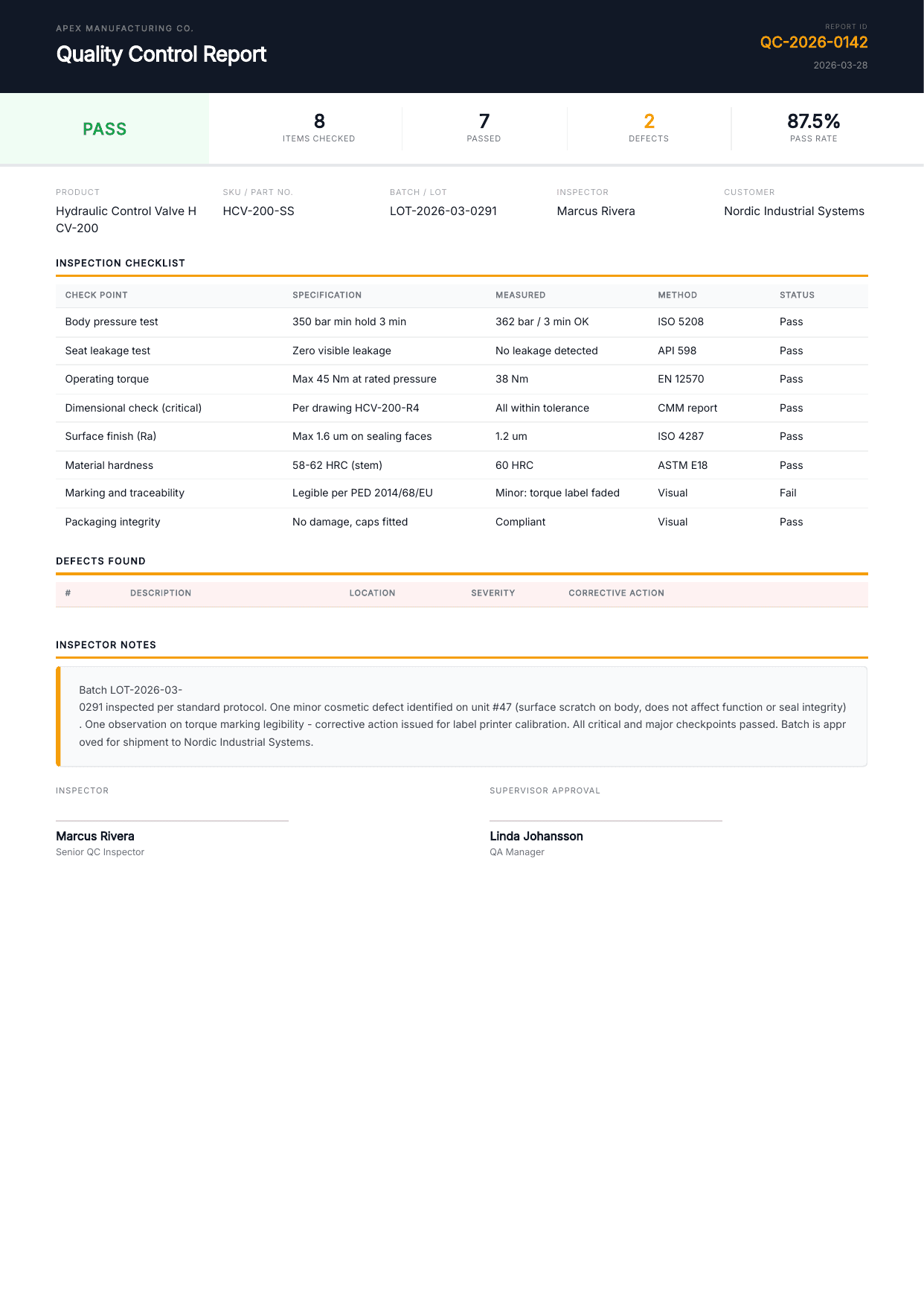
Step-by-step guide: Automate QC Reports from Airtable →
Spec Sheets
Product specification sheets with technical data, dimensions, materials, and images. Spec sheets pull from a Products table with linked specifications and feature records.
Typical fields: Product name, SKU, description, dimensions, weight, materials, certifications, product photos.
Trigger: Generate on demand or when a product record is marked "Published."
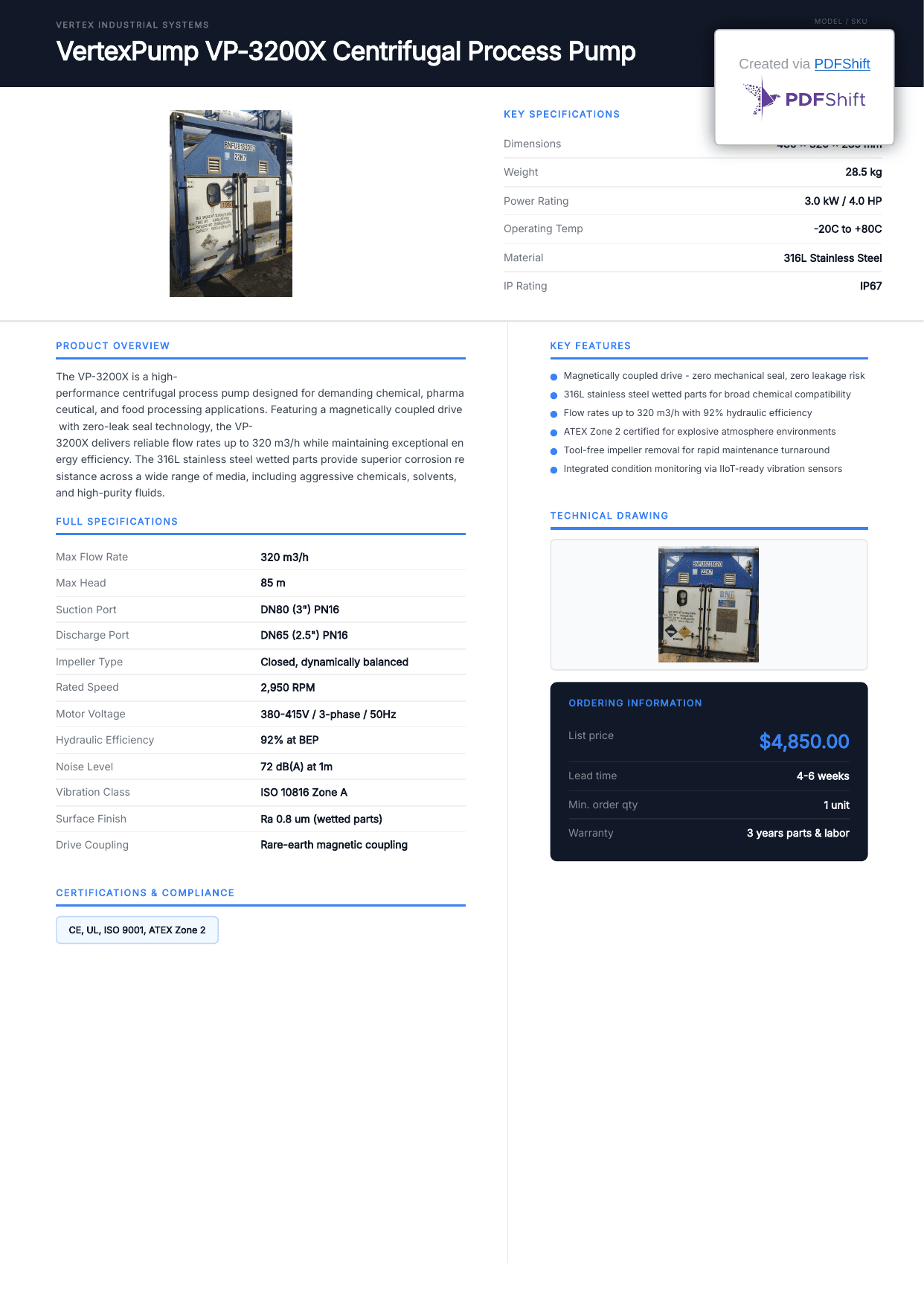
Step-by-step guide: Generate Spec Sheet PDFs from Airtable →
Traceability Documents
Traceability documents prove where a product came from, what happened to it, and who approved it. With FDA food recalls up 93% in early 2025 and FSMA traceability rules requiring 24-hour record sharing by 2028, manual traceability documentation is a compliance risk.
Typical fields: Product, batch/lot, raw materials (suppliers, lot numbers), process steps, inspection results, shipping details, timestamps.
Trigger: Auto-generate when batch status changes to "Shipped" or on demand during audits.
Step-by-step guide: Airtable Traceability Document Automation →
Certificates of Conformity
A Certificate of Conformity (CoC) certifies that a product batch meets specified requirements. It compiles test results from quality inspections and confirms compliance with customer or regulatory standards.
Typical fields: Product, batch number, customer, order reference, test parameters, test results (pass/fail), applicable standards, authorized signatory.
Trigger: Auto-generate when all QC checks pass for a batch.
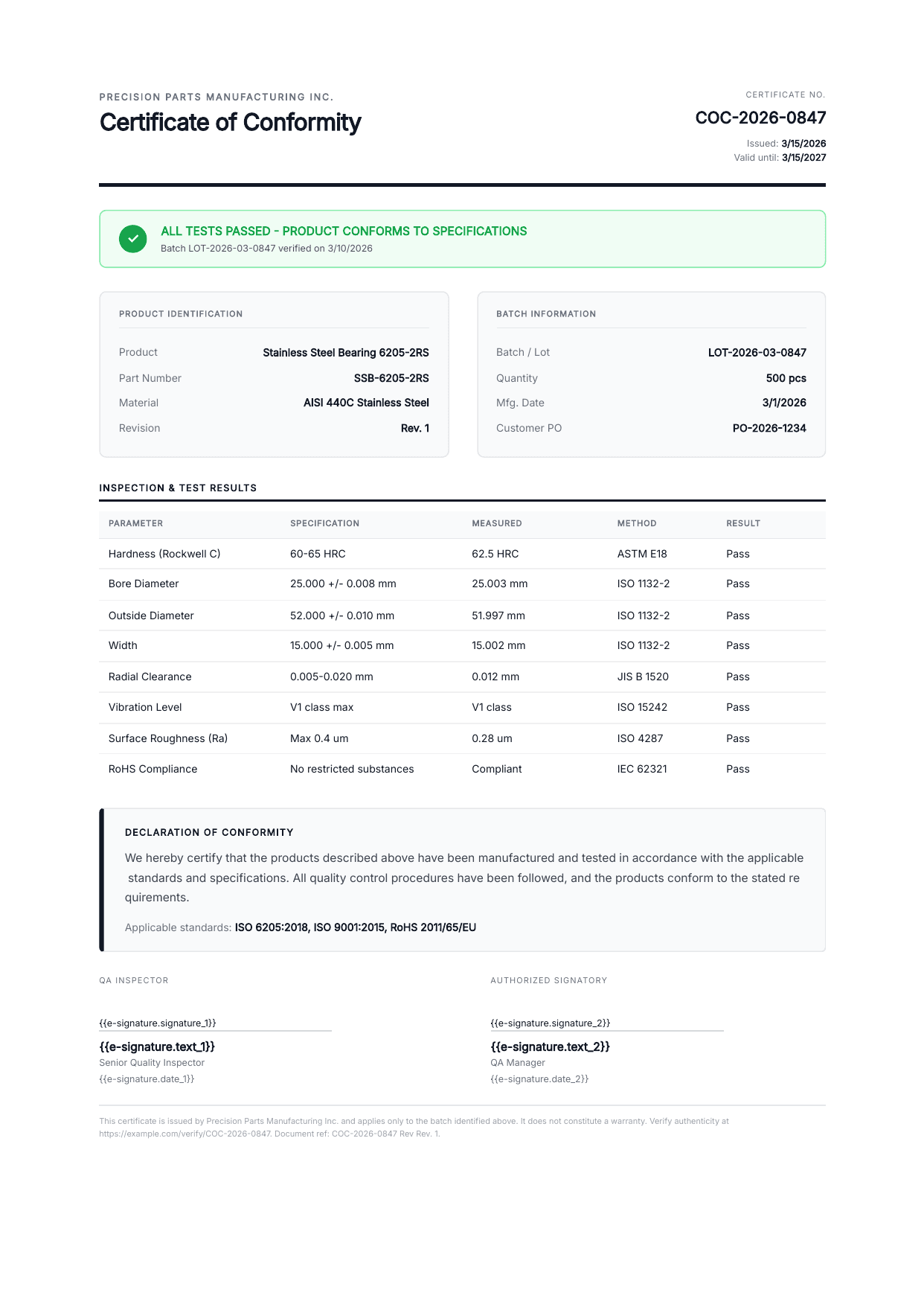
Step-by-step guide: Certificate of Conformity Automation →
Still deciding which tool handles this? We compare eleven of them in our certificate generation tools roundup.
Document Frequency Summary
| Document | Frequency | Line Items | E-Signature | Guide |
|---|---|---|---|---|
| Production Orders | Per job | ✅ BOM components | Optional (supervisor) | → |
| QC Reports | Per inspection | ✅ Checklist + defects | ✅ Inspector | → |
| Spec Sheets | Per product | ✅ Specifications | Optional | → |
| Traceability Docs | Per batch | ✅ Process steps + suppliers | ✅ QA manager | → |
| Certificates of Conformity | Per batch | ✅ Test results | ✅ Authorized signatory | → |
How to Structure Your Airtable Base for Manufacturing
The right base structure connects your production data so documents can pull information from multiple tables automatically.
Here's a QC-focused manufacturing base you can copy and start with:
Core Tables
Products Your product catalog. Every other table references this.
- Product name, SKU, description
- Category, specifications
- BOM (linked to Components table)
- Active/discontinued status
Components / BOM Linked to Products. Bill of Materials for each product.
- Component name, part number
- Quantity per unit, unit of measure
- Supplier (linked to Suppliers table)
- Lead time, cost
Production Orders One record per manufacturing job.
- Order number, product (linked), quantity
- BOM items (linked - auto-populated from product)
- Status (Draft, Released, In Progress, Complete)
- Due date, priority
- PDF attachment field
QC Inspections Linked to Production Orders or Batches.
- Inspector, date, type
- Checklist items (linked table)
- Defects found (linked table)
- Photos (attachment field)
- Pass/Fail status
Suppliers Your supplier database for traceability.
- Supplier name, contact, certifications
- Products supplied (linked)
Key Relationships
Products
  ├── Components / BOM
  │     └── Suppliers
  ├── Production Orders
  │     └── BOM Items (linked from Components)
  ├── QC Inspections
  │     ├── Checklist Items
  │     └── Defects
  └── Certificates of Conformity
        └── Test Results
Views for Document Generation
- "Released Orders" - Production orders ready for the shop floor
- "Pending Inspection" - Jobs awaiting QC
- "Failed Inspections" - QC reports requiring corrective action
- "Ready to Ship" - Batches with all QC passed, needing CoC
Setting Up Your First Manufacturing Document
The process is the same for all five document types. Each deep-dive article linked above covers the full setup, but here's the overview.
1. Create Your Template
Use Google Docs for simple documents or the HTML Template Builder for precise layouts with logos, headers, and structured tables.
Add {{variable}} placeholders where Airtable data should appear. For BOM line items or checklist results, use {{loop_0}} in a table row to create dynamic content that grows with your data.
2. Connect and Map
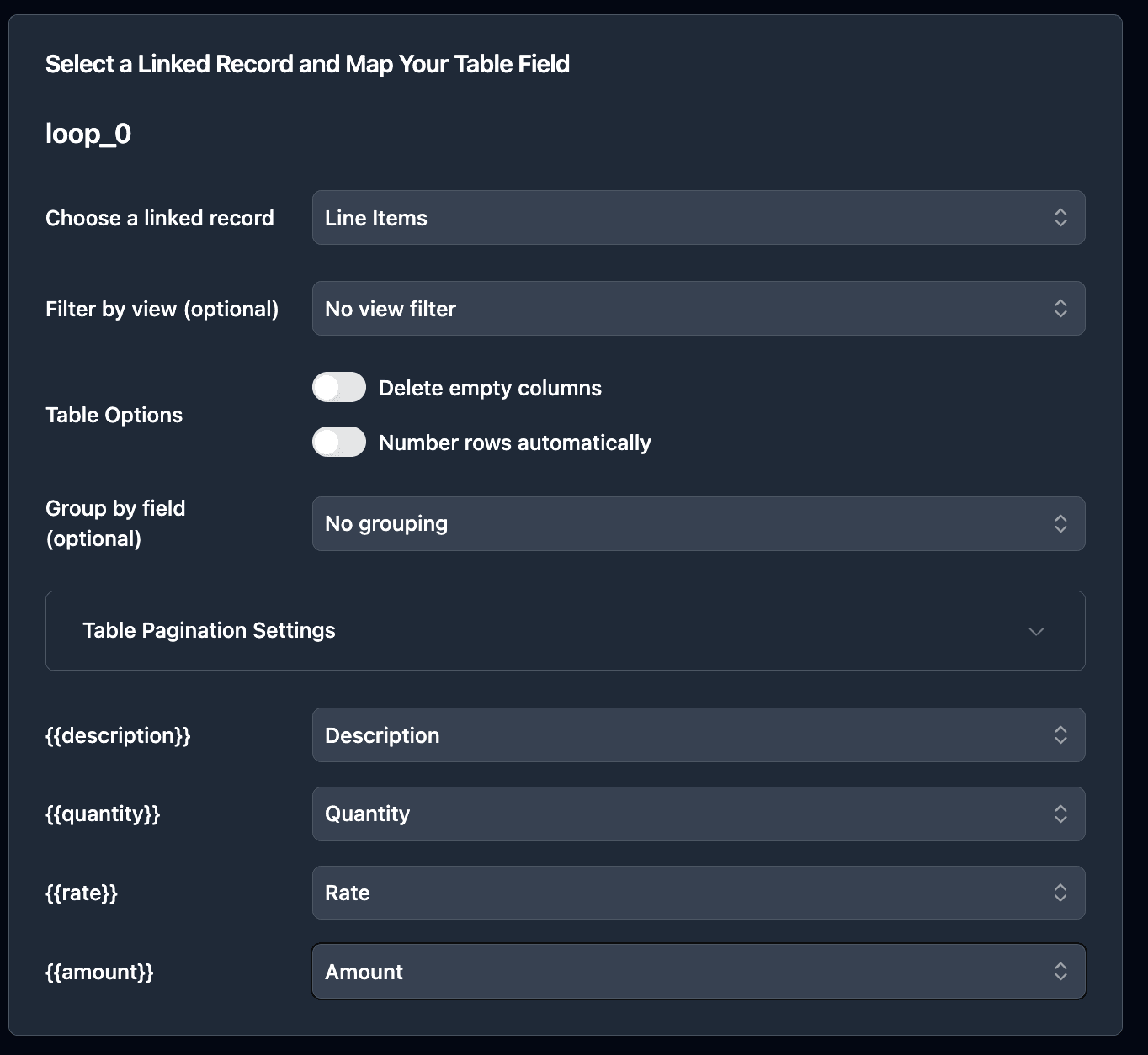
In TypeFlow, select your base, table, and template. Map each variable to its Airtable field.
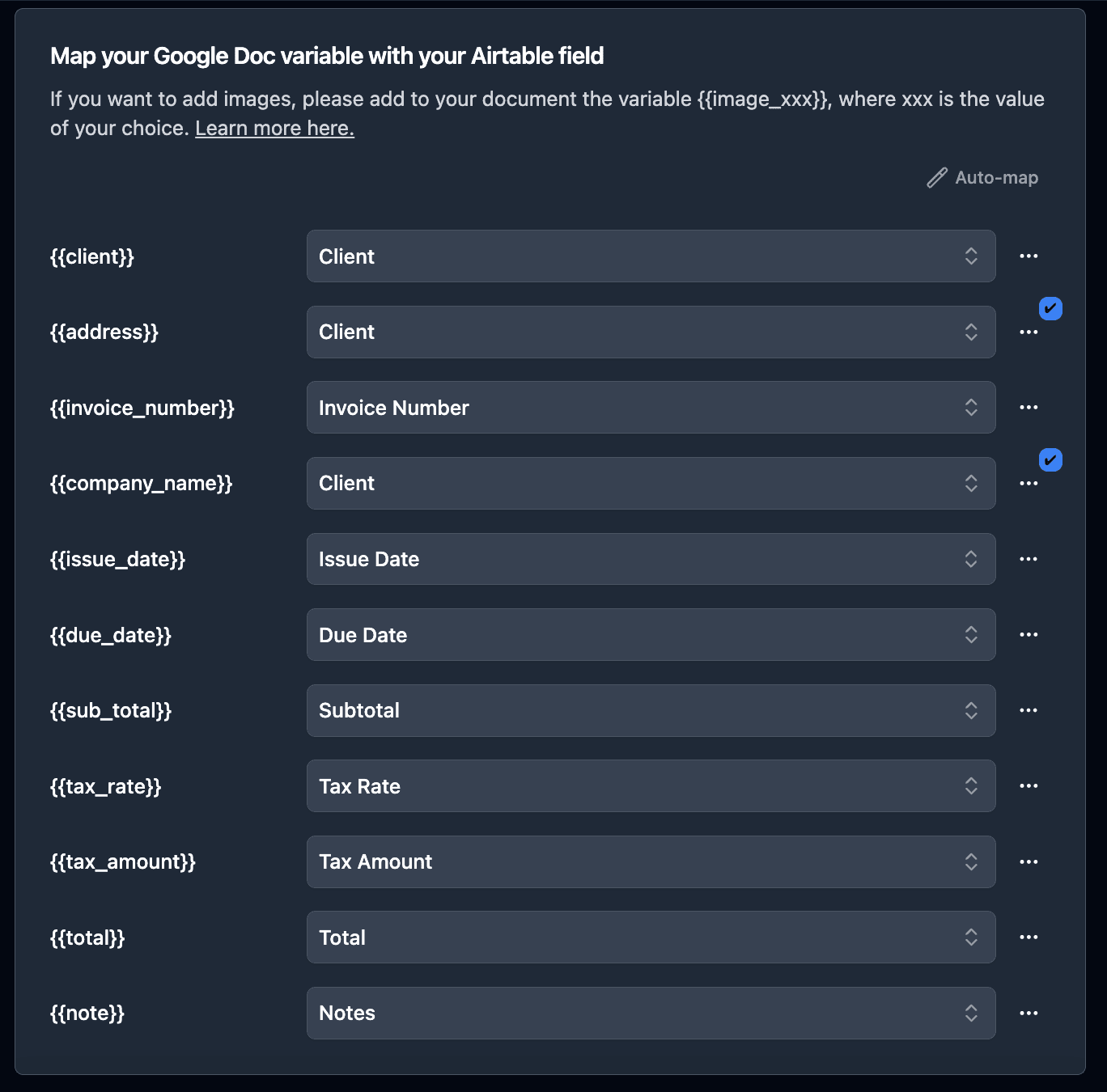
For line items (BOM components, checklist items, test results), select the linked record field and map the sub-fields.
3. Set Up Your Trigger
Button field - One click generates the PDF. Best for on-demand documents like spec sheets.
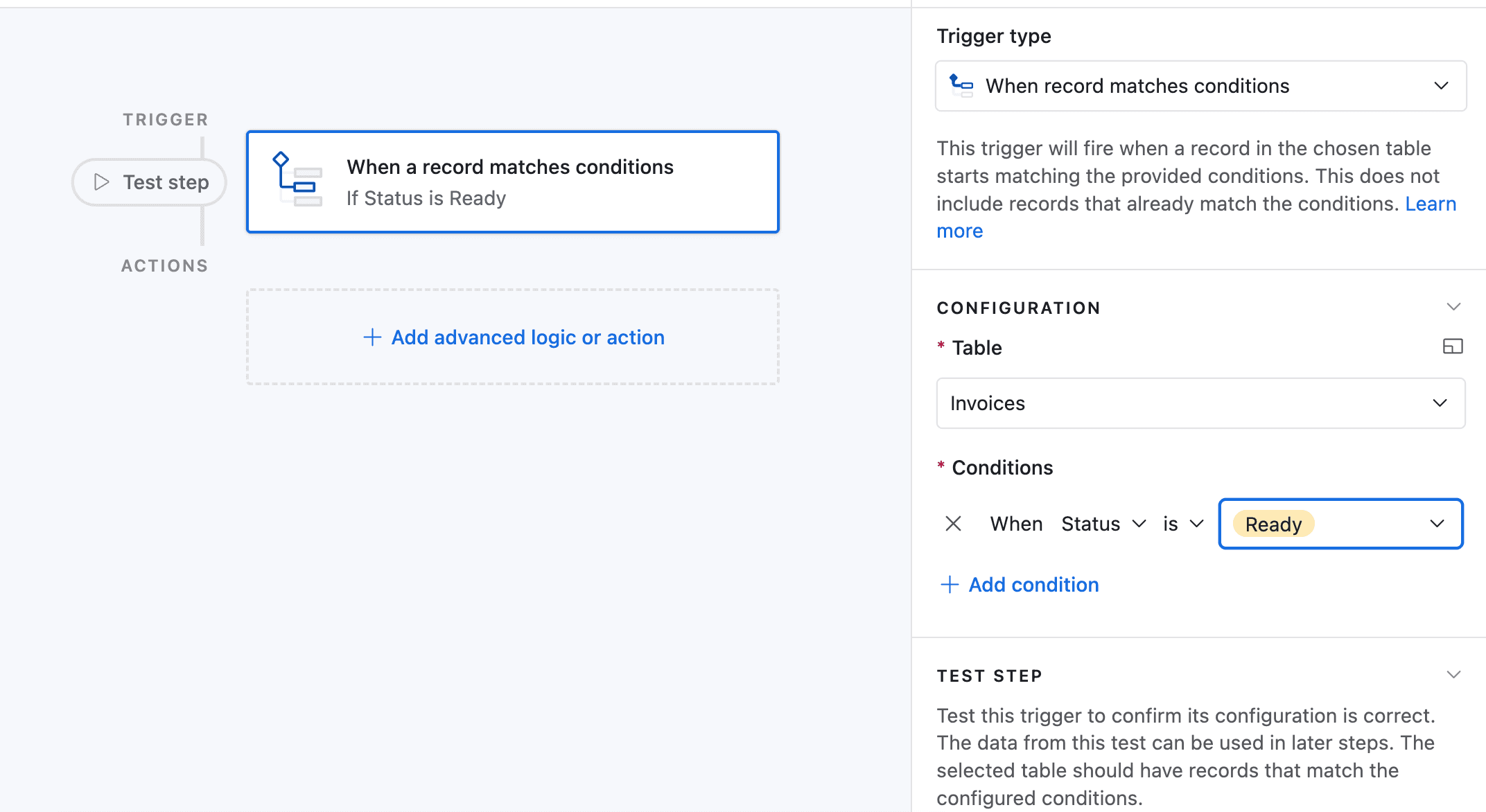
Airtable Automation - Auto-generate when conditions are met. Best for production orders (status = "Released"), QC reports (inspection = "Complete"), and CoCs (all tests passed).
Bulk generation - Generate all documents for a batch at once from the TypeFlow bulk generate page.
4. Test and Refine
Generate a test document with real data. Verify:
- BOM line items display all components
- Calculated fields (totals, formulas) render correctly
- Photos (for QC reports) appear at the right size
- The document prints cleanly on standard paper
Compliance and Quality Management
Manufacturing documentation serves two purposes: operational (tell people what to do) and compliance (prove you did it). Automation handles both.
ISO 9001 Documentation
ISO 9001 requires documented procedures, records of inspections, and traceability of changes. With Airtable + TypeFlow:
- Document control: Templates are versioned in Google Docs. Each generated PDF is timestamped and attached to the Airtable record.
- Inspection records: QC reports generated from Airtable data are consistent and complete - no missing fields, no inconsistent formatting.
- Audit trail: Every signed document includes a Certificate of Completion with IP address, timestamps, and device information. On the Enterprise plan, you can sync the full audit trail directly to Airtable for complete visibility without leaving your base.
FDA and FSMA Traceability
For food, pharma, and medical device manufacturers, traceability documentation is non-negotiable. McKinsey reports that only 2% of companies can identify third-tier supplier risks - traceability documents bridge that gap.
TypeFlow pulls supplier data, lot numbers, and process steps from linked Airtable records into a single traceability PDF. When an auditor asks for records, you generate the document in seconds instead of spending hours compiling data.
E-Signature for Inspector Approvals
Quality inspections and certificates need authorized signatures. TypeFlow's built-in e-signature handles this:
- Inspector signs QC report on a tablet after completing the inspection
- QA manager signs Certificate of Conformity before shipment
- Signatures are legally compliant under ESIGN Act and eIDAS
- Full audit trail with IP address, timestamp, and device information
For audit-ready reports with e-signature approval, see our compliance reporting guide.
Automating the Manufacturing Document Workflow
Here's how the five document types fit into an automated workflow:
Product created in Airtable
    ↓
Production Order released
    ↓ (automation triggers)
Production Order PDF generated → sent to shop floor
    ↓ (production complete)
QC Inspection conducted
    ↓ (inspection complete, automation triggers)
QC Report PDF generated → signed by inspector
    ↓ (all QC checks pass)
Certificate of Conformity generated → signed by QA manager
    ↓ (ready to ship)
Traceability Document generated → attached to shipment record
Each step is triggered by a status change in Airtable. No manual document creation at any point.
Real-World Examples
Parts distributor generates spec sheets for their entire catalog. Each spec sheet pulls product dimensions, materials, certifications, and photos from Airtable. When a new product is added, the spec sheet generates automatically and attaches to the record for sales team access.
Food manufacturer creates traceability documents for every batch. Supplier lot numbers, process temperatures, and QC test results compile into a single PDF. During their last FDA audit, they produced 6 months of traceability records in under 10 minutes.
Custom fabrication shop generates production orders with BOM line items for each job. The foreman receives the PDF on their tablet with materials, quantities, and assembly instructions. After completion, the QC inspector signs the inspection report on-site.
Best Practices
Start with your highest-volume document
Don't automate all five document types at once. Pick the one your team creates most often (usually production orders or QC reports) and get that workflow running smoothly first.
Use Airtable views to control generation
Create filtered views like "Ready to Generate" and "Pending QC" so you never generate a document for an incomplete record. Add a "PDF Generated" checkbox that updates automatically.
Keep templates simple and compliant
For ISO-regulated environments, add a document control header: document number, revision, effective date, and approval signature. These fields should come from Airtable so they're always current.
Link everything back to the product
Every production order, inspection, and certificate should link back to the Product record. This creates a complete product history accessible from one place.
Manage vendor contracts alongside production
If you source materials from multiple suppliers, consider formalizing vendor agreements in Airtable. See our guide on managing vendor and supplier contracts in Airtable.
Start Automating Manufacturing Documents
Your production data is already in Airtable. The templates take 30 minutes to set up. The automation runs itself after that.
Stop copying BOM data into Word templates. Stop chasing inspector signatures by email. Stop spending hours compiling traceability records for audits. Rated by quality and operations teams on G2.
Start for Free - 20 documents included, no credit card required.
Automate your document generation
Start with 20 free documents. Built for businesses using Airtable.
Frequently Asked Questions
Find answers to the most common questions about this feature.
Popular Questions
All Questions
Need more help?
Our team is here to help you solve all your problems and answer your questions.
Contact UsThis guide is based on manufacturing workflows from Airtable teams using TypeFlow. For industry research, see Deloitte Smart Manufacturing Survey, McKinsey Manufacturing, and ISO 9001. For regulatory guidance, see FDA FSMA and Deloitte Traceability. Last reviewed May 2026.

Kevin from TypeFlow
•AuthorKevin Rabesaotra is a growth engineer and automation specialist with 8+ years of experience building no-code solutions. As Founder & CEO of TypeFlow, he has helped hundreds of businesses automate document generation and streamline workflows with Airtable integrations. Previously, Kevin was a Product Lead specializing in growth engineering, running experiments to drive revenue, retention, and lead generation.
More articles
How to Print Labels from Airtable with Quantity Control (Step by Step)
Print multiple labels per Airtable record based on a quantity field. Step-by-step guide for linked records mode and quantity repeat mode with barcodes and Avery sheets.
Read articleHow to Print Avery Mailing Labels from Airtable
Print Avery mailing labels (5160, 5161, 5162) from Airtable without Word mail merge. Step-by-step guide with print label mode, automation, and bulk generation.
Read articleHow to Create Inventory Labels with Barcodes in Airtable
Create inventory labels with Code 128, EAN-13, or QR barcodes from Airtable. Step-by-step guide for warehouse, retail, and asset tracking with thermal and Avery printers.
Read article