Dividers
Add horizontal and vertical dividers to separate sections in your templates. Customize thickness and color with a simple slider.
Overview
Dividers are simple line elements that help organize your document layout:
| Type | Use Case |
|---|---|
| Horizontal Divider | Separate sections, create visual breaks |
| Vertical Divider | Divide columns, create side-by-side layouts |
Adding Dividers
Method 1: Quick Add Menu
- Select any element on the canvas
- Click the + Add button in the toolbar
- Choose Divider or Vertical Divider from Quick Add
Method 2: Blocks Panel
- Open the Blocks panel (left sidebar)
- Look in the Content category
- Drag Divider or Vertical Divider onto your canvas
Method 3: Keyboard Shortcut
- Press
/anywhere on the canvas - Type "divider" to filter
- Click to insert
Customizing Thickness
Once you add a divider, you can easily adjust its thickness:
- Select the divider on your canvas
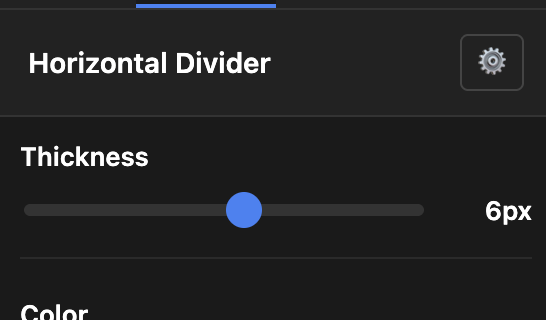
- Open the Design tab in the right sidebar
- You'll see the header shows "Horizontal Divider" or "Vertical Divider"
- Use the Thickness slider to adjust (1px to 10px)
The slider provides real-time feedback - you'll see the divider change as you drag.
Thickness Guidelines
| Thickness | Recommended Use |
|---|---|
| 1px | Subtle separators, fine lines |
| 2-3px | Standard dividers, section breaks |
| 4-5px | Bold dividers, emphasis |
| 6-10px | Decorative bars, headers |
Changing Color
Below the thickness slider, you'll find color presets:
| Preset | Color Code | Best For |
|---|---|---|
| Light | #cccccc | Subtle separation on white backgrounds |
| Gray | #666666 | Standard professional look |
| Dark | #333333 | High contrast, emphasis |
| Custom | 🎨 | Click to pick any color |
Using Brand Colors
- Click the 🎨 button
- Enter your brand color code or use the color picker
- The divider updates instantly
Video Tutorial
Watch how to add and customize dividers in Template Builder:
Tips
- Vertical dividers work best inside flex containers or table cells
- Use consistent thickness throughout your document for a professional look
- Match divider colors with your overall color scheme
- For subtle separation, use light colors with thin lines (1-2px)
Related Articles
- Template Builder Overview - Full editor guide
- Pre-built Blocks - All available blocks