Airtable Shipping & Fulfillment Document Automation: Complete Guide
Key Takeaways:
- Airtable + TypeFlow automates the full fulfillment document chain: packing lists, custom package labels with barcodes, bills of lading, commercial invoices, and proof of delivery.
- Order line items populate dynamically from Airtable linked records - the packing list grows with the order, no manual entry.
- Bulk generation handles end-of-day batch processing: generate all packing lists for today's shipments in one click.
- Barcodes and QR codes on labels and packing slips for warehouse scanning - no separate labeling software needed.
Last reviewed August 2026.
After labeling products from Airtable, the next step is fulfillment: packing lists, shipping documents, and delivery confirmations. You can automate all of these directly from Airtable - connect TypeFlow to your order data, set up templates with barcodes and line items, and generate all shipping documents per order automatically. No manual copy-paste per shipment.
When teams create packing lists, invoices, and delivery documents manually, the same order data is copied into multiple files. Automating those documents removes that repetitive handoff. For a team shipping 50 orders per day with 3 documents each, automation turns hours of copy-paste into minutes.
This guide covers every fulfillment document type, the Airtable base structure you need, and how to automate the entire chain from order to delivery.
Automate your shipping documents
Generate packing lists, labels, and commercial invoices from Airtable. Barcodes and bulk generation included.
Start free with 20 documents →From Airtable Records to Warehouse Documents
Airtable tracks both inventory and orders. TypeFlow generates the documents each team needs to receive products, label inventory, pack orders, and complete delivery. These are two branches of the same operational system.
Inventory branch: Product or stock record → barcode labels → receive, store, pick.
Order branch: Order + line items → packing list → shipping documents → proof of delivery.
| Workflow | Airtable trigger | Team | Document | Guide |
|---|---|---|---|---|
| Receive and identify inventory | Stock received or product created | Warehouse | Product labels with barcode | Inventory labels |
| Replenish or relabel stock | Qty to Label updated | Warehouse | Quantity-based labels | Quantity control |
| Prepare an order | Order status = Ready to Pack | Fulfillment | Pick list or packing list | Packing lists |
| Ship an order | Carrier or shipment assigned | Shipping | Custom package labels and shipping documents | Shipping documents |
| Confirm delivery | Delivery complete | Operations | Proof of delivery with e-signature | Proof of delivery |
If you need product, inventory, or barcode labels, start with our label printing guide. For a full comparison of label printing tools, see Best Label Printing Tools for Airtable in 2026.
Why Fulfillment Teams Need Document Automation
The daily document burden
At 50 orders per day with 2-5 documents each, manual creation consumes 3-20 hours daily in copy-paste work. A typical fulfillment operation generates multiple documents per order:
| Order stage | Document | Created how (manual) |
|---|---|---|
| Packed | Packing list | Copy items from order to template |
| Labeled | Shipping label | Type address, add barcode manually |
| Shipped (international) | Commercial invoice | Compile HS codes, values, origin |
| Shipped (freight) | Bill of lading | Fill carrier form with cargo details |
| Delivered | Proof of delivery | Get signature, scan, upload |
At 50 orders per day, that's 100-250 documents created manually. Each one takes 2-5 minutes of copy-paste work. The math is simple: automation saves 3-20 hours per day depending on volume.
TypeFlow vs shipping platforms
Tools like ShipStation, Shippo, and EasyPost handle carrier rates and label printing. But they don't generate custom packing lists, branded commercial invoices, or packaging inserts with your design.
TypeFlow doesn't replace your shipping platform. It handles the document side that shipping platforms don't:
| Feature | TypeFlow | ShipStation | Shippo |
|---|---|---|---|
| Custom packing lists | ✅ Full design control | Basic template | Basic |
| Custom commercial invoices | ✅ Your layout and branding | ✅ | ✅ |
| Custom warehouse and package labels | ✅ With barcodes | Limited | Limited |
| Packaging inserts | ✅ With QR codes | ❌ | ❌ |
| Proof of delivery with e-signature | ✅ | Carrier-dependent | ❌ |
| Bill of lading | ✅ Custom template | ❌ | ❌ |
| Carrier postage labels and rates | ❌ (use ShipStation) | ✅ | ✅ |
| Bulk document generation | ✅ | ✅ | ✅ |
| Airtable integration | ✅ Native | Via Zapier | Via Zapier |
Use both together: ShipStation for shipping rates and carrier labels, TypeFlow for custom branded documents from your Airtable data.
Fulfillment Documents You Can Automate
Packing Lists
The document inside every package. Lists all items, quantities, and the ship-to address. Your warehouse team uses it to verify the pick, and the customer uses it to confirm what arrived.
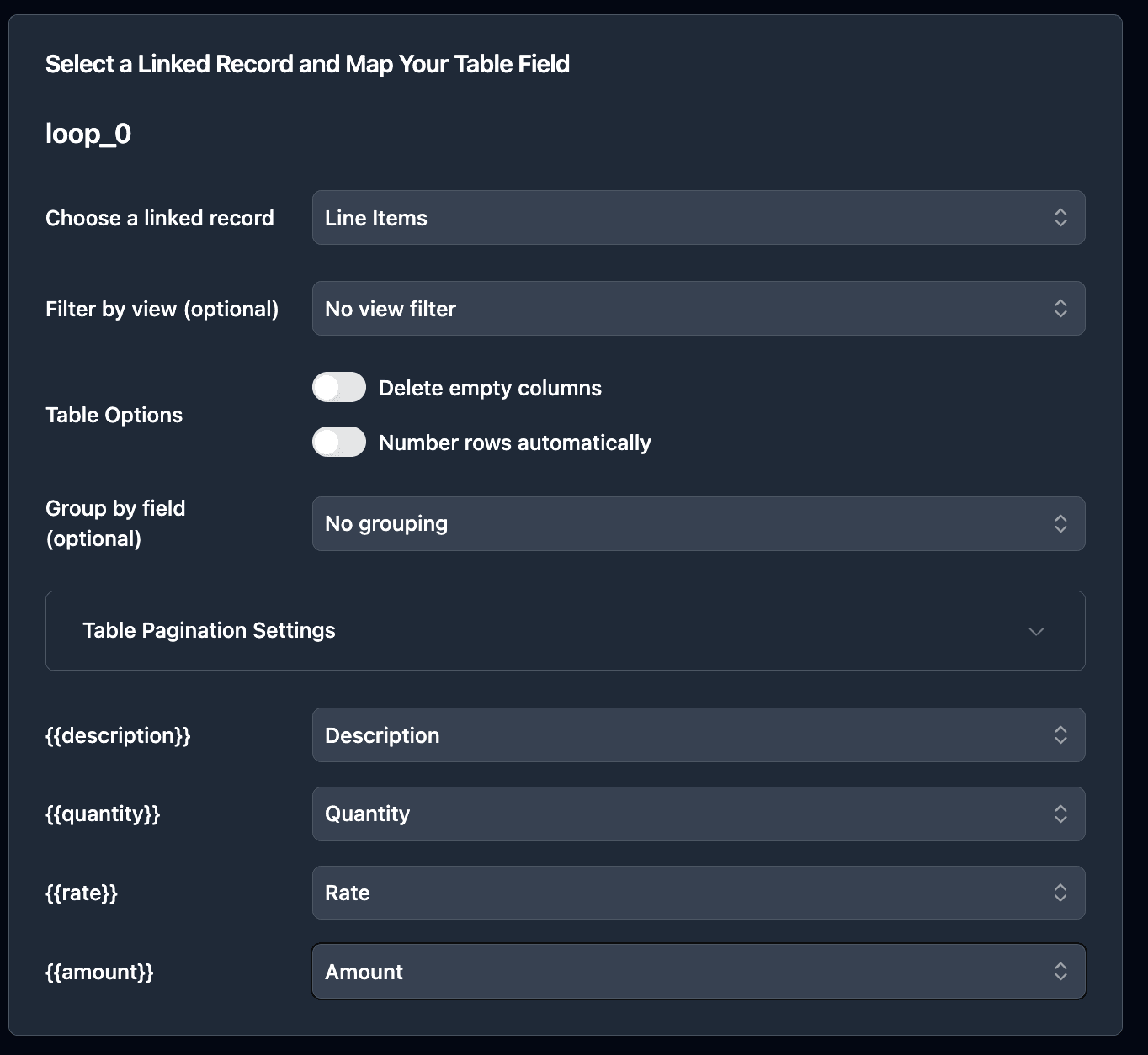
Order line items from Airtable linked records populate dynamically using loop_0 - the table grows based on how many items are in each order. No manual entry.
Key fields: Order number, customer name, ship-to address, items (linked), quantities, SKUs, special handling notes.
Trigger: Auto-generate when order status changes to "Ready to Pack."
Step-by-step guide: Generate Packing Lists from Airtable →
Custom Package and Warehouse Labels
Custom labels with recipient details, order barcode, handling notes, weight, and carrier reference. TypeFlow supports barcode and QR code generation natively in HTML templates - Code128, QR Code, EAN-13, UPC-A. For carrier postage labels with rates, use a shipping platform like ShipStation or Shippo.
Key fields: Ship-to name and address, return address, order number (as barcode), weight, handling instructions.
Trigger: Generate with the packing list or separately when order is packed.
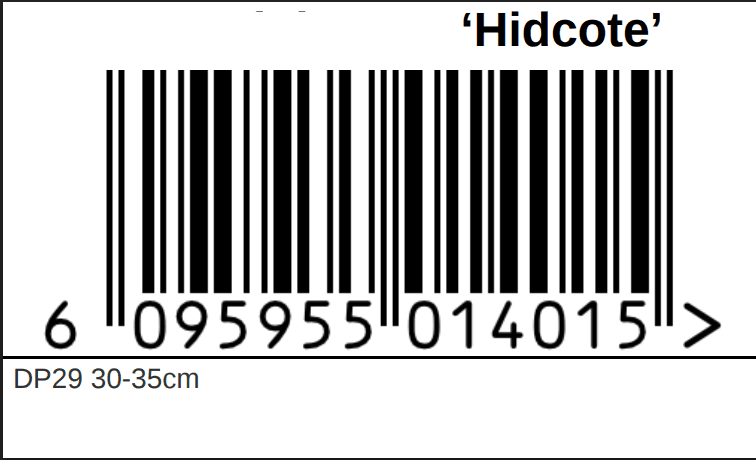
Step-by-step guide: Print Labels from Airtable →
Bills of Lading
Required for freight shipments (LTL, FTL). Documents the shipper, consignee, cargo description, weight, and freight class. The carrier signs at pickup and the receiver signs at delivery.
Key fields: Shipper info, consignee info, carrier, BOL number, commodity description, weight, freight class, handling instructions.
Trigger: Auto-generate when shipment method = "Freight."
Step-by-step guide: Shipping Document Generation from Airtable →
Commercial Invoices
Required for international shipments. Includes HS codes per item, declared values, country of origin, and Incoterms (FOB, CIF, etc.). U.S. Customs and Border Protection requires packing lists for all international shipments.
Key fields: Exporter info, importer info, items with HS codes, quantities, unit values, total value, country of origin, currency, Incoterms.
Trigger: Auto-generate when ship-to country is not domestic.
Step-by-step guide: Shipping Document Generation from Airtable →
Proof of Delivery
Confirms that the shipment arrived and was received. The recipient signs on their phone or tablet using TypeFlow's e-signature. The signed PDF saves back to the Airtable order record automatically.
Key fields: Order number, delivery date/time, recipient name, recipient signature, delivery notes, photos of delivered goods.
Trigger: Driver opens the signing link on arrival, recipient signs on-site.
Step-by-step guide: Generate Proof of Delivery from Airtable →
Packaging Inserts
Print-ready cards included with every order: thank-you message, product care instructions, warranty details, and a QR code linking to a how-to guide or product page. Generated per order with personalized content from Airtable.
Key fields: Customer name, product name, care instructions, QR code URL, warranty terms.
Trigger: Auto-generate when order status changes to "Processing."
Document Summary
| Document | Frequency | Line Items | Barcode/QR | E-Signature | Guide |
|---|---|---|---|---|---|
| Packing List | Every order | ✅ Order items | ✅ Order barcode | Optional | → |
| Custom Package Labels | Every order | ❌ | ✅ Order barcode | ❌ | → |
| Bill of Lading | Freight only | ✅ Cargo items | Optional | ✅ Carrier + receiver | → |
| Commercial Invoice | International | ✅ Items + HS codes | Optional | Optional | → |
| Proof of Delivery | Every delivery | ❌ | Optional | ✅ Recipient | → |
| Packaging Insert | Every order | ❌ | ✅ QR code | ❌ | - |
How to Structure Your Airtable Base for Fulfillment
We've built a ready-to-use fulfillment base you can copy and start with:
Copy the Shipping & Fulfillment base →
Core Tables
Orders One record per order. The hub of your fulfillment workflow.
- Order number (auto-number), order date
- Customer (linked to Customers table)
- Ship-to address
- Status (Received, Processing, Packed, Shipped, Delivered)
- Shipping method, carrier, tracking number
- PDF attachments (packing list, commercial invoice, POD)
Products Your product catalog.
- Product name, SKU, description
- Weight, dimensions
- HS code (for international), country of origin
- Price, cost
- Product image
Order Items (Line Items) Linked to Orders and Products. Each item in an order.
- Product (linked), quantity, unit price, total
- These become
loop_0line items in your packing list template
Customers
- Name, company, email, phone
- Default shipping address
- International flag (triggers commercial invoice)
Key Relationships
Customers
  └── Orders
        └── Order Items
              └── Products
Views for Fulfillment Workflow
- "Ready to Pack" - Orders with status = Processing, all items confirmed
- "Ship Today" - Orders packed, awaiting carrier pickup
- "International" - Orders requiring commercial invoices
- "Awaiting Delivery" - Shipped orders pending POD
- "Delivered" - Completed orders with signed POD
Setting Up Your First Fulfillment Document
1. Create Your Template
Use Google Docs for packing lists and commercial invoices. Use the HTML Template Builder for labels and packaging inserts where precise sizing matters.
For order items, use loop_0 in a table row - TypeFlow repeats the row for each item in the order.
2. Connect and Map
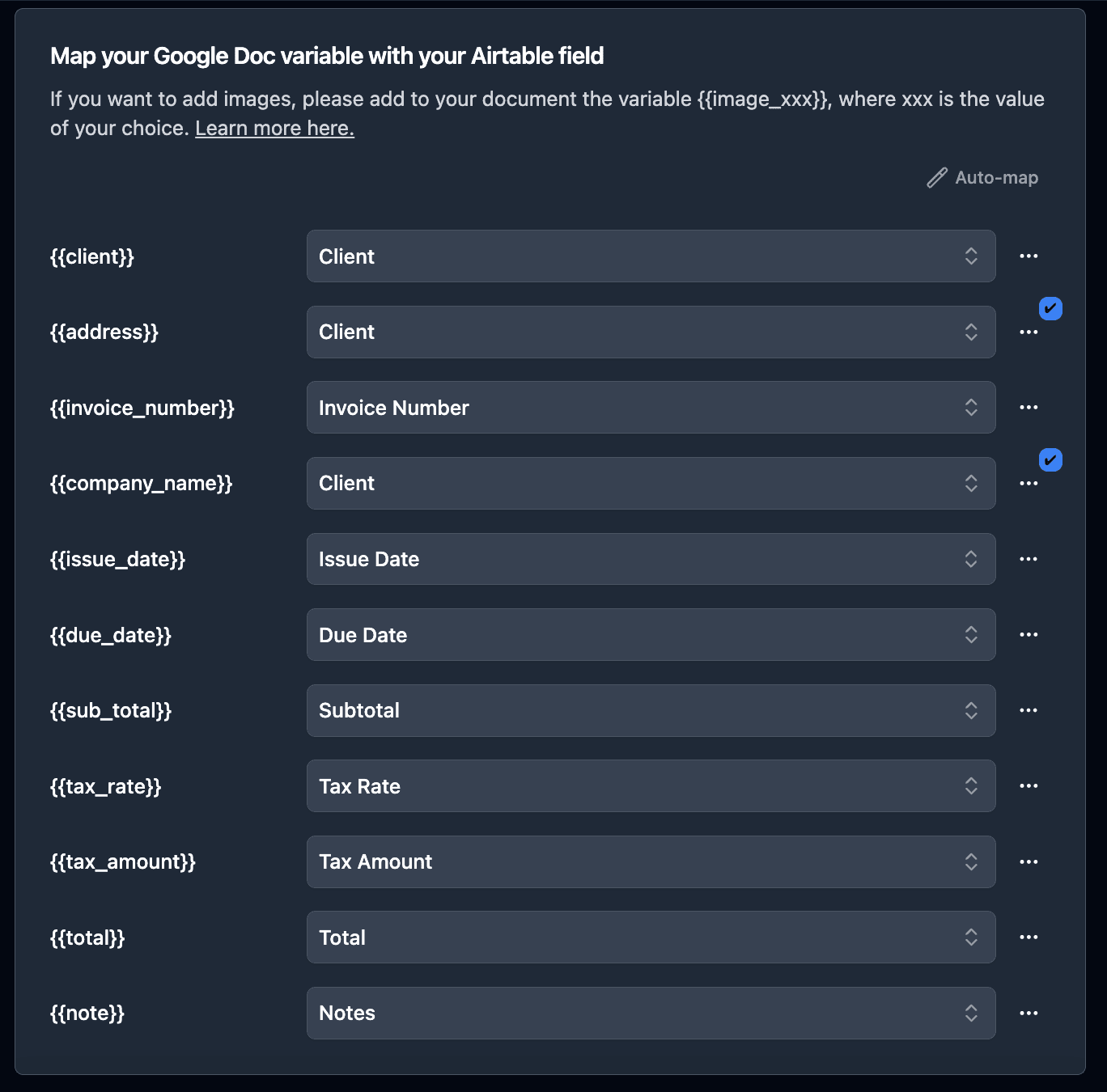
Select your Orders table, choose your template, and map each variable to its Airtable field. For line items, select the Order Items linked record field and map the sub-fields (product name, SKU, quantity).
3. Add Barcodes and QR Codes
In your HTML template, add barcode variables where you need them. TypeFlow supports Code128, QR Code, EAN-13, and UPC-A natively.
For a packing list with an order barcode at the top and a QR code linking to the tracking page, just add the barcode variable in your template - no external barcode software needed.
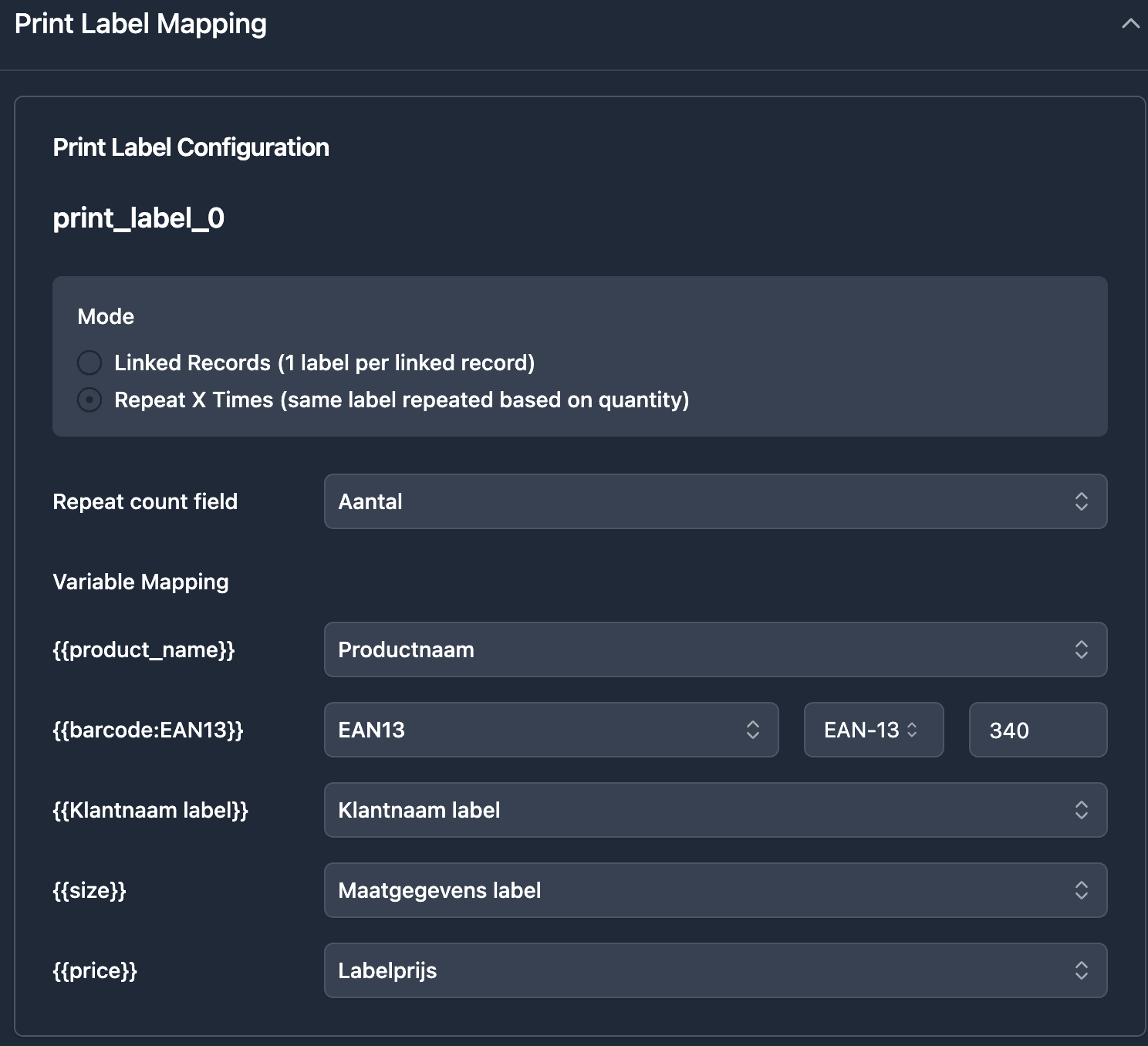
Learn more about barcodes and QR codes →
Automating the Fulfillment Document Workflow
The Complete Chain
Order received in Airtable
    |
    v (status = "Processing")
Packaging insert generated (if enabled)
    |
    v (status = "Packed")
Packing list generated automatically
Shipping label generated
    |
    v (status = "Shipped")
Commercial invoice generated (if international)
Bill of lading generated (if freight)
    |
    v (delivery confirmed)
Proof of delivery with e-signature
    |
    v (all docs saved to Airtable record)
Each step is triggered by a status change in Airtable Automations. No manual document creation at any point.
Bulk Generation for Batch Processing
End-of-day fulfillment: open the TypeFlow bulk generate page, filter by the "Ship Today" view, and generate all packing lists in one batch.
Morning prep: generate pick lists for the warehouse team based on today's orders.
Weekly: generate shipping summary reports from a filtered view.
Email Delivery
Send commercial invoices to customs brokers automatically. TypeFlow's email delivery attaches the PDF and sends it to the recipient configured in your flow - the customer, the carrier, or the customs broker.
Real-World Examples
E-commerce brand generates packing lists and packaging inserts automatically when orders change to "Processing." Each insert is personalized with the customer's name, the product they ordered, and a QR code linking to care instructions. 50 orders per day, zero manual document work.
Wholesale distributor creates commercial invoices for international orders. Each invoice pulls HS codes and country of origin from the Products table, calculates totals from line items, and emails the PDF to the customs broker. What took 20 minutes per shipment now takes seconds.
3PL warehouse triggers document generation from WMS status updates via Zapier. Each shipment gets a packing list and bill of lading generated simultaneously. Drivers receive the POD signing link before arriving at the delivery address.
Best Practices
Separate domestic and international workflows
Create different automation triggers for domestic (packing list only) and international (packing list + commercial invoice) orders. Use a formula field or a "Country" single select to route orders automatically.
Use views to control batch generation
The "Ship Today" view should only show orders that are fully packed and ready. Add a "Documents Generated" checkbox that updates automatically to prevent duplicate generation.
Keep HS codes in your Products table
Don't add HS codes per order - store them in the Products table and pull them via linked records. When an HS code changes, it updates everywhere automatically.
Test with real international orders
Commercial invoices are the most error-prone document. Test with a real international order including HS codes, multiple currencies, and Incoterms before going live.
Start Automating Fulfillment Documents
Your order data is in Airtable. Your warehouse team is spending hours on paperwork. The gap is automation.
Connect TypeFlow, create your templates, and generate your first packing list in under 30 minutes. Then add labels, commercial invoices, and proof of delivery as your workflow grows. Rated by Airtable users on G2.
Start for Free - 20 documents included, no credit card required.
Automate your document generation
Start with 20 free documents. Built for businesses using Airtable.
Frequently Asked Questions
Find answers to the most common questions about this feature.
Popular Questions
All Questions
Need more help?
Our team is here to help you solve all your problems and answer your questions.
Contact UsThis guide is based on fulfillment workflows from e-commerce and logistics teams using Airtable and TypeFlow. For international trade requirements, see U.S. CBP, ICC Incoterms, and WCO HS Codes. Last reviewed August 2026.

Kevin from TypeFlow
•AuthorKevin Rabesaotra is a growth engineer and automation specialist with 8+ years of experience building no-code solutions. As Founder & CEO of TypeFlow, he has helped hundreds of businesses automate document generation and streamline workflows with Airtable integrations. Previously, Kevin was a Product Lead specializing in growth engineering, running experiments to drive revenue, retention, and lead generation.
More articles
How to Print Labels from Airtable with Quantity Control (Step by Step)
Print multiple labels per Airtable record based on a quantity field. Step-by-step guide for linked records mode and quantity repeat mode with barcodes and Avery sheets.
Read articleHow to Print Avery Mailing Labels from Airtable
Print Avery mailing labels (5160, 5161, 5162) from Airtable without Word mail merge. Step-by-step guide with print label mode, automation, and bulk generation.
Read articleHow to Create Inventory Labels with Barcodes in Airtable
Create inventory labels with Code 128, EAN-13, or QR barcodes from Airtable. Step-by-step guide for warehouse, retail, and asset tracking with thermal and Avery printers.
Read article