Best Airtable PDF Form Filling Tools in 2026
TypeFlow is the best tool to fill PDF forms from Airtable. It reads your base directly, detects the form fields already inside the PDF, and signs the finished document without a second subscription. DocsAutomator also fills uploaded PDFs and is the closest alternative. miniExtensions suits teams already running its extension suite, and Plumsail Documents fits Microsoft-stack workflows through Power Automate.
This guide is for the job nobody enjoys: retyping the same W-9, lease agreement, or credit application by hand when the data already sits in Airtable. If you want to build a new document from your own template instead, that is a different job - see our PDF generation tools for Airtable comparison. For other document types, we also compare tools for contract generation, invoicing, and e-signatures.
What Is an Airtable PDF Form Filling Tool
An Airtable PDF form filling tool takes a PDF form you already have and writes your record data into its fields. You upload the form once, map each field to an Airtable field, and every future record produces a completed copy.
The distinction that matters when you are choosing: filling populates a form someone else designed; generation builds a new document from your template. Tax authorities, landlords, lenders and certification bodies hand you a fixed layout you cannot redesign. That is the case this page covers.
The forms that come up most often are tax forms like the W-9 and 1099, lease agreements, credit applications, insurance claims, and HR onboarding paperwork.
Why Airtable Cannot Fill Existing PDF Forms on Its Own
Airtable has no native way to write record data into a fixed PDF form. Page Designer builds new single-page layouts from scratch, which does not help when a bank sends you their form and expects it back on their layout.
That leaves two bad options. You retype the data by hand, or you export and reformat - and exporting Airtable data to PDF produces a new file rather than a filled form.
The Airtable Community forum has years of threads on this exact problem, where users describe entering data into an existing PDF as time consuming and mistake prone. It is the single most cited discussion on the topic.
What Manual Form Filling Actually Costs
Retyping is slow, and the errors are the expensive part. Data entry keyers earn a median wage of $18.17 an hour in the US (U.S. Bureau of Labor Statistics, May 2023), which sets a floor on what an hour of manual filling costs before anyone checks the work.
The direction of travel is clear too: the same agency projects data entry keyer employment to fall 25.5% between 2025 and 2035 (U.S. Bureau of Labor Statistics, Employment Projections).
And the format is not going anywhere. Adobe reports more than 400 billion PDFs opened in Acrobat in a year (Adobe Fast Facts, 2024). Forms are a large share of that.
What to Look for in a PDF Form Filling Tool
Five criteria separate a tool that handles real forms from one that handles demos.
Native Airtable Connection
A native connection reads your base directly instead of routing through an automation platform. Every extra hop is another subscription, another place for a run to fail silently, and another system to debug when a form comes out blank.
TypeFlow connects through its native Airtable integration, so the form-filling step is not dependent on a Zapier or Make scenario staying healthy.
Field Detection and Manual Placement
AcroForm fields are the real, built-in fields Adobe defines inside a fillable PDF. A flat PDF is a scan or a print-to-PDF with no fields at all - just pixels.
A tool that only detects AcroForm fields stops working the moment someone sends you a scan. A tool that only does manual placement makes you position every field by hand on forms that already declare them. You want both, because real inboxes contain both.
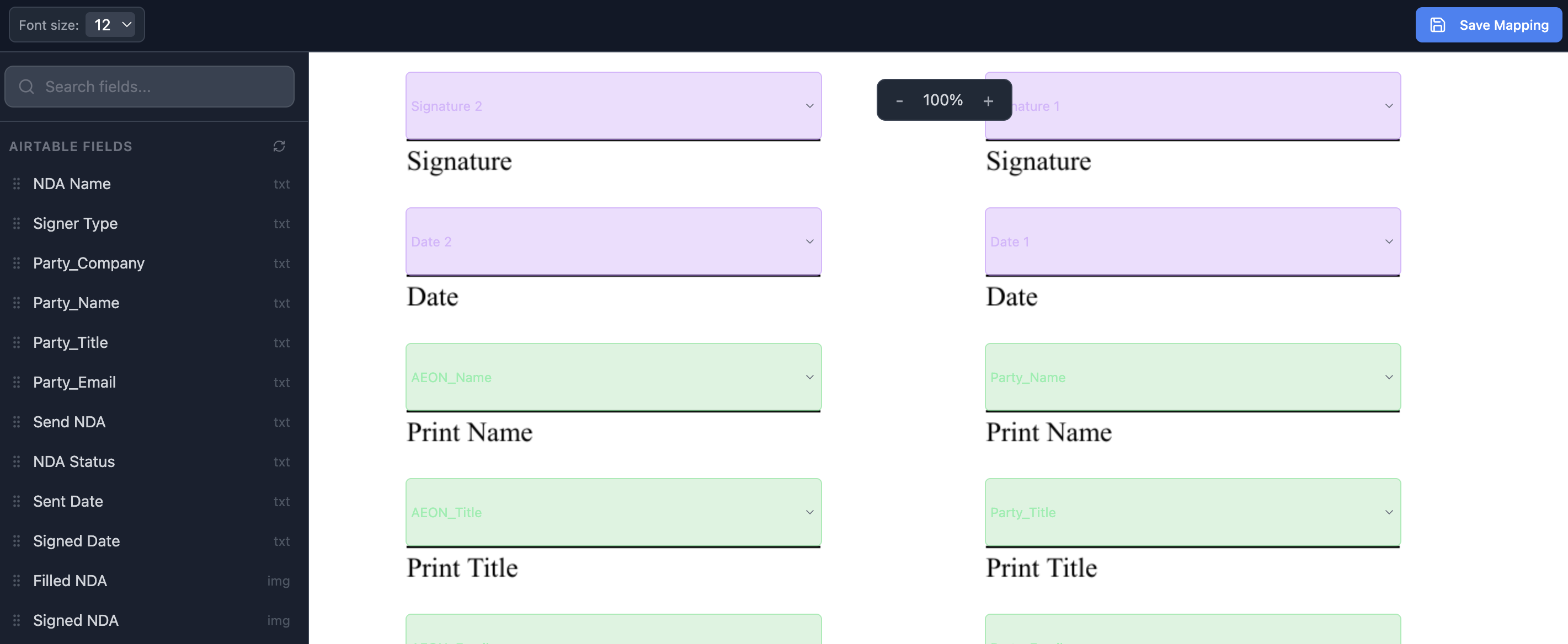
Your Airtable fields sit in the left panel, and each detected box on the form gets one. Signature fields are marked separately so they route to the signing step instead of being filled with data.
Checkbox Groups and Split Fields
This is where generic tools break on real paperwork.
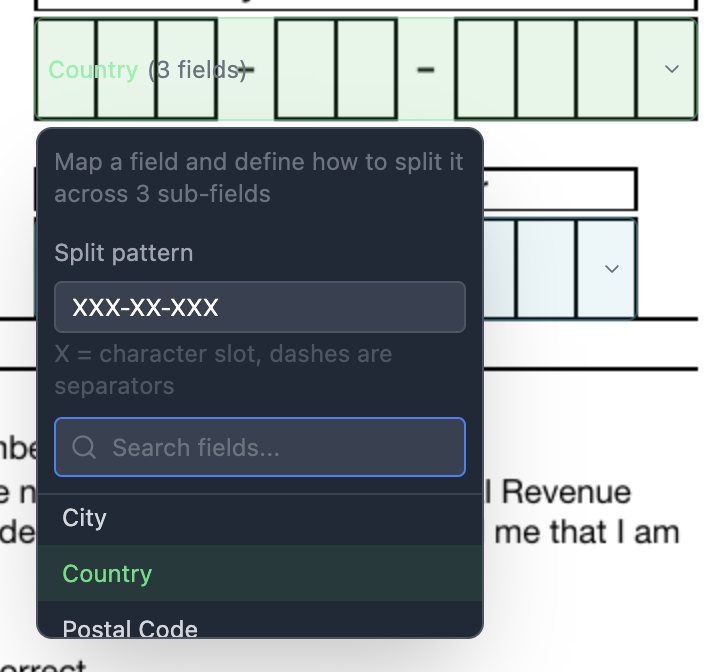
A checkbox group is a set of boxes where exactly one should be ticked - filing status on a W-9, for instance. A split field is one value spread across separate boxes, like a Social Security number printed as XXX-XX-XXXX with a box per digit.
Tax and compliance forms are full of both. A tool that cannot map them sends you back to editing PDFs by hand, which defeats the purpose.
In TypeFlow you select the boxes, group them, and give the group a split pattern - XXX-XX-XXXX puts one character per box and treats the dashes as separators. One Airtable field then fills the whole row.
E-Signature Without Per-Envelope Fees
Filled forms usually need signing. If your form-filling tool cannot do it, you add a signature tool, a second bill, and a handoff between two systems.
TypeFlow includes unlimited e-signatures on every paid plan, so a filled form goes out for signature from the same place it was filled.
Automation and Bulk Filling
Two modes matter: a trigger that fills one form when a record changes, and a bulk run that fills one form per record across a filtered view. Onboarding twelve new hires should be one run, not twelve clicks.
Best Airtable PDF Form Filling Tools Compared
TypeFlow is the best overall choice for filling PDF forms from Airtable, because it detects existing form fields, covers flat PDFs with manual placement, handles checkbox groups and split fields, and signs in the same tool.
| Tool | Fills Existing PDFs | Field Detection | Flat PDFs | E-Signature | Native Airtable | Starting Price |
|---|---|---|---|---|---|---|
| TypeFlow | Yes | Automatic (AcroForm) | Manual placement | Unlimited, included | Yes | $29/mo |
| DocsAutomator | Yes | Automatic (AcroForm) | Visual editor | $0.50 per signed doc | Yes | $29/mo |
| miniExtensions | Yes | Partial | Limited | No | Yes | $29/mo |
| Plumsail Documents | Yes | Yes | Limited | No | Via Zapier, Make or Power Automate | $25/mo |
TypeFlow
TypeFlow reads the form you upload, finds the fields already inside it, and maps them to your Airtable columns. When a form has no fields - a scan, a printed copy - you place them by hand on the page instead.
The part that matters on real paperwork is what happens next. Checkbox groups map to a single choice, and one Airtable value can split across separate boxes, so a Social Security number lands one digit per box without manual correction.
- Best for: Airtable teams filling tax, lease, and compliance forms who want signing included.
- Not ideal for: teams whose data lives outside Airtable or Softr.
- Pricing: free trial with 20 documents, then Starter $29/mo (200 documents), Pro $59/mo (1,000 documents), Enterprise $199/mo. All paid plans include unlimited e-signatures. See TypeFlow pricing plans.
See how TypeFlow fills existing PDF forms for the full setup, or our step-by-step guide to filling PDF forms from Airtable for the whole workflow.
DocsAutomator
DocsAutomator lets you upload an existing PDF and place data fields onto it in a visual editor. It connects natively to Airtable and covers Google Docs and Word templates as well, so it is the closest alternative if you also generate documents from templates.
It also detects AcroForm fields on upload and converts them into placeholders, so the starting point is close to TypeFlow's. The differences show up later: e-signatures cost $0.50 per signed document, and there is no grouping of several boxes under one field with a split pattern.
- Best for: teams that need both form filling and template generation in one tool.
- Not ideal for: high signature volume, where the per-document fee adds up, or forms where one value spans several boxes.
- Pricing: Professional $29/mo (100 documents), $19/mo billed annually. Business $79/mo (1,000 documents), $59/mo billed annually. E-signatures $0.50 per document on every plan.
miniExtensions
miniExtensions is an Airtable-native suite covering forms, portals, and interfaces, with PDF capability among them. If you already run it for client portals or form intake, adding PDFs avoids another vendor.
Pricing is per extension rather than per user, so the cost depends on how many pieces of the suite you use.
- Best for: teams already using miniExtensions for forms or portals.
- Not ideal for: teams that only need form filling and nothing else.
- Pricing: Basic $29/mo, Premium $89/mo, Scale $189/mo, priced per extension. Verify current pricing.
Plumsail Documents
Plumsail Documents fills fillable PDFs and is built for the Microsoft ecosystem. It reaches Airtable through Zapier, Make, or Power Automate rather than a direct integration, and has no built-in e-signature.
If your organisation already runs on SharePoint and Power Automate, that middleware is infrastructure you have anyway. If it is not, it is an extra subscription and an extra failure point.
See our Plumsail comparison for Airtable for a side-by-side view.
- Best for: Microsoft 365 and Power Automate teams.
- Not ideal for: teams that want a direct Airtable connection and signing in one place.
- Pricing: from $25/mo for 200 documents. Verify current pricing.
Developer Approaches: PDF.co and Make + PDFFiller
Two routes are worth knowing about but do not belong in the table above, because they are not products you evaluate the same way.
PDF.co is a REST API that fills PDF forms programmatically, reached from Airtable through Make or Zapier. It suits developers who want usage-based control and are comfortable building the integration.
Make + PDFFiller means assembling the workflow yourself from two subscriptions. Flexible if you already live in Make, but you own the maintenance and the debugging when a scenario breaks.
Both trade setup effort for control. If nobody on your team writes code or maintains automation scenarios, neither is the right starting point.
Fill your PDF forms from Airtable
Upload a form, map your fields, and let every record produce a completed copy. E-signatures included on all paid plans.
Start free with 20 documents →Best Tool by Use Case
| Use Case | Recommended Tool | Why |
|---|---|---|
| Tax and compliance forms (W-9, ISO) | TypeFlow | Detects existing fields, handles checkbox groups and split fields |
| Fill and sign in one place | TypeFlow | Unlimited e-signatures, no per-envelope fee |
| Form filling plus template generation | DocsAutomator | Covers both jobs in one tool |
| Already running miniExtensions | miniExtensions | Adds PDFs without another vendor |
| Microsoft 365 and Power Automate | Plumsail Documents | Built for that ecosystem |
| Developer resources available | PDF.co | API control and usage-based pricing |
| Building new documents, not filling forms | PDF generation tools for Airtable | Different job |
How to Choose
Choose TypeFlow If
- Your data lives in Airtable and you want a direct connection.
- You fill forms you did not design and cannot change.
- Your forms mix true fillable PDFs and scans.
- You hit checkbox groups or split fields like Social Security numbers.
- You need signatures and do not want a per-envelope bill.
Choose DocsAutomator If
- You fill existing forms and generate documents from templates.
- You want one tool for both jobs rather than the best tool for each.
- Your signature volume is low enough that $0.50 per document is fine.
Choose miniExtensions If
- You already run it for forms, portals, or interfaces.
- Per-extension pricing fits how you use the suite.
Choose Plumsail If
- You run on Microsoft 365, SharePoint, or Power Automate.
- You already maintain Zapier or Make scenarios.
- You do not need built-in e-signature.
Pricing Methodology
Prices are publicly listed USD figures checked on September 25, 2026. TypeFlow pricing reflects monthly billing; annual billing is lower. Competitor pricing models differ - per extension, per document, per signed envelope - so compare on your own volume rather than on the entry price alone. Verify current pricing on each provider's official page.
Automate your document generation
Start with 20 free documents. Built for businesses using Airtable.
FAQs About Filling PDF Forms from Airtable
Find answers to the most common questions about this feature.
Popular Questions
All Questions
Need more help?
Our team is here to help you solve all your problems and answer your questions.
Contact Us
Kevin from TypeFlow
•AuthorKevin Rabesaotra is a growth engineer and automation specialist with 8+ years of experience building no-code solutions. As Founder & CEO of TypeFlow, he has helped hundreds of businesses automate document generation and streamline workflows with Airtable integrations. Previously, Kevin was a Product Lead specializing in growth engineering, running experiments to drive revenue, retention, and lead generation.
More articles
How to Print Labels from Airtable with Quantity Control (Step by Step)
Print multiple labels per Airtable record based on a quantity field. Step-by-step guide for linked records mode and quantity repeat mode with barcodes and Avery sheets.
Read articleHow to Print Avery Mailing Labels from Airtable
Print Avery mailing labels (5160, 5161, 5162) from Airtable without Word mail merge. Step-by-step guide with print label mode, automation, and bulk generation.
Read articleHow to Create Inventory Labels with Barcodes in Airtable
Create inventory labels with Code 128, EAN-13, or QR barcodes from Airtable. Step-by-step guide for warehouse, retail, and asset tracking with thermal and Avery printers.
Read article