How to Generate Lease Agreement PDFs from Airtable Data
You can generate lease agreement PDFs directly from your Airtable tenant and property data - names, addresses, rent amounts, and lease terms pulled automatically. Connect TypeFlow, use a Google Docs or HTML/CSS template with conditional clauses for pet addendums or parking, and send leases for e-signature directly from Airtable.
With 44 million renter households in the US, efficient lease generation matters. For a complete overview of all real estate documents you can automate, see our guide to real estate document automation in Airtable.
By the end, you'll have a system that:
- Creates lease agreements with tenant and property data from Airtable
- Handles conditional clauses like pet addendums or parking agreements
- Generates leases on-demand or automatically when new tenants are added
- Saves each PDF directly to an attachment field on the Airtable record
- Supports e-signatures natively, or integrates with DocuSign via Airtable for enterprise needs
Key Takeaways
- Generate lease PDFs from Airtable using TypeFlow with Google Docs templates or Template Builder
- Map tenant and property fields (name, address, rent, dates) to template variables
- Add conditional sections for pet policies, parking, or other addendums
- Automate lease creation when a record is created or a status changes to "Ready for Lease"
- Send leases for e-signature without leaving your Airtable workflow
Who Should Use This Guide
This guide is for anyone managing rental properties with Airtable:
- Property managers handling multiple units and tenants across buildings
- Landlords managing rental agreements without dedicated property management software
- Real estate teams needing consistent lease documents across their portfolio
- Short-term rental operators managing Airbnb or VRBO properties
- Real estate developers with multiple units coming online - also check our guide on generating property brochures from Airtable
If you also manage other contracts beyond leases, see our guide on Airtable contract management, explore our contract automation solution, or learn how to generate contracts from Airtable step by step.
What You Need Before Starting
Before you start, make sure you have:
- An Airtable account with a base containing tenant and property data
- A Google account (if using Google Docs templates) or just use TypeFlow's Template Builder
- A TypeFlow account - free to start with 20 documents
If you're new to Airtable, a base is simply where your tables and records live.
- Base: Your Airtable database (made up of tables, views, and records).
- Page Designer: Great for simple one-page layouts, but not ideal for multi-page leases or automated workflows.
For professional lease agreements (multi-page PDFs, automation, and optional e-signatures), you'll want a dedicated document generation tool.
How to Set Up Your Airtable Base for Lease Agreements
Your Airtable base needs the right structure before you can generate leases. Here's a recommended setup.
Essential Fields for Tenant and Property Data
Your Tenants or Leases table should include these core fields:
| Field Name | Field Type | Example |
|---|---|---|
| Tenant Name | Single line text | John Smith |
| Property Address | Single line text | 123 Main Street, Apt 4B |
| Monthly Rent | Currency | $1,500 |
| Security Deposit | Currency | $1,500 |
| Lease Start Date | Date | 2026-04-01 |
| Lease End Date | Date | 2027-03-31 |
| Landlord Name | Single line text | ABC Properties LLC |
| Has Pets | Checkbox | Yes/No |
| Parking Included | Checkbox | Yes/No |
Using Linked Records for Properties and Landlords
For larger portfolios, create separate tables and link them:
Properties Table:
- Property Address
- Unit Number
- Bedrooms / Bathrooms
- Square Footage
Landlords Table:
- Landlord Name
- Company Name
- Phone
Leases Table:
- Tenant Name
- Property (Link to Properties)
- Landlord (Link to Landlords)
- Lease Terms...
In your template, access linked fields with dot notation: {{Property.Address}}, {{Landlord.Company_Name}}.
Organizing Records for Lease Workflows
Create views to filter your records:
- Pending Leases - Status = "Ready for Lease"
- Active Leases - Status = "Active"
- Expiring Soon - Lease End Date within 60 days
This makes it easy to generate leases for specific groups of tenants.
Ready to automate your lease agreements?
Generate professional PDF leases from Airtable in minutes. No legal software needed.
Start free with 20 documents →How to Create a Lease Agreement Template
TypeFlow offers two ways to create your lease template: Google Docs for familiarity, or Template Builder for more control.
Option A: Google Docs Template
If you already have a lease agreement in Word or Google Docs, you can convert it into a template by adding placeholder variables.
Example lease paragraph with placeholders:
This Lease Agreement is entered into on {{Lease_Start_Date}} between
{{Landlord_Name}} ("Landlord") and {{Tenant_Name}} ("Tenant") for the
property located at {{Property_Address}}.

The monthly rent is {{Monthly_Rent}}, due on the 1st of each month.
A security deposit of {{Security_Deposit}} is required before move-in.
Common lease variables:
| Variable | Maps to |
|---|---|
{{Tenant_Name}} | Tenant's full name |
{{Property_Address}} | Full property address |
{{Monthly_Rent}} | Rent amount |
{{Security_Deposit}} | Deposit amount |
{{Lease_Start_Date}} | Lease start date |
{{Lease_End_Date}} | Lease end date |
{{Landlord_Name}} | Landlord or company name |
Option B: Template Builder (Visual Editor)
Template Builder is TypeFlow's visual HTML editor. It's useful when you want precise control over your lease layout.
Why use Template Builder for leases:
- Drag-and-drop layout control
- Consistent formatting across all leases
- No Google account required
- Pre-built legal document blocks
TypeFlow includes a ready-to-use Lease Agreement template:
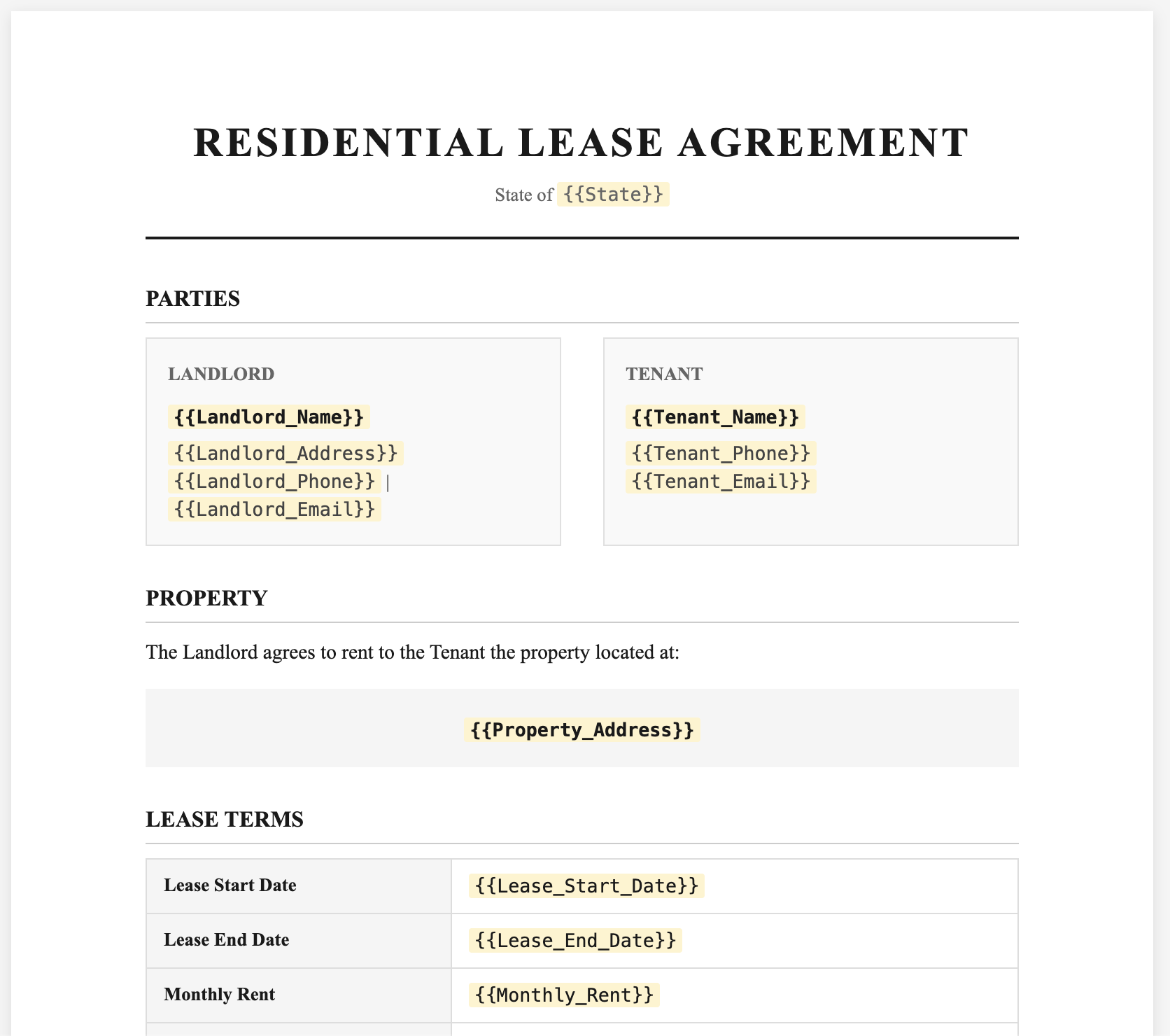
To use Template Builder:
- Start a new flow in TypeFlow
- Choose "Template Builder" instead of Google Docs
- Add text blocks with your lease language
- Insert variables from the Fields panel
- Add signature blocks at the bottom
Adding Conditional Sections for Addendums
Many leases include optional sections that only apply to certain tenants. TypeFlow supports conditional logic to show or hide sections.
Example: Pet Addendum
Only include the pet policy section when the "Has Pets" checkbox is checked in Airtable:
{{section_Pet_Addendum}}
PET ADDENDUM

Tenant is permitted to keep the following pet(s) on the premises: {{Pet_Description}}.
A pet deposit of {{Pet_Deposit}} is required. Tenant agrees to...
{{/section_Pet_Addendum}}
Example: Parking Agreement
{{section_Parking}}
PARKING ADDENDUM

Tenant is assigned parking space #{{Parking_Space_Number}} at no additional cost.
{{/section_Parking}}
This keeps your lease clean and only includes relevant sections for each tenant.
How to Connect TypeFlow to Your Airtable Base
Step 1: Create a TypeFlow Account and New Flow
- Sign up at typeflow.us
- Click "New Flow"
- Select your Airtable base
- Choose your Leases or Tenants table
Step 2: Select Your Lease Template
Choose your template source:
- Google Docs - Select the document with your lease placeholders
- Template Builder - Create or select a saved template
TypeFlow automatically detects all {{variables}} in your template.
Step 3: Add a Generate Button to Your Base
Add a button field to trigger lease generation:
- In Airtable, create a new Button field called "Generate Lease"
- Set the action to "Open URL"
- Paste the TypeFlow generation URL from your flow settings
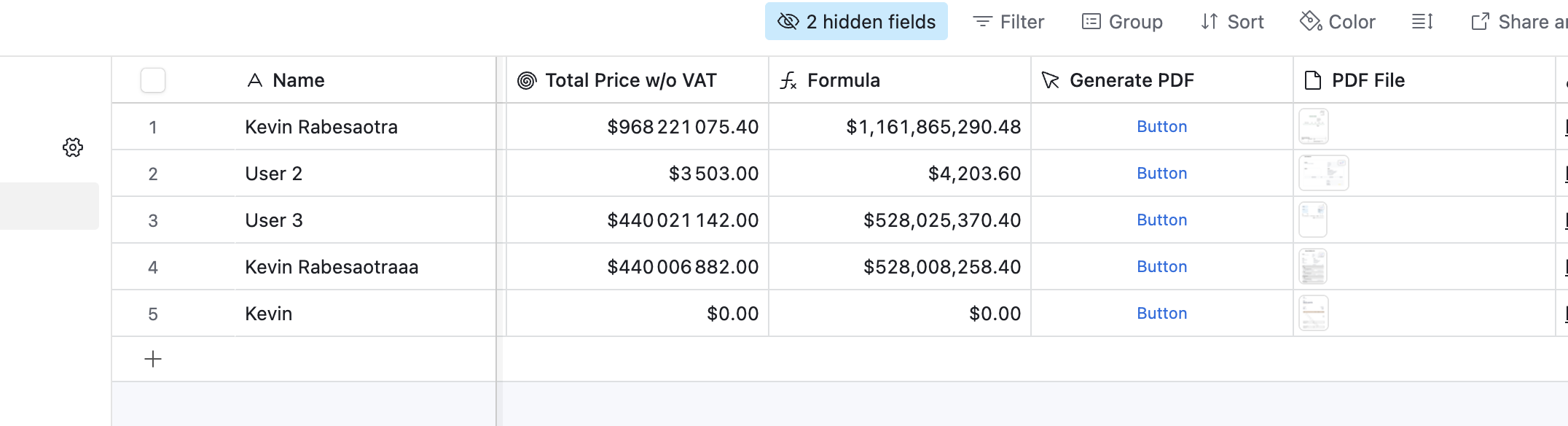
Click the button on any tenant record to generate their lease instantly.
How to Map Airtable Fields to Your Lease Template
In TypeFlow's mapping interface, connect each template variable to the right Airtable field:
| Template variable | Airtable field |
|---|---|
{{Tenant_Name}} | Tenant Name |
{{Monthly_Rent}} | Monthly Rent |
{{Lease_Start_Date}} | Lease Start Date |
{{Property.Address}} | Address (from linked Properties) |
Tips for accurate mapping:
- Search: Use the search bar to find fields quickly
- Linked records: Click "Configure Linked Fields" to access nested data
- Currency: TypeFlow preserves Airtable currency formatting (including symbols) for fields like Monthly_Rent
- Dates: Date fields format based on your template
How to Automate Lease PDF Generation in Airtable
Once your template and field mapping are done, you can generate leases instantly with a button - or automate it so leases are created the moment a tenant is approved.
Using Airtable Automations for Instant Lease PDFs
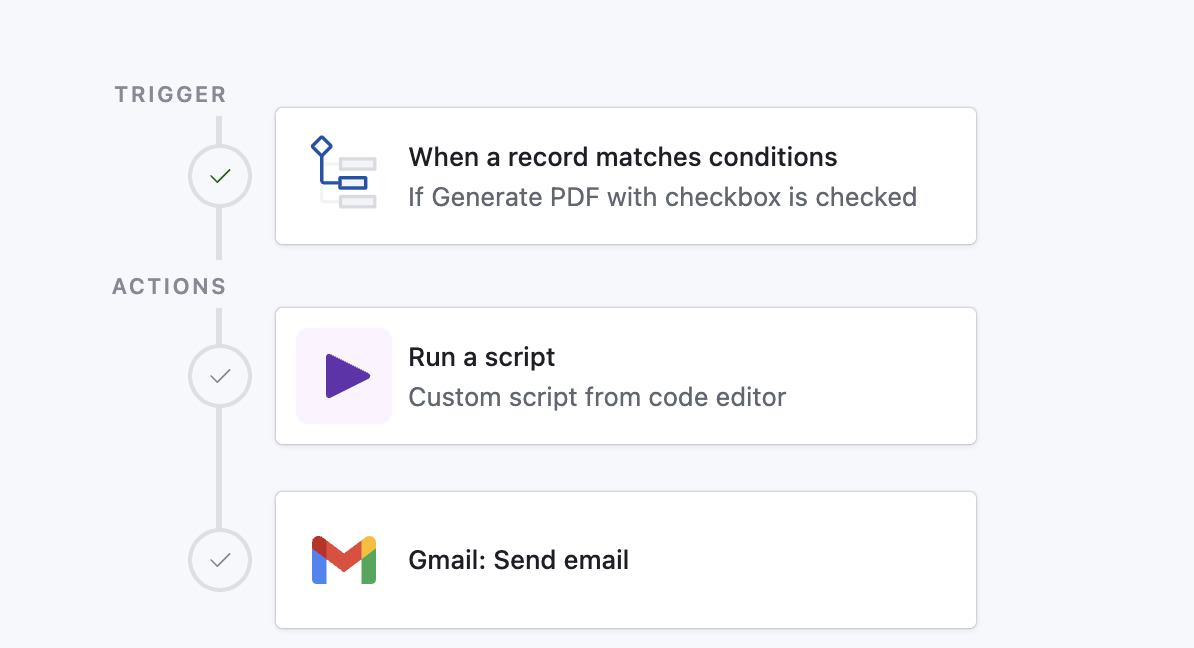
Set up an automation to generate leases when records meet certain conditions:
- Go to Airtable Automations
- Create a new automation
- Set trigger: "When record matches conditions"
- Condition: Status = "Ready for Lease"
- Add action: Run the TypeFlow script
Now whenever you change a tenant's status to "Ready for Lease," their lease generates automatically.
Triggering Lease Generation on Form Submission
If you collect tenant applications through Airtable forms:
- Set the automation trigger to "When record is created"
- Add conditions to filter qualified applicants
- Generate the lease PDF automatically when approved
This creates a seamless flow from application to signed lease.
Generating Multiple Leases at Once
Use the TypeFlow Airtable extension to select multiple tenant records from a view and generate personalized lease agreements for all of them in a single action. This is useful for onboarding a batch of tenants at the start of a month or preparing renewal documents for an entire building.
Where to Store and Deliver Generated Leases
TypeFlow gives you several options for storing and delivering generated lease PDFs:
- Attachment field in Airtable - Keeps documents with the tenant record for easy access
- Email delivery - Send the lease directly to the tenant and/or landlord
- Google Drive - Save to a shared folder for team access
Most property managers attach to Airtable for easy access and send a copy by email at the same time. If you also generate investor reports, the same storage approach works.
Adding E-Signatures to Your Lease Agreements
Most lease agreements require signatures from both landlord and tenant. TypeFlow includes built-in e-signature functionality. For a complete walkthrough, see our guide to generating documents with e-signatures from Airtable.
How to Add Signature Fields to Your Template
Add e-signature placeholders where you want signers to sign. The format is {{e-signature.TYPE_SIGNERNUMBER}}:
TENANT SIGNATURE

Signature: {{e-signature.signature_1}}
Full Name: {{e-signature.text_1}}
Date: {{e-signature.date_1}}

---

LANDLORD SIGNATURE

Signature: {{e-signature.signature_2}}
Full Name: {{e-signature.text_2}}
Date: {{e-signature.date_2}}
Available field types:
signature_1- Draw or type signaturetext_1- Text input fielddate_1- Date pickercheckbox_1- Confirmation checkbox
Configure Signers in TypeFlow
- Open your flow and click the E-Signature tab
- Toggle Enable E-Signature to ON
- Add signers and map their email to an Airtable field (e.g., Tenant Email, Landlord Email)
- Choose Sequential signing if landlord must sign after tenant
What Signers Experience
Signers get an email with a secure link to review the lease, fill in any required fields, and complete signing. Once finished, the signed PDF (plus a Certificate of Completion) is saved back to Airtable.
- Audit trail: Includes timestamps and signer metadata for record-keeping
- Auto-save: Signed files are stored with the right Airtable record
- Legally binding: E-signatures are enforceable under the ESIGN Act and UETA
Automate your document generation
Start with 20 free documents. Built for businesses using Airtable.
Real-World Examples: Lease Agreement Automation in Action
Commercial Real Estate Agency
A commercial real estate agency managing 450+ active listings migrated from their legacy ERP to Airtable and Softr. They use TypeFlow to automatically regenerate property listing PDFs every time a record is updated - rent, surface area, or availability changes trigger a new PDF with the latest data. With multiple property types (office leases, retail spaces, warehouses), they use different templates for each category. The team generates over 500 documents per month without any manual work.
Property Management Company
A property management firm handling 200+ residential units uses TypeFlow to generate lease renewals 60 days before expiration. When a tenant confirms renewal, their status changes to "Renewal Approved," triggering automatic lease generation with updated rent amounts and dates. The lease is sent for e-signature immediately - no manual document work required.
Independent Landlord
A landlord with 8 rental units collects tenant applications through an Airtable form. Once an application is approved, changing the status to "Ready for Lease" generates the agreement and sends it for e-signature. The signed lease saves back to the tenant record automatically.
Short-Term Rental Operator
An Airbnb manager generates stay agreements for each booking. Property rules, check-in instructions, and rental period are pulled directly from the booking record into a branded agreement PDF. With conditional sections, different house rules appear depending on the property.
TypeFlow vs Other Airtable PDF Tools
Several tools can generate documents from Airtable. Here's how TypeFlow compares:
| Feature | TypeFlow | Documint | Plumsail | Formstack |
|---|---|---|---|---|
| Google Docs templates | Yes | No | Yes (Word) | No |
| Built-in e-signatures | Yes | No | No | Separate product |
| Template Builder | Yes | Yes | No | No |
| Airtable extension | Yes | Yes | Yes | Yes |
| Conditional sections | Yes | Yes | Yes | Yes |
| Free tier | 20 docs | Limited | 30-day trial | No |
TypeFlow is designed for teams already using Google Docs and Airtable who want document generation and e-signatures in one tool without per-document fees.
Best Practices for Lease Agreement Automation
Use Clear Naming Conventions
Match your Airtable field names to your template variables exactly. Avoid special characters that cause mapping errors.
| Instead of | Use |
|---|---|
| Tenant's Name | Tenant_Name |
| Monthly Rent ($) | Monthly_Rent |
| Lease Start-Date | Lease_Start_Date |
Test Your Template Before Going Live
Generate a test lease with sample data before using real tenant information:
- Create a test record with dummy data
- Generate the lease PDF
- Check that all variables populate correctly
- Verify conditional sections appear/hide as expected
Store Generated Leases in Airtable
Configure TypeFlow to save the PDF directly to an attachment field on the tenant record. This keeps all lease documents organized alongside tenant data.
Create a Lease Template Library
If you manage different property types (residential, commercial, short-term), create separate templates for each. Use a "Lease Type" field in Airtable to select the appropriate template automatically.
Common Issues and How to Fix Them
Variables Not Populating
Causes:
- Typo in variable name (check spelling and underscores)
- Field not mapped in TypeFlow
- Empty field in Airtable
Fix: Compare your template variables against your Airtable field names. They must match exactly.
Conditional Sections Not Working
Causes:
- Checkbox field not properly mapped
- Syntax error in
{{section_}}tags
Fix: Ensure the section name matches your mapped field exactly, and both opening {{section_Name}} and closing {{/section_Name}} tags are present.
PDF Formatting Issues
Causes:
- Complex formatting in Google Docs
- Non-standard fonts
Fix: Use standard fonts (Arial, Times New Roman) and simple formatting. Avoid text boxes or complex tables.
Start Generating Lease Agreements Today
With TypeFlow, you set up your lease template once and generate professional PDFs for every tenant. No more copying and pasting data, no more inconsistent formatting.
The system handles one lease or hundreds with the same ease - and with built-in e-signatures, you can go from Airtable record to signed lease without leaving your workflow. See what users say about TypeFlow on G2.
Related Real Estate Documents
- Generate Property Brochures from Airtable - Create branded listing brochures with photos and agent info.
- Generate Investor Report PDFs from Airtable - Build quarterly investor reports with portfolio data.
Automate your document generation
Start with 20 free documents. Built for businesses using Airtable.
Frequently Asked Questions
Find answers to the most common questions about this feature.
Popular Questions
All Questions
Need more help?
Our team is here to help you solve all your problems and answer your questions.
Contact Us
Kevin from TypeFlow
•AuthorKevin Rabesaotra is a growth engineer and automation specialist with 8+ years of experience building no-code solutions. As Founder & CEO of TypeFlow, he has helped hundreds of businesses automate document generation and streamline workflows with Airtable integrations. Previously, Kevin was a Product Lead specializing in growth engineering, running experiments to drive revenue, retention, and lead generation.
More articles
How to Print Labels from Airtable with Quantity Control (Step by Step)
Print multiple labels per Airtable record based on a quantity field. Step-by-step guide for linked records mode and quantity repeat mode with barcodes and Avery sheets.
Read articleHow to Print Avery Mailing Labels from Airtable
Print Avery mailing labels (5160, 5161, 5162) from Airtable without Word mail merge. Step-by-step guide with print label mode, automation, and bulk generation.
Read articleHow to Create Inventory Labels with Barcodes in Airtable
Create inventory labels with Code 128, EAN-13, or QR barcodes from Airtable. Step-by-step guide for warehouse, retail, and asset tracking with thermal and Avery printers.
Read article